
PayPal is sending out data breach notifications to thousands of users who had their accounts accessed through credential stuffing attacks that exposed some personal data.
Credential stuffing are attacks where hackers attempt to access an account by trying out username and password pairs sourced from data leaks on various websites.
Credential stuffing targets users that employ the same password for multiple online accounts, which is known as “password recycling.”
PayPal explains that the credential stuffing attack occurred between December 6 and December 8, 2022. The company detected and mitigated it at the time but also started an internal investigation to find out how the hackers obtained access to the accounts.
By December 20, 2022, PayPal concluded its investigation, confirming that unauthorized third parties logged into the accounts with valid credentials.
The electronic payments platform claims that this was not due to a breach on its systems and has no evidence that the user credentials were obtained directly from them.
According to the data breach reporting from PayPal, 34,942 of its users have been impacted by the incident. During the two days, hackers had access to account holders’ full names, dates of birth, postal addresses, social security numbers, and individual tax identification numbers.
Transaction histories, connected credit or debit card details, and PayPal invoicing data are also accessible on PayPal accounts.
PayPal says it took timely action to limit the intruders’ access to the platform and reset the passwords of accounts confirmed to have been breached.
Also, the notification claims that the attackers have not attempted or did not manage to perform any transactions from the breached PayPal accounts.
“We have no information suggesting that any of your personal information was misused as a result of this incident, or that there are any unauthorized transactions on your account,” reads PayPal’s notification to impacted users.
“We reset the passwords of the affected PayPal accounts and implemented enhanced security controls that will require you to establish a new password the next time you log in to your account” – PayPal
Impacted users will receive a free-of-charge two-year identity monitoring service from Equifax.
The company strongly recommends that recipients of the notices change the passwords for other online accounts using a unique and long string. Typically, a good password is at least 12-characters long and includes alphanumeric characters and symbols.
Moreover, PayPal advises users to activate two-factor authentication (2FA) protection from the ‘Account Settings’ menu, which can prevent an unauthorized party from accessing an account, even if they have a valid username and password.
Original Posts: PayPal accounts breached in large-scale credential stuffing attack
Microsoft has acknowledged a new bug affecting some Windows 11 applications triggering launch issues and causing them to display errors after a system restore.
The company said that “after running a System Restore to a previous restore point on a device that is running Windows 11, version 22H2, some Windows applications that use the MSIX Windows app package format may experience” various instability problems, including failures to launch, freezes, and crashes.
Multiple Microsoft apps are known to be affected by this known issue, including Notepad, Paint, Microsoft Office apps, Cortana, and the Windows Terminal app.
“This list of apps is not a complete list. Any Windows applications that use the MSIX Windows app package format may experience this issue,” Redmond said.
Affected users might experience one of the following symptoms users might experience:
While these are some of the issues that users are most likely to experience following a Windows system restore, others not listed above could also occur on impacted devices.
The Windows 11 22H2 editions impacted by this known issue include Windows 11 22H2 SE, Home, Pro, Enterprise, Enterprise Multi-Session, Education, and IoT Enterprise.
Microsoft has not said if it’s investigating this known issue or working on a fix but has shared a workaround for affected users.
Those experiencing problems when trying to launch apps after system restore might be able to work around this issue by:
In related news, Microsoft released a PowerShell script over the weekend to find and recover some of the Windows app shortcuts deleted Friday morning by a rogue Defender for Endpoint attack surface reduction (ASR) rule.
The faulty ASR rule has caused widespread disruption in enterprise environments, with users unable to launch their applications and Windows administrators scrambling to restore shortcuts.
Original Posts: Microsoft: Windows 11 apps might not start after system restore
While many people love the new interface in Windows 11, others prefer the old look and feel of Windows 10, or at least some of the features that are now missing in the newer operating system.
Thankfully, numerous apps are available to get your Windows 11 experience customized how you like while removing unwanted bloatware from the operating system.
Below are three applications that can help you customize Windows 11 to how you like it.
Windows 11 is essentially Windows 10 with a new design, so it also comes with the same bloatware problem, which is unwanted apps preinstalled by OEM and Microsoft.
Like Windows 10, Windows 11 allows users to remove apps from the Settings or Control Panel manually. But if you want to delete all bloatware from your system quickly, you can try a new open-source app called ThisIsWin11.
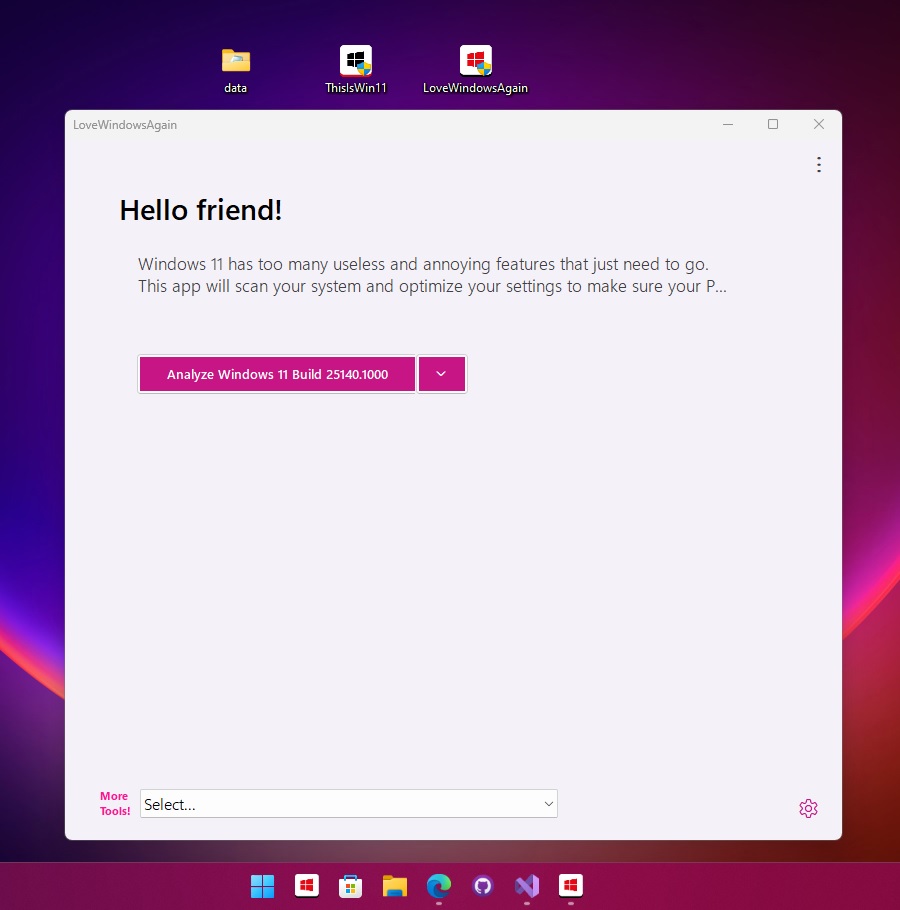
This app lets you customize advanced and basic features of the operating system and disable Windows 11 features like Microsoft Teams integration on the taskbar.
The app currently comes with the following features:
The tool is available for free on Github.
With ElevenClock, you can customize the Windows 11 Taskbar clock so that it is formatted how you like, can be customized with different colors, and even brings back “seconds” to the displayed time.

With ElevenClock, you can show the clock over fullscreen, hide the clock when clicked, display a task manager shortcut on the clock context menu, disable the notifications badge, and more.
The tool is available for free on Github.
Start11 was recently released to help users customize the appearance of the Windows 11 Start Menu and even restore the classic interface.
The program is compatible with Windows 11 and Windows 10 and can be used to recreate the user interface from previous operating systems.
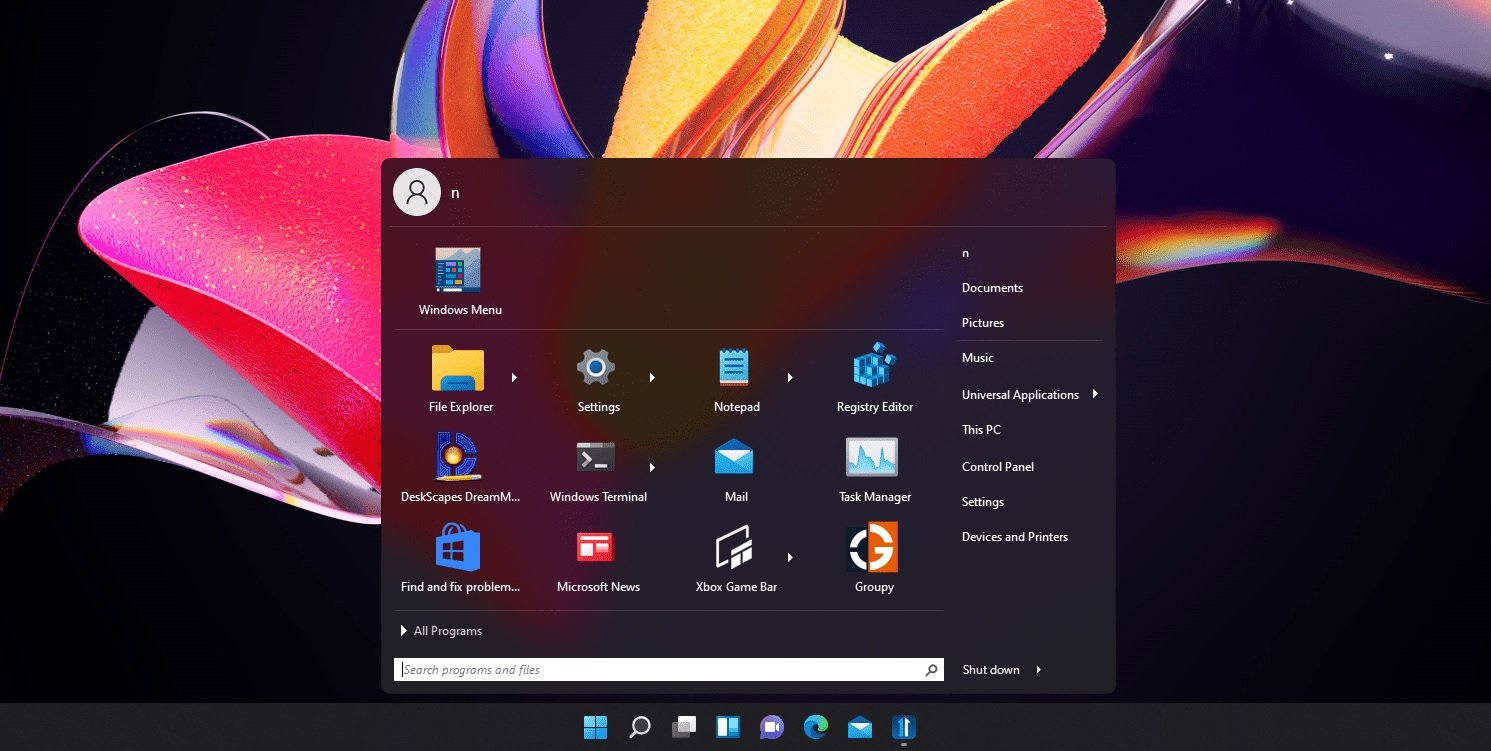
With Start11, you can even get a Windows 11-like Start menu on Windows 10 or the Windows 10 Start Menu on Windows 11.
At the same time, Start11 comes with several other features that allow you to customize the way the Start Menu looks, such as:
The tool is currently in beta, costing $4.99 (free trial available). The program is expected to get more customization options in the future.
You can download the app from here.
Original Posts: How to customize the Windows 11 desktop experience
Microsoft warned customers today that Exchange Server 2013 will reach its extended end-of-support (EOS) date 90 days from now, on April 11, 2023.
Exchange Server 2013 was released in January 2013 and has already reached the mainstream end date more than four years ago, in April 2018.
After the extended EOS date is reached, Microsoft will no longer provide technical support and bug fixes for new issues that could impact the servers’ stability or usability.
Time zone updates and security updates to address newly found vulnerabilities impacting servers running Exchange Server 2013 will also no longer be available starting in April.
“Exchange Server 2013 will continue to run after this date, of course; however, due to the risks listed above, we strongly recommend that you migrate from Exchange Server 2013 as soon as possible,” Microsoft Exchange Product Marketing Manager Scott Schnoll said.
“If you haven’t started your migration from Exchange Server 2013 to Exchange Online or Exchange Server 2019, get going now!”
Microsoft recommends upgrading on-premises Exchange Server 2013 servers to Exchange Server 2019 to keep receiving bug fixes and security updates for new flaws.
However, before deploying new Exchange Server 2019 installations across servers running software quickly reaching EOS, you should ensure that your network, hardware, software, and clients meet the requirements.
Redmond also advises admins to migrate to its hosted Exchange Online email and calendaring client as an alternative option, available as an Office 365 subscription or as a stand-alone service.
“If you’re migrating to Exchange Online, you might be eligible to use our Microsoft FastTrack service,” Schnoll said.
“FastTrack provides best practices, tools, and resources to make your migration to Exchange Online as seamless as possible. Best of all, you’ll have a support engineer walk you through from planning and design to migrating your last mailbox.”
“Exchange Server 2013 will continue to run after this date, of course; however, due to the risks listed above, we strongly recommend that you migrate from Exchange Server 2013 as soon as possible,” Microsoft Exchange Product Marketing Manager Scott Schnoll said.
“If you haven’t started your migration from Exchange Server 2013 to Exchange Online or Exchange Server 2019, get going now!”
Microsoft recommends upgrading on-premises Exchange Server 2013 servers to Exchange Server 2019 to keep receiving bug fixes and security updates for new flaws.
However, before deploying new Exchange Server 2019 installations across servers running software quickly reaching EOS, you should ensure that your network, hardware, software, and clients meet the requirements.
Redmond also advises admins to migrate to its hosted Exchange Online email and calendaring client as an alternative option, available as an Office 365 subscription or as a stand-alone service.
“If you’re migrating to Exchange Online, you might be eligible to use our Microsoft FastTrack service,” Schnoll said.
“FastTrack provides best practices, tools, and resources to make your migration to Exchange Online as seamless as possible. Best of all, you’ll have a support engineer walk you through from planning and design to migrating your last mailbox.”
Original Posts: Microsoft: Exchange Server 2013 reaches end of support in 90 days
Today is Microsoft’s January 2023 Patch Tuesday, and with it comes fixes for an actively exploited zero-day vulnerability and a total of 98 flaws.
This is the first Patch Tuesday of 2023, and it fixes a whopping 98 vulnerabilities, with eleven of them classified as ‘Critical.’
Microsoft gave the vulnerabilities this severity rating as they allow remote code execution, bypass security features, or elevate privileges.
The number of bugs in each vulnerability category is listed below:
This month’s Patch Tuesday fixes one zero-day vulnerability, one actively exploited and the other publicly disclosed.
Microsoft classifies a vulnerability as a zero-day if it is publicly disclosed or actively exploited with no official fix available.
The actively exploited zero-day vulnerability fixed in today’s updates is:
CVE-2023-21674 – Windows Advanced Local Procedure Call (ALPC) Elevation of Privilege Vulnerability discovered by Jan Vojtěšek, Milánek, and Przemek Gmerek of Avast.
Microsoft states that this is a Sandbox escape vulnerability that can lead to the elevation of privileges.
“An attacker who successfully exploited this vulnerability could gain SYSTEM privileges,” explains Microsoft’s advisory.
It is unclear how threat actors used this vulnerability in attacks, and BleepingComputer reached out to Avast for comment.
Microsoft also stated that ‘CVE-2023-21549 – Windows SMB Witness Service Elevation of Privilege Vulnerability‘ was publicly disclosed.
However, BleepingComputer was told by Akamai security researcher Stiv Kupchik that they followed the regular disclosure process and the vulnerability should not be classified as publicly disclosed.
Other vendors who released updates in January 2023 include:
Below is the complete list of resolved vulnerabilities and released advisories in the January 2023 Patch Tuesday updates. To access the full description of each vulnerability and the systems that it affects, you can view the full report here.
Original Posts: Microsoft January 2023 Patch Tuesday fixes 98 flaws, 1 zero-day
Starting today, WhatsApp allows users to connect via proxy servers due to Internet shutdowns or if their governments block the service in their country.
The new proxy support option is available to all users running the latest WhatsApp iOS and Android applications.
WhatsApp said that connecting through a proxy will maintain the messages’ privacy and security as they will remain protected by end-to-end encryption.
This ensures that they can only be read by you and the recipient, with no one in between, like the proxy server, Meta, or WhatsApp, being able to access their contents.
“Using a proxy doesn’t change the high level of privacy and security that WhatsApp provides to all users. Your personal messages and calls will still be protected by end-to-end encryption,” the company said on Thursday.
“Only use a proxy if you’re unable to connect to WhatsApp. Your IP address may be visible to the proxy provider, which is not WhatsApp,” a warning says when setting up the proxy within the app.
To connect through a proxy on Android and iOS, you have to enter a proxy address after enabling the “Use Proxy” option under “Storage and Data” within the WhatsApp settings.
Those who want to help their friends or family to stay connected even when their connection is disrupted or blocked can set up their own proxies using the instructions available here.
“Our wish for 2023 is that these internet shutdowns never occur. Disruptions like we’ve seen in Iran for months on end deny people’s human rights and cut people off from receiving urgent help,” WhatsApp said.
“Though in case these shutdowns continue, we hope this solution helps people wherever there is a need for secure and reliable communication.”
WhatsApp rolled out end-to-end encrypted chat backups on iOS and Android devices in October 2021 to block anyone from accessing chats’ contents, regardless of where they are stored.
In December 2021, it also expanded the privacy control features with the addition of default disappearing messages in all new chats.
These privacy and security improvements came after WhatsApp backtracked on earlier decisions to restrict some features or delete the user accounts of those who disagreed with a new privacy policy requiring users to share their data with other Meta companies.
According to Meta, the instant messaging and video calling platform is being used by more than two billion people from over 180 countries worldwide.
Taiwan-based NAS maker Synology has addressed a maximum (10/10) severity vulnerability affecting routers configured to run as VPN servers.
The vulnerability, tracked as CVE-2022-43931, was discovered internally by Synology’s Product Security Incident Response Team (PSIRT) in the VPN Plus Server software and was given a maximum CVSS3 Base Score of 10 by the company.
VPN Plus Server is a virtual private network server that allows administrators to set up Synology routers as a VPN server to allow remote access to resources behind the router.
The vulnerability can be exploited in low-complexity attacks without requiring privileges on the targeted routers or user interaction.
“A vulnerability allows remote attackers to possible execute arbitrary command via a susceptible version of Synology VPN Plus Server,” Synology said in a security advisory published on Friday.
“Out-of-bounds write vulnerability in Remote Desktop Functionality in Synology VPN Plus Server before 1.4.3-0534 and 1.4.4-0635 allows remote attackers to execute arbitrary commands via unspecified vectors.”
Out-of-bounds write vulnerabilities can result in severe impacts, such as data corruption, system crashes, and code execution following memory corruption.
Synology has released security updates to patch the bug and advises customers to upgrade VPN Plus Server for SRM (Synology Router Manager) to the latest available version.
| Product | Fixed Release Availability |
|---|---|
| VPN Plus Server for SRM 1.3 | Upgrade to 1.4.4-0635 or above |
| VPN Plus Server for SRM 1.2 | Upgrade to 1.4.3-0534 or above |
Last month, Synology issued a second advisory rated as a critical severity and announced that it had patched multiple security vulnerabilities in the Synology Router Manager.
“Multiple vulnerabilities allow remote attackers to execute arbitrary command, conduct denial-of-service attacks or read arbitrary files via a susceptible version of Synology Router Manager (SRM),” the company said.
While Synology didn’t list the security flaws’ CVE IDs, multiple researchers and teams are credited for reporting the patched bugs, with at least two of them having successfully demoed zero-day exploits targeting the Synology RT6600ax router during the first day of the Pwn2Own Toronto 2022 hacking contest.
Gaurav Baruah earned $20,000 for executing a command injection attack against the WAN interface of the Synology RT6600ax.
Computest, which was also credited in the critical December advisory, demoed a command injection root shell exploit targeting the LAN interface of the same Synology router.
Original Posts: Synology fixes maximum severity vulnerability in VPN routers
A previously unknown Linux malware has been exploiting 30 vulnerabilities in multiple outdated WordPress plugins and themes to inject malicious JavaScript.
According to a report by antivirus vendor Dr. Web, the malware targets both 32-bit and 64-bit Linux systems, giving its operator remote command capabilities.
The main functionality of the trojan is to hack WordPress sites using a set of hardcoded exploits that are run successively, until one of them works.
The targeted plugins and themes are the following:
If the targeted website runs an outdated and vulnerable version of any of the above, the malware automatically fetches malicious JavaScript from its command and control (C2) server, and injects the script into the website site.
Infected pages act as redirectors to a location of the attacker’s choosing, so the scheme works best on abandoned sites.
These redirections may serve in phishing, malware distribution, and malvertising campaigns to help evade detection and blocking. That said, the operators of the auto-injector might be selling their services to other cybercriminals.
An updated version of the payload that Dr. Web observed in the wild also targets the following WordPress add-ons:
The new add-ons targeted by the new variant indicate that the development of the backdoor is active at the moment.
Dr. Web also mentions that both variants contain functionality that is currently inactive, which would allow brute-forcing attacks against website administrator accounts.
Defending against this threat requires admins of WordPress websites to update to the latest available version the themes and plugins running on the site and replace those that are no longer developed with alternatives that being supported.
Netgear has fixed a high-severity vulnerability affecting multiple WiFi router models and advised customers to update their devices to the latest available firmware as soon as possible.
The flaw impacts multiple Wireless AC Nighthawk, Wireless AX Nighthawk (WiFi 6), and Wireless AC router models.
Attackers can exploit this flaw in low-complexity attacks without requiring permissions or user interaction.
In a security advisory published on Wednesday, Netgear said it “strongly recommends that you download the latest firmware as soon as possible.”
The list of vulnerable routers and the patched firmware versions can be found in the table below.
| Vulnerable Netgear router | Patched firmware version |
| RAX40 | Firmware version 1.0.2.60 |
| RAX35 | Firmware version 1.0.2.60 |
| R6400v2 | Firmware version 1.0.4.122 |
| R6700v3 | Firmware version 1.0.4.122 |
| R6900P | Firmware version 1.3.3.152 |
| R7000P | Firmware version 1.3.3.152 |
| R7000P | Firmware version 1.0.11.136 |
| R7960P | Firmware version 1.4.4.94 |
| R8000P | Firmware version 1.4.4.94 |
To download and install the latest firmware for your Netgear router, you have to go through the following steps:
“The pre-authentication buffer overflow vulnerability remains if you do not complete all recommended steps,” Netgear also warned.
“NETGEAR is not responsible for any consequences that could have been avoided by following the recommendations in this notification.”
A Netgear spokesperson was not immediately available for comment when contacted by BleepingComputer earlier today for more information.
On Wednesday, Netgear urged customers to patch a second vulnerability that can be exploited to trigger a denial of service state in attacks targeting Wireless AC Nighthawk and Wireless AX Nighthawk (WiFi 6) routers.
Earlier this year, Netgear also fixed a bad Orbi firmware update that prevented customers from accessing their devices’ admin consoles.
Original Posts: Netgear warns users to patch recently fixed WiFi router bug
Malware operators have been increasingly abusing the Google Ads platform to spread malware to unsuspecting users searching for popular software products.
Among the products impersonated in these campaigns include Grammarly, MSI Afterburner, Slack, Dashlane, Malwarebytes, Audacity, μTorrent, OBS, Ring, AnyDesk, Libre Office, Teamviewer, Thunderbird, and Brave.
The threat actors the clone official websites of the above projects and distribute trojanized versions of the software when users click the download button.
Some of the malware delivered to victim systems this way include variants of Raccoon Stealer, a custom version of the Vidar Stealer, and the IcedID malware loader.
However, one missing details was how users were exposed to these websites, a piece of information that has now become known.
Two reports from Guardio Labs and Trend Micro explain that these malicious websites are promoted to a broader audience via Google Ad campaigns.
The Google Ads platform helps advertisers promote pages on Google Search, placing them high in the list of results as advertisements, often above the official website of the project.
This means that users looking for legitimate software on a browser without an active ad blocker will see promotion first and are likely to click on it because it looks very similar to the actual search result.
If Google detects that the landing site is malicious, the campaign is blocked, and the ads are removed, so threat actors need to employ a trick in that step to bypass Google’s automated checks.
According to Guardio and Trend Micro, the trick is to take the victims clicking on the ad to an irrelevant but benign site created by the threat actor and then redirect them to a malicious site impersonating the software project.
“The moment those “disguised” sites are being visited by targeted visitors the server immediately redirects them to the rogue site and from there to the malicious payload,” explains Guardio Labs in the report.
“Those rogue sites are practically invisible to visitors not reaching from the real promotional flow showing up as benign, unrelated sites to crawlers, bots, occasional visitors, and of course for Google’s policy enforcers” – Guardio Labs
The payload, which comes in ZIP or MSI form, is downloaded from reputable file-sharing and code-hosting services such as GitHub, Dropbox, or Discord’s CDN. This ensures that any anti-virus programs running on the victim’s machine won’t object to the download.
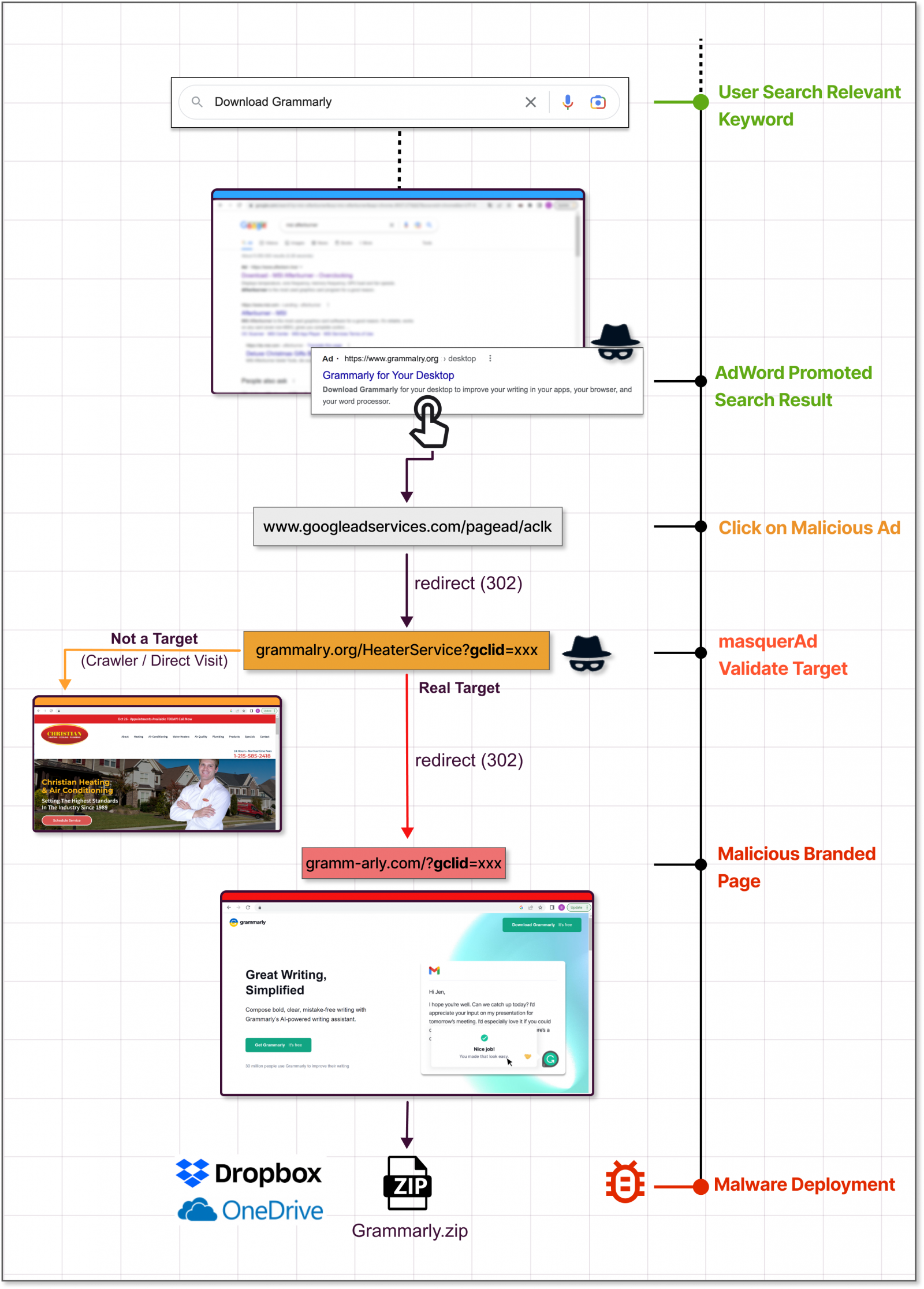
Guardio Labs says that in a campaign they observed in November, the threat actor lured users with a trojanized version of Grammarly that delivered Raccoon Stealer.
The malware was bundled with the legitimate software. Users would get what they downloaded and the malware would install silently.
Trend Micro’s report, which focuses on an IcedID campaign, says the threat actors abuse the Keitaro Traffic Direction System to detect if the website visitor is a researcher or a valid victim before the redirection happens. Abusing this TDS has been seen since 2019.
Promoted search results can be tricky as they carry all the signs of legitimacy. The FBI has recently issued a warning about this type of ad campaign, urging internet users to be very cautious.
One good way to block these campaigns is to activate an ad-blocker on your web browser, which filters out promoted results from Google Search.
Another precaution would be to scroll down until you see the official domain of the software project you’re looking for. If unsure, the official domain is listed on the software’s Wikipedia page.
If you visit the website of a particular software project frequently to source updates, it’s better to bookmark the URL and use that for direct access.
A common sign that the installer you’re about to download might be malicious is an abnormal file size.
Another clear giveaway of foul play is the domain of the download site, which may resemble the official one but has swapped characters in the name or a single wrong letter, known as “typosquatting.”
Original Posts: Hackers abuse Google Ads to spread malware in legit software
« Previous 1 … 5 6 7 8 9 … 21 Next »