
Hackers are actively targeting a critical flaw in YITH WooCommerce Gift Cards Premium, a WordPress plugin used on over 50,000 websites.
YITH WooCommerce Gift Cards Premium is a plugin that website operators to sell gift cards in their online stores.
Exploiting the vulnerability, tracked as CVE-2022-45359 (CVSS v3: 9.8), allows unauthenticated attackers to upload files to vulnerable sites, including web shells that provide full access to the site.
CVE-2022-45359 was disclosed to the public on November 22, 2022, impacting all plugin versions up to 3.19.0. The security update that addressed the problem was version 3.20.0, while the vendor has already released 3.21.0 by now, which is the recommended upgrade target.
Unfortunately, many sites still use the older, vulnerable version, and hackers have already devised a working exploit to attack them.
According to WordPress security experts at Wordfence, the exploitation effort is well underway, with hackers leveraging the vulnerability to upload backdoors on the sites, obtain remote code execution, and perform takeover attacks.
Wordfence reverse-engineered exploit hackers are using in attacks, finding that the issue lies in the plugin’s “import_actions_from_settings_panel” function that runs on the “admin_init” hook.
Moreover, this function does not perform CSRF or capability checks in vulnerable versions.
These two issues make it possible for unauthenticated attackers to send POST requests to “/wp-admin/admin-post.php” using the appropriate parameters to upload a malicious PHP executable on the site.
The malicious requests appear on logs as unexpected POST requests from unknown IP addresses, which should be a sign for site admins they are under attack.
The uploaded files spotted by Wordfence are the following:
The analysts report that most attacks occurred in November before admins could patch the flaw, but a second peak was observed on December 14, 2022.
IP address 103.138.108.15 was a significant source of attacks, launching 19,604 exploitation attempts against 10,936 websites. The next largest IP address is 188.66.0.135, which conducted 1,220 attacks against 928 WordPress sites.
The exploitation attempts are still ongoing, so users of the YITH WooCommerce Gift Cards Premium plugin are recommended to upgrade to version 3.21 as soon as possible.
Original Posts: Hackers exploit bug in WordPress gift card plugin with 50K installs
LastPass, a password manager with over 25 million users, gave more details about the latest breach into the company’s systems. The firm claims users’ personal data or master passwords were not affected – yet researchers are worried.
In a blog post, Karim Touba, Chief Executive of LastPass, once again confirmed that a threat actor had recently gained access to a third-party cloud-based storage service, which LastPass uses to store backups of its production data.
The company had earlier said that the attacker used information obtained in the August 2022 incident, and now has decided to share what exactly was stolen or copied. Details are worrying.
Kouba once again said that in the August breach, no customer data was accessed. However, the threat actor stole “some source code and technical information from our development environment.”
This data was used to target another employee. After obtaining the needed credentials and keys, attackers accessed and decrypted “some storage volumes” within the cloud-based storage service where backups are held.
What’s concerning is the type of information that was copied. LastPass says the backup contained “basic customer account information and related metadata including company names, end-user names, billing addresses, email addresses, telephone numbers, and the IP addresses from which customers were accessing the LastPass service.”
The attackers were also able to copy a backup of customer vault data from the encrypted storage container which is stored in a proprietary binary format that contains both unencrypted data, such as website URLs, as well as fully-encrypted sensitive fields such as website usernames and passwords, secure notes, and form-filled data.
Of course, LastPass stresses that the encrypted fields remain secure – they can only be decrypted with a unique key derived from each user’s master password. The latter is never known to LastPass and is not stored or maintained by the company.
And yet, experts seem to be very frustrated. After all, when LastPass says that hackers were able to “copy a backup of customer vault data” – and that’s exactly what the firm says – it means that the threat actor theoretically now has access to all those passwords. Of course, if the attacker can crack the stolen vaults.
Yes, LastPass claims there’s nothing to worry about if your master password is strong: “Because of the hashing and encryption methods we use to protect our customers, it would be extremely difficult to brute force guess master passwords for those customers who follow our password best practices.”
“If you use the default settings above, it would take millions of years to guess your master password using generally-available password-cracking technology,” the company adds.
But what if the “best practices” are by chance – and a fat one at that because it’s often hard to keep up with the most recent settings – not followed? What if the master password is weak or older?
LastPass has an answer: “In this case, as an extra security measure, you should consider minimizing risk by changing passwords of websites you have stored.” Yes, that means password changes for every website you trusted LastPass to store – and that’s a lot of fuss.
There’s more, though. LastPass admits that some unencrypted data was stolen, and that includes website URLs (Uniform Resource Locators). This is important as hackers would actually know which websites users have accounts with and target them with phishing or other types of attacks.
According to John Scott-Railton, Senior Researcher at Citizen Lab at the University of Toronto, LastPass now “has a giant target on their back because of the juicy data $ password trove that they handle, and they are absolutely failing their customers.”
“Attackers didn’t just get encrypted passwords. They got unencrypted URLs. Think: URLs with account tokens, API keys & credentials, etc.,” the researcher wrote.
“Do your employees use LastPass? Or how about your users? Do you even know? The unencrypted URL breach is bad news for your security model, and you should be thinking about mitigations.”
Alison Gianotto, the founder of Snipe-IT, an open-source asset management firm, called the situation at LastPass a mess. She already told her LastPass-using employees to expect to get phishing emails, some of which might actually cite the LastPass breach as a reason to click on their links.
Original Posts: LastPass tells world more about recent breach, researchers frustrated
An Android banking malware named ‘Godfather’ has been targeting users in 16 countries, attempting to steal account credentials for over 400 online banking sites and cryptocurrency exchanges.
The malware generates login screens overlaid on top of the banking and crypto exchange apps’ login forms when victims attempt to log in to the site, tricking the user into entering their credentials on well-crafted HTML phishing pages.
The Godfather trojan was discovered by Group-IB analysts, who believe it is the successor of Anubis, a once widely-used banking trojan that gradually fell out of use due to its inability to bypass newer Android defenses.
ThreatFabric first discovered Godfather in March 2021, but it has undergone massive code upgrades and improvements since then.
Also, Cyble published a report yesterday highlighting a rise in the activity of Godfather, pushing an app that mimics a popular music tool in Turkey, downloaded 10 million times via Google Play.
Group-IB has found a limited distribution of the malware in apps on the Google Play Store; however, the main distribution channels haven’t been discovered, so the initial infection method is largely unknown.
Almost half of all apps targeted by Godfather, 215, are banking apps, and most of them are in the United States (49), Turkey (31), Spain (30), Canada (22), France (20), Germany (19), and the UK (17).
Apart from banking apps, Godfather targets 110 cryptocurrency exchange platforms and 94 cryptocurrency wallet apps.
Interestingly, the trojan is configured to check the system language, and if it’s set to Russian, Azerbaijani, Armenian, Belarusian, Kazakh, Kyrgyz, Moldovan, Uzbek, or Tajik, it stops its operation.
This is a strong indication that the authors of Godfather are Russian speaking, possibly residing in the CIS (Commonwealth of Independent States) region.
Once installed on the device, Godfather imitates ‘Google Protect,’ a standard security tool found on all Android devices. The malware even goes to the extent of emulating a scanning action on the device.
The goal of this scan is to request access to the Accessibility Service from what appears to be a legitimate tool. Once the victim approves the request, the malware can issue itself all permissions it needs to perform malicious behavior.
This includes access to SMS texts and notifications, screen recording, contacts, making calls, writing to external storage, and reading the device status.
Moreover, the Accessibility Service is abused to prevent the user from removing the trojan, exfiltrating Google Authenticator OTPs (one-time passwords), processing commands, and stealing the contents of PIN and password fields.
Godfather exfiltrates a list of installed apps to receive matching injections (fake HTML login forms to steal credentials) from the C2 server.
The malware can also generate fake notifications from apps installed on the victim’s device to take the victim to a phishing page, so it doesn’t have to wait for the target app to open.
For apps not on the list, Godfather can employ its screen recording features to capture the credentials entered by the victim in the fields.
Additionally, the malware also accepts the following commands from the C2, which it executes with administrator privileges on the device:
Apart from the above, the trojan feature modules that enable it to perform actions such as keylogging, launching a VNC server, recording the screen, locking the screen, exfiltrating and blocking notifications, enabling silent mode, establishing a WebSocket connection, and dimming the screen.
Anubis’ source code was leaked in 2019, so Godfather might be either a new project from the same authors or a new malware created by a new threat group.
The similarities extend to the method of receiving the C2 address, processing, and implementation of C2 commands, the web fakes module, the proxy module, and the screen capture module.
Godfather has omitted the inclusion of Anubis’ file encryption, audio recording, and GPS tracking modules, but has added a VNC module, implemented a new communication protocol and traffic encryption algorithm, and added a system to steal Google Authenticator codes.
Overall, Godfather is a feature-rich, dangerous trojan built on proven code from the Anubis malware, targeting an extensive list of apps and Android users from around the globe.
To protect yourself against this threat, only download apps from Google Play, keep your device up to date, use an AV tool, ensure that Play Protect is active, and keep the number of installed apps at the minimum possible.
Microsoft has fixed a security vulnerability used by threat actors to circumvent the Windows SmartScreen security feature and deliver Magniber ransomware and Qbot malware payloads.
The attackers used malicious standalone JavaScript files to exploit the CVE-2022-44698 zero-day to bypass Mark-of-the-Web security warnings displayed by Windows to alert users that files originating from the Internet should be treated with caution.
“An attacker can craft a malicious file that would evade Mark of the Web (MOTW) defenses, resulting in a limited loss of integrity and availability of security features such as Protected View in Microsoft Office, which rely on MOTW tagging,” Redmond explained on Tuesday.
According to Microsoft, this security flaw can only be exploited using three attack vectors:
However, in all these scenarios, the threat actors would have to trick their targets into opening malicious files or accessing attacker-controlled websites with CVE-2022-44698 exploits.
Microsoft released security updates to address this zero-day during the December 2022 Patch Tuesday after working on a fix for this actively exploited zero-day vulnerability since late October.
HP’s threat intelligence team first reported in October that phishing attacks were distributing the Magniber ransomware using standalone.JS JavaScript files digitally signed with a malformed as discovered by Will Dormann, a senior vulnerability analyst at ANALYGENCE.
This would cause SmartCheck to error out and allow the malicious files to execute without throwing any security warnings and install the Magniber ransomware, even though it got tagged with a MoTW flag.
Last month, the same Windows zero-day vulnerability was also abused in phishing attacks to drop the Qbot malware without displaying MOTW security warnings.
As security researcher ProxyLife found, threat actors behind this recent QBot phishing campaign switched to the Windows Mark of the Web zero-day by distributing JS files signed with the same malformed key used in the Magniber ransomware attacks.
QBot (aka Qakbot) is a Windows banking trojan that has evolved into a malware dropper that will steal emails for use in subsequent phishing attacks or deliver additional payloads such as Brute Ratel, Cobalt Strike, and other malware.
The Egregor, Prolock, and Black Basta ransomware operations are also known to have partnered with QBot to gain access to victims’ corporate networks.
During the December 2022 Patch Tuesday, Microsoft also fixed a publicly disclosed zero-day (CVE-2022-44710) that would allow attackers to gain SYSTEM privileges on unpatched Windows 11 systems.
Original Posts: Microsoft patches Windows zero-day used to drop ransomware
Today is Microsoft’s December 2022 Patch Tuesday, and with it comes fixes for two zero-day vulnerabilities, including an actively exploited bug, and a total of 49 flaws.
Six of the 49 vulnerabilities fixed in today’s update are classified as ‘Critical’ as they allow remote code execution, one of the most severe types of vulnerabilities.
The number of bugs in each vulnerability category is listed below:
The above counts do not include twenty-five Microsoft Edge vulnerabilities previously fixed on December 5th.
For information about the non-security Windows updates, you can read today’s articles on the Windows 10 KB5021233 and KB5021237 updates and the Windows 11 KB5021255 and KB5021234 updates.
This month’s Patch Tuesday fixes two zero-day vulnerabilities, one actively exploited and the other publicly disclosed.
Microsoft classifies a vulnerability as a zero-day if it is publicly disclosed or actively exploited with no official fix available.
The actively exploited and publicly disclosed zero-day vulnerability fixed in today’s updates are:
CVE-2022-44698 – Windows SmartScreen Security Feature Bypass Vulnerability discovered by Will Dormann.
“An attacker can craft a malicious file that would evade Mark of the Web (MOTW) defenses, resulting in a limited loss of integrity and availability of security features such as Protected View in Microsoft Office, which rely on MOTW tagging.”
Threat actors exploited this vulnerability by creating malicious stand-alone JavaScript files that were signed using a malformed signature.
When signed in this manner, it would cause SmartCheck to error out and not display a Mark of the Web security warnings, allowing the malicious scripts to run and install the malware automatically.
Threat actors actively exploited this flaw in numerous malware distribution campaigns, including ones spreading the QBot trojan and Magniber Ransomware.
The other publicly disclosed vulnerability is:
CVE-2022-44710 – DirectX Graphics Kernel Elevation of Privilege Vulnerability discovered by Luka Pribanić.
“Successful exploitation of this vulnerability requires an attacker to win a race condition. An attacker who successfully exploited this vulnerability could gain SYSTEM privileges.”
Other vendors who released updates in December 2022 include:
Below is the complete list of resolved vulnerabilities and released advisories in the December 2022 Patch Tuesday updates. To access the full description of each vulnerability and the systems that it affects, you can view the full report here.
Original Posts: Microsoft December 2022 Patch Tuesday fixes 2 zero-days, 49 flaws
Microsoft is finally adding a built-in screen recorder to Windows 11 through the Snipping Tool, enabling users to capture videos of their desktop without the need for a third-party app.
The update is being pushed as part of a phased roll-out to Windows Insiders in the Dev Channel and will be available once Snipping Tool version 11.2211.35.0 is installed.
To use the new feature, Windows Insiders must open the app and click on the new Record option at the top of the window.
“You will then be able to select and refine the part of your screen that you want to record before starting your screen recording session,” Windows Inbox Apps Principal Product Manager Lead Dave Grochocki explained.
“When you are finished, you can preview your recording before saving or sharing it with others.”
The company is also aware of known issues that might impact the user experience for those who already have access to this preview feature.
Some users might see a slight delay between when they click the “Start” button and when the recording begins. Others will also notice that the Snipping Tool app window will fail to restore itself after starting a new snip from within the app.
As the Snipping Tool is an ‘inbox’ app, which are applications automatically installed by default in Windows, all users will eventually be able to have this feature without installing additional software from Microsoft.
If you are running the latest Windows 11 Developer build and do not have the new screen recording feature in the Snippet Tool yet, please be patient, as it is slowly rolling out.
On Friday evening, Redmond also announced that the Windows 11 widgets board would be fully functional even if users are not signed into their accounts.
This change is rolling out to Insiders in the Dev Channel running the Windows 11 Insider Preview Build 25262.
In the most recent update for Widgets, we are removing the sign-in requirement for the widgets board and making it available for all users,” Microsoft’s Amanda Langowski and Brandon LeBlanc said.
“Now, you can now get weather updates on the taskbar, pin widgets from your favorite apps or access personalized dynamic feed without an account.”
Microsoft also addressed an issue where File Explorer would enter a crash loop if the Widgets app package was missing after upgrading to Build 25252.
Starting with Media Player version 11.2211.34.0, Windows Insiders can also browse their video library by folder.
Original Posts: Microsoft adds screen recording to Windows 11 Snipping Tool
Microsoft is working to address a new known issue affecting apps using ODBC database connections after installing the November 2022 Patch Tuesday Windows updates.
According to Redmond, affected apps might fail to connect to databases via connections using the Microsoft ODBC SQL Server driver.
“After installing this update, apps that use ODBC connections through Microsoft ODBC SQL Server Driver (sqlsrv32.dll) to access databases might not connect,” Microsoft explains.
“Additionally, you might receive an error in the app, or you might receive an error from the SQL Server.”
The list of potential errors users might see on affected systems includes:
The known issue impacts both client and server Windows platforms, from Windows 7 SP1 and Windows Server 2008 SP2 up to the latest released Windows 11 and Windows Server 2022.
Windows users can use the following steps to check if one of their apps uses ODBC connections to connect to a database and might be affected by this known issue:
tasklist /m sqlsrv32.dll
Microsoft added that it’s currently working on a resolution, with more details regarding this issue to be released with a future update.
The company is investigating domain controller freezes and restarts since November 25, also triggered by last month’s Patch Tuesday Windows Server updates.
One week earlier, Microsoft addressed domain controller sign-in failures and other authentication problems caused by November Patch Tuesday Windows updates with emergency out-of-band (OOB) updates.
Original Posts: Microsoft: November updates break ODBC database connections
A new set of Android malware, phishing, and adware apps have infiltrated the Google Play store, tricking over two million people into installing them.
The apps were discovered by Dr. Web antivirus and pretend to be useful utilities and system optimizers but, in reality, are the sources of performance hiccups, ads, and user experience degradation.
One app illustrated by Dr. Web that has amassed one million downloads is TubeBox, which remains available on Google Play at the time of writing this.
TubeBox promises monetary rewards for watching videos and ads on the app but never delivers on its promises, presenting various errors when trying to redeem the collected rewards.
Even users who get to complete the final withdrawal step never really receive the funds, as the researchers say it’s all a trick to try and keep them on the app for as long as possible, watching ads and generating revenue for the developers.
Other adware apps that appeared on Google Play in October 2022 but have since been removed are:
The above apps receive commands from Firebase Cloud Messaging and load the websites specified in these commands, generating fraudulent ad impressions on the infected devices.
In the case of Fast Cleaner & Cooling Master, which had a low download volume, the remote operators could also configure an infected device to act as a proxy server. This proxy server would allow the threat actors to channel their own traffic through the infected device.
Finally, Dr. Web discovered a set of loan scam apps claiming to have a direct relationship with Russian banks and investment groups, each having an average of 10,000 downloads on Google Play.
These apps were promoted via malvertizing through other apps, promising guaranteed investment profits. In reality, the apps take the users to phishing sites where their personal information is collected.
To protect yourself from fraudulent apps on Google Play, always check for negative reviews, scrutinize the privacy policy, and visit the developer’s site to evaluate its authenticity.
In general, try to keep the number of installed apps on your device at a minimum and periodically check and ensure that Google’s Play Protect feature is active.
Original Posts: Android malware apps with 2 million installs spotted on Google Play
LastPass says unknown attackers breached its cloud storage using information stolen during a previous security incident from August 2022.
The company added that, once in, the threat actors also managed to access customer data stored in the compromised storage service.
“We recently detected unusual activity within a third-party cloud storage service, which is currently shared by both LastPass and its affiliate, GoTo,” the company said.
“We have determined that an unauthorized party, using information obtained in the August 2022 incident, was able to gain access to certain elements of our customers’ information.”
Lastpass said it hired security firm Mandiant to investigate the incident and notified law enforcement of the attack.
It also noted that customers’ passwords have not been compromised and “remain safely encrypted due to LastPass’s Zero Knowledge architecture.”
“We are working diligently to understand the scope of the incident and identify what specific information has been accessed,” Lastpass added.
This is the second security incident disclosed by Lastpass this year after confirming in August that the company’s developer environment was breached via a compromised developer account.
The advisory was published days after BleepingComputer reached out to the company and received no response to questions regarding a possible breach.
In emails sent to customers at the time, Lastpass confirmed the attackers had stolen source code and proprietary technical information from its systems.
In a subsequent update, the company revealed that the attackers behind the August security breach maintained internal access to their systems for four days until they were evicted.
LastPass is behind one of the most popular password management software, claiming that it’s being used by more than 33 million people and 100,000 businesses.
Original Posts: Lastpass says hackers accessed customer data in new breach
Windows 11 may soon show a system tray indicator notifying when your computer is connected to a VPN, allowing users wishing to browse anonymously to ensure they are connected.
With your online data treated as a commodity, many users have started to use VPN services to hide their identity while browsing the web, streaming movies, or downloading files.
When connected to a VPN server, your Internet connections will go through the service’s IP addresses, preventing your home IP address from being seen by the website or online service you are using.
However, if you are using a VPN to download a file or browse a site, and it suddenly disconnects, you may continue browsing the web without realizing it, exposing your home IP address.
As first reported by Neowin, Twitter user PhantomOcean3 discovered that Windows 11 ‘Dev’ build 25247 includes a new hidden feature that, when enabled, displays a small shield icon overlaid the Network system tray icon when connected to a VPN.
The image below above have been made larger, and the shield is relatively small in practice, so if this makes it into production, we should expect the shield to be more prominent.
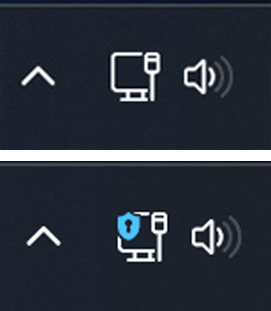
The images above have been made larger, and the shield is relatively small in practice, so if this makes it into production, we should expect the shield to be more prominent.
Unfortunately, there are some limitations to the new feature, as it only works when connecting to VPNs configured using the built-in Windows 11 client and does not work with WiFi.
“This *seems* to work only if you connect to a VPN from the quick setting or the Network & internet > VPN page in Settings,” PhantomOcean3 tweeted about the new feature.
Furthermore, the feature does not work when connected to commercial VPN services using their applications.
In BleepingComputer’s tests using both NordVPN and ProtonVPN, when connected to a VPN, the indicator does not currently show.
However, as this is an in-development, unannounced feature, it is unfinished and in its beginning stages.
Furthermore, while this is a very handy feature, Microsoft has previously disclosed that features found in a Windows Insider build may never make it into production.
If you wish to test out the new Windows 11 VPN indicator, you can join the Windows Insider program and install the current Windows 11 build (build 25247) or later.
To get this build, you will need to join the ‘Dev’ channel of the Windows Insider program.
Once the latest Windows 11 insider build is installed, please follow these steps to enable the new Task Manager:
vivetool /enable /id:38113452After entering the command, ViveTool will respond with “Successfully set feature configuration.”
When done testing, you can disable the hidden feature by running the following ViveTool commands from an elevated command prompt.
vivetool /disable /id:38113452
Original Posts: Windows 11 is getting a VPN status indicator in the taskbar
« Previous 1 … 6 7 8 9 10 … 21 Next »