
Microsoft will soon fast-track multi-factor authentication (MFA) adoption for its Microsoft 365 cloud productivity platform by adding MFA capabilities to the Outlook email client.
The company says in a new Microsoft 365 roadmap entry that users will be able to complete MFA requests for Microsoft 365 apps directly in the Outlook app via a new feature dubbed Authenticator Lite.
With Authenticator Lite, users will be able to log into their work or school account via Outlook with an extra layer of security.
The feature will be available in Outlook mobile apps for iOS and Android devices, and it will likely require users to enter a code or approve a notification after entering their password.
“Authenticator Lite (in Outlook) is a feature that allows your users to complete multi-factor authentication (MFA) for their work or school account using the Outlook app on their iOS or Android device,” Microsoft explains.
At the moment, Microsoft 365 MFA requests can be completed using verification codes obtained via an authentication app (Microsoft’s Authenticator app or third-party authenticator apps), a security key, a phone call, or text messaging.
Once the new Authenticator Lite capabilities roll out to Outlook users worldwide (until the end of the month, according to Microsoft’s estimations), they will also be able to complete authentication requests in Outlook.
Microsoft’s decision could boost MFA adoption among Microsoft 365 users, as Outlook has a much larger user base than Microsoft’s Authenticator app.
The Outlook app has more than 500 million downloads on Android and 5.5 million reviews on iOS, while the Authenticator app has 50 million downloads on Android and 233,100 reviews on iOS.
Once rolled out, the new Authenticator Lite feature will allow hundreds of millions more Microsoft 365 customers to enable and use MFA to secure their accounts.
Integrating MFA authentication directly into Outlook mobile apps, will make it much easier for users to authenticate their sessions without switching between multiple apps.
Microsoft’s Director of Identity Security, Alex Weinert, said several years ago that MFA reduces the risk of account compromise by more than 99.9%, regardless of the password.
Weinert added MFA makes it harder and costlier for attackers to break into accounts. He cited a study that showed less than 0.1% of accounts using any MFA were compromised.
As part of the same push to boost MFA adoption, Microsoft-owned GitHub announced that two-factor authentication (2FA) will be mandatory for all active developers starting today.
Original Posts: Outlook app to get built-in Microsoft 365 MFA on Android, iOS
The seemingly innocuous Microsoft OneNote file has become a popular file format used by hackers to spread malware and breach corporate networks. Here’s how to block malicious OneNote phishing attachments from infecting Windows.
To give a little background on how we got to Microsoft OneNote files becoming the tool of choice for malware-distributing phishing attacks, we first need to explain how we got here.
Threat actors have been abusing macros in Microsoft Word and Excel documents for years to download and install malware on Windows devices.
After Microsoft finally disabled macros by default in Word and Excel Office documents, threat actors began turning to other less commonly used file formats to distribute malware, such as ISO files and password-protected ZIP archives.
These were popular file formats as a Windows bug allowed files in ISO images to bypass Mark-of-the-Web (MoTW) security warnings, and the popular 7-Zip archive utility did not propagate MoTW flags to files extracted from ZIP archives.
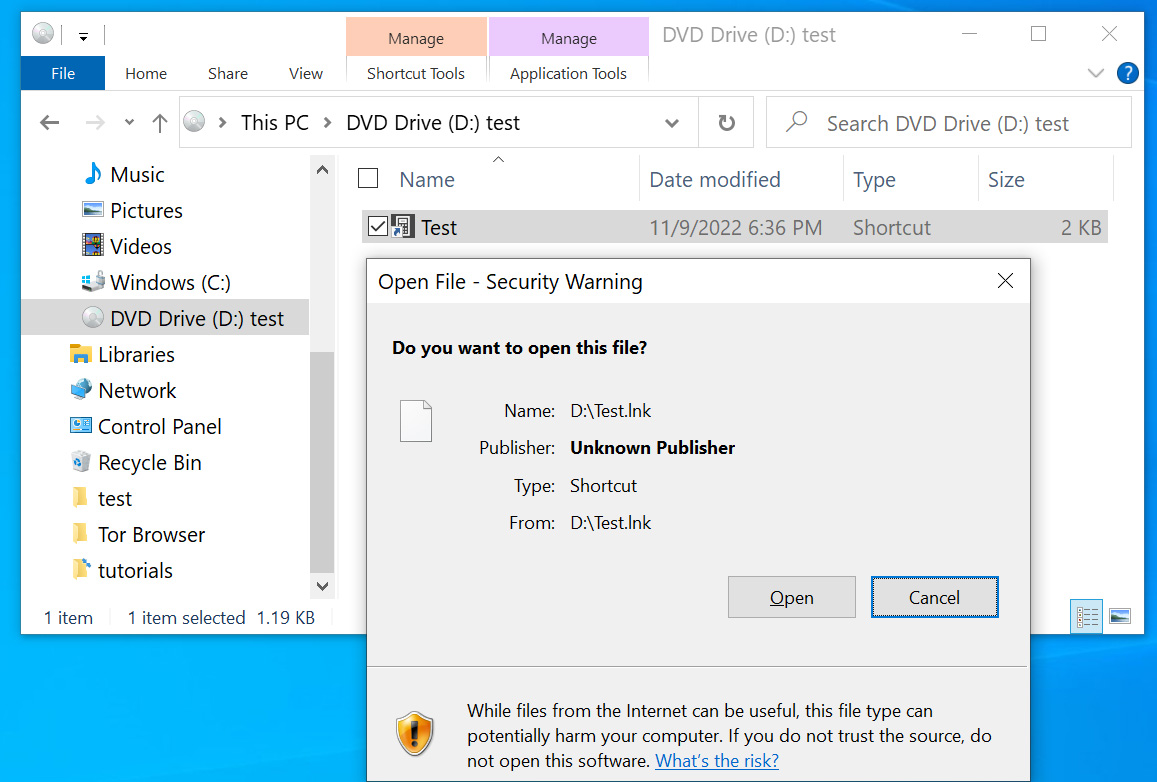
However, after both 7-Zip and Windows fixed these bugs, Windows once again began displaying scary security warnings when a user attempted to open files in downloaded ISO and ZIP files, causing threat actors to find another file format to use in attacks.
Since mid-December, threat actors have turned to another file format for distributing malware – Microsoft OneNote attachments.
Microsoft OneNote attachments use the ‘.one‘ file extension and are an interesting choice, as they do not distribute malware through macros or vulnerabilities.
Instead, threat actors create intricate templates that appear to be a protected document with a message to ‘double-click’ a design element to view the file, as shown below.
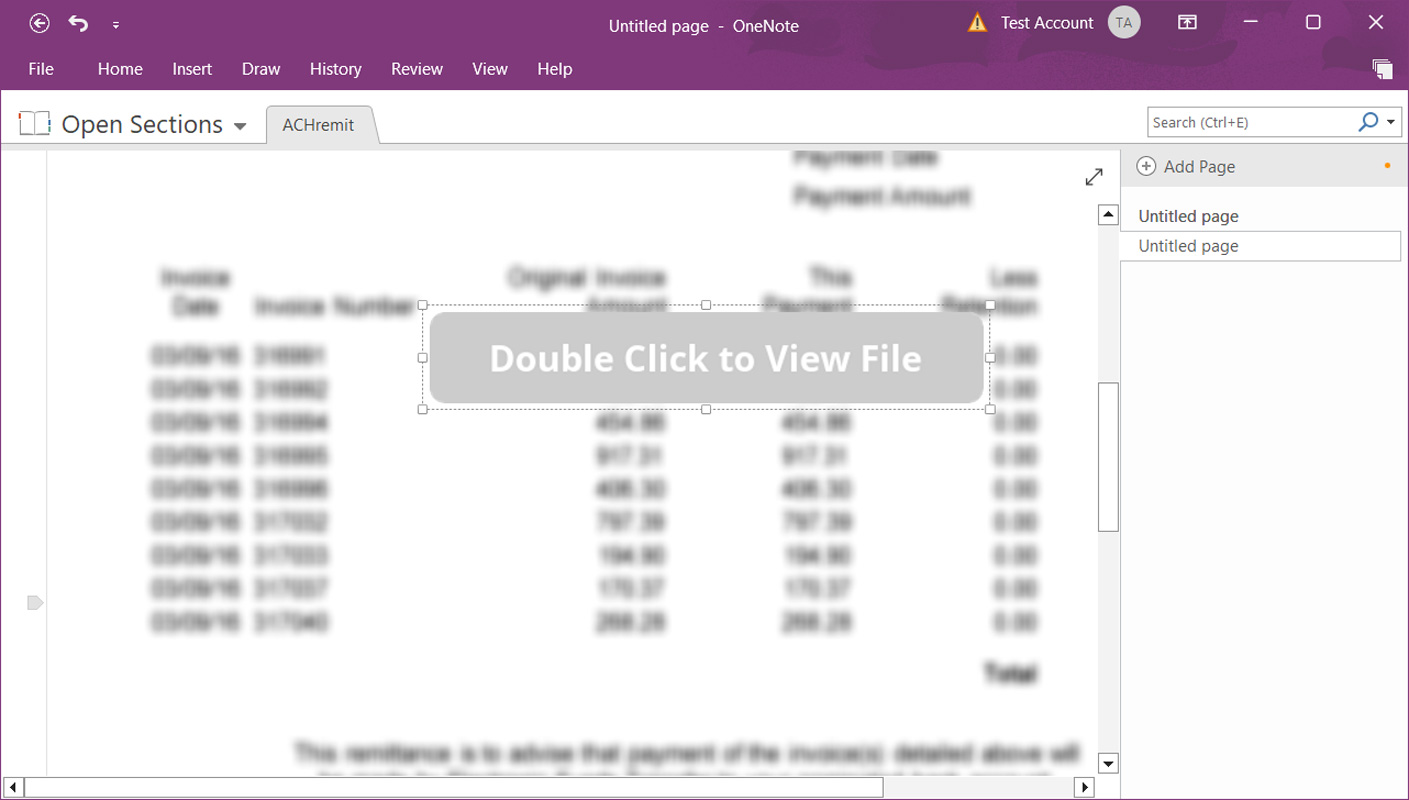
When double-clicking on the button, you are double-clicking on the embedded file and causing the file to launch.
While double-clicking an embedded file will display a security warning, as we know from previous phishing attacks abusing Microsoft Office macros, users commonly ignore warnings and allow the file to run anyway.
Sadly, you just need one user to accidentally allow a malicious file to run for an entire corporate network to be compromised in a full blown ransomware attack.
And this is not theoretical, as in some Microsoft OneNote QakBot campaigns, security researchers have found that they ultimately led to a ransomware attack, such as BlackBasta, on a compromised network.
The best way to prevent malicious Microsoft OneNote attachments from infecting Windows is to block the ‘.one‘ file extension at your secure mail gateways or mail servers.
However, if that is not possible for your environment, you can also use Microsoft Office group policies to restrict the launching of embedded file attachments in Microsoft OneNote files.
First, install the Microsoft 365/Microsoft Office group policy templates to get started with Microsoft OneNote policies.
Now that the policies are installed, you will find new Microsoft OneNote policies named ‘Disable embedded files’ and ‘Embedded Files Blocked Extensions,’ as shown below.
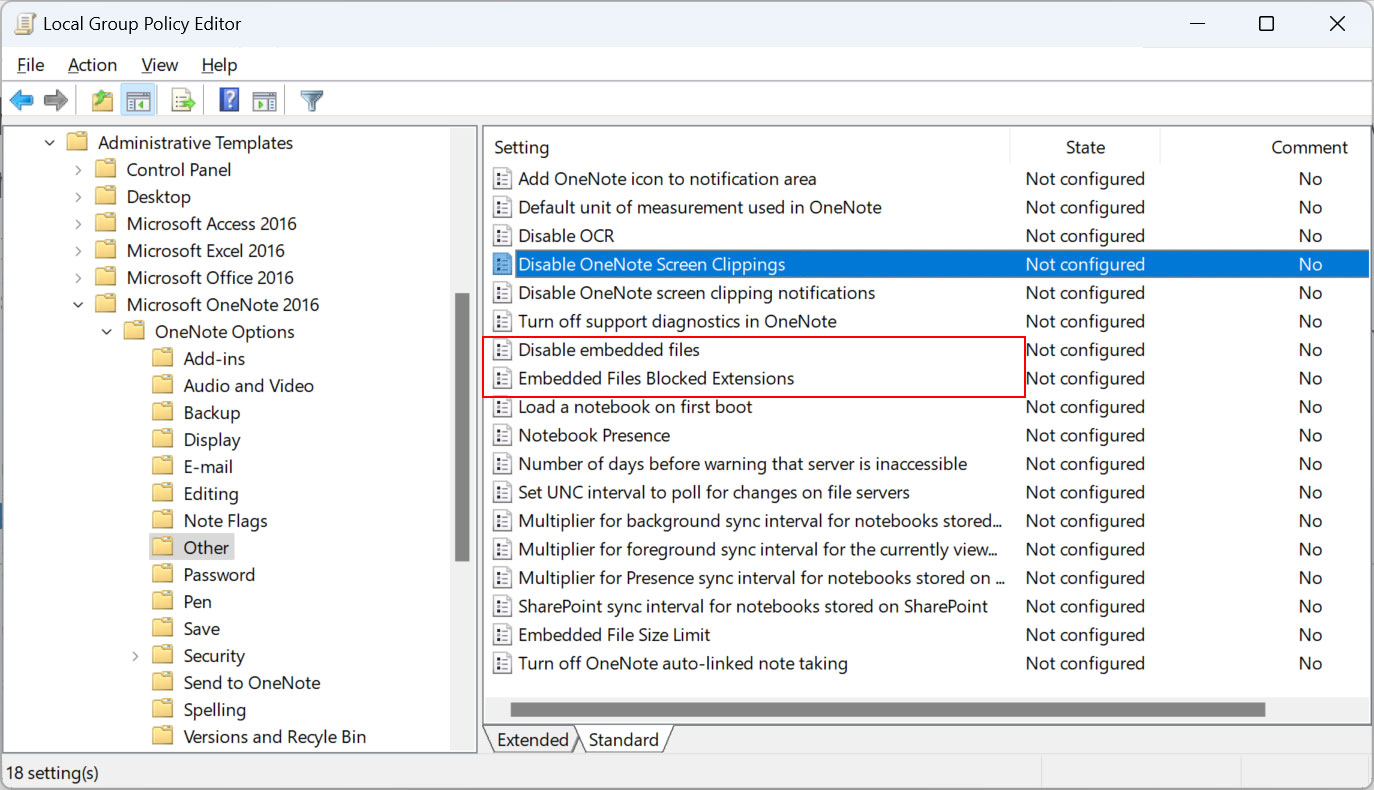
The ‘Disable embedded files‘ group policy is the most restrictive as it prevents all embedded OneNote files from being launched. You should enable this option if you have no use case for using embedded OneNote attachments.
“To disable the ability to embed files on a OneNote page, so people cannot transmit files that might not be caught by anti-virus software, etc,” reads the group policy description.
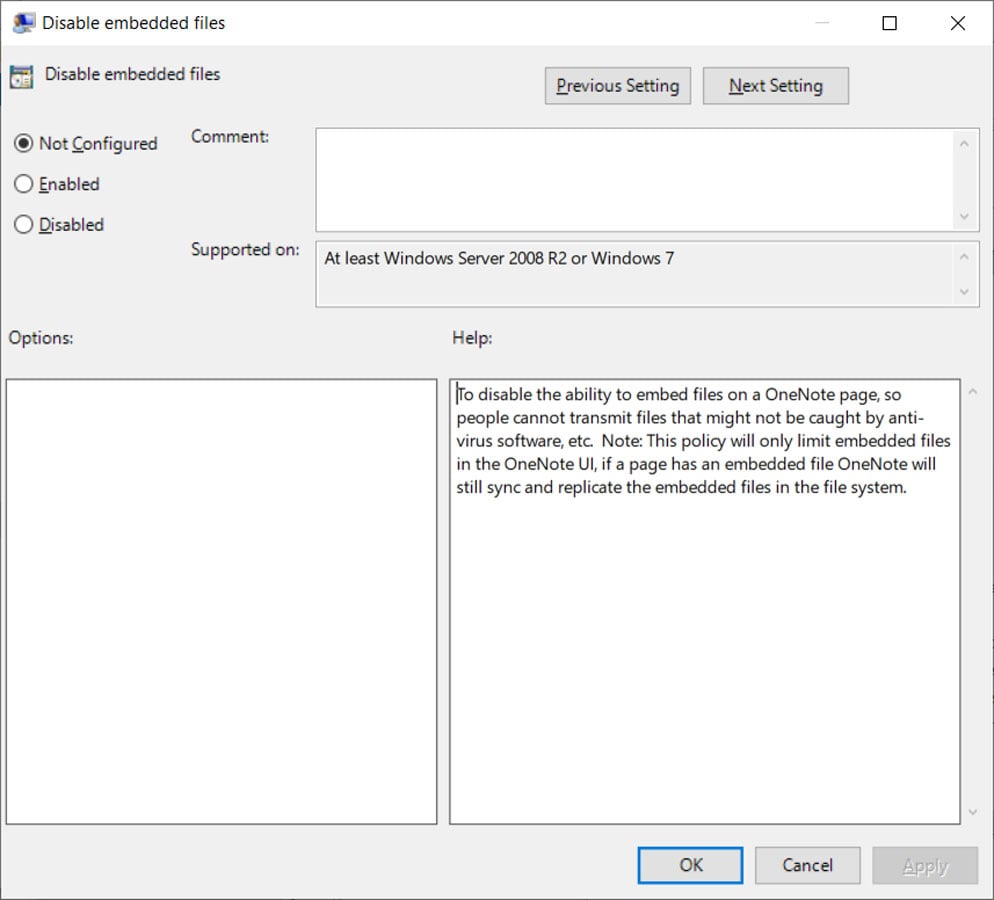
When enabled, the following Windows Registry key will be created. Note that the paths may differ depending on your Microsoft Office version.
Windows Registry Editor Version 5.00
[HKEY_CURRENT_USER\SOFTWARE\Policies\Microsoft\office\16.0\onenote\options]
“disableembeddedfiles”=dword:00000001
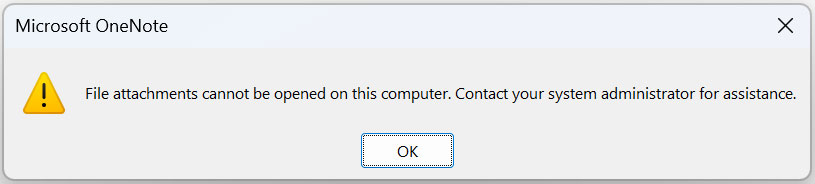
Now, when a user attempts to open any attachments embedded in a Microsoft OneNote document, they will receive the following error.
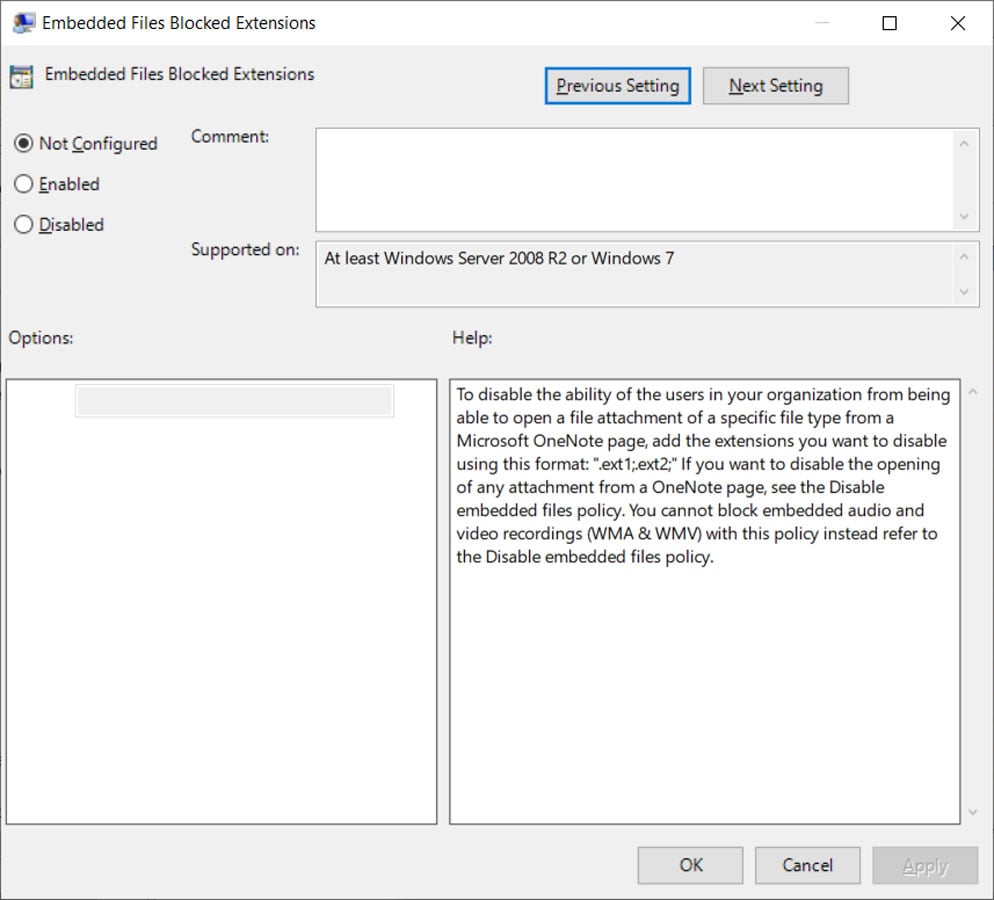
A less restrictive option, but potentially more unsafe, is the ‘Embedded Files Blocked Extensions‘ group policy, which allows you to input a list of embedded file extensions that will be blocked from opening in a Microsoft OneNote document.
“To disable the ability of the users in your organization from being able to open a file attachment of a specific file type from a Microsoft OneNote page, add the extensions you want to disable using this format: ‘.ext1;.ext2;’,” reads the policy description.
“f you want to disable the opening of any attachment from a OneNote page, see the Disable embedded files policy. You cannot block embedded audio and video recordings (WMA & WMV) with this policy instead refer to the Disable embedded files policy.”
When enabled, the following Windows Registry key will be created with the list of blocked extensions you entered.
Windows Registry Editor Version 5.00
[HKEY_CURRENT_USER\SOFTWARE\Policies\Microsoft\office\16.0\onenote\options\embeddedfileopenoptions]
“blockedextensions”=”.js;.exe;.bat;.vbs;.com;.scr;.cmd;.ps1″
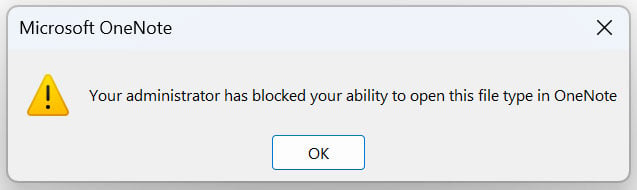
Now, when a user attempts to open a blocked file extension in a Microsoft OneNote document, they will receive the following error.
Some suggested file extensions to block are .js, .exe, .com, .cmd, .scr, .ps1, .vbs, and .lnk. However, as threat actors discover new file extensions to abuse, this list may be bypassed by other malicious file types.
While blocking any file type is not always a perfect solution due to an environment’s requirements, the results of not doing anything to restrict the abuse of Microsoft OneNote files can be even worse.
Therefore, it is strongly advised to block OneNote attachments, or at least the abuse of embedded file types, in your environment to prevent a cyberattack.
Original Posts: How to prevent Microsoft OneNote files from infecting Windows with malware
The latest version of Google Chrome for macOS (110.0.5481.100) includes new optimizations that increase battery life on MacBooks.
Google’s tests on an M2-powered 13-inch MacBook Pro running macOS “Ventura” 13.2.1 allowed generic internet browsing for 17 hours and YouTube video watching for 18 hours.
If Chrome’s Energy Saving mode is also activated, the browsing time on macOS may be extended by another 30 minutes.
Ever since Apple released its own “Silicon” line of processors, it revolutionized battery life on Macbooks, leaving the Windows laptop competition way behind on that front.
The reason why Google is optimizing Chrome battery consumption on Macs is likely because users report that Safari has much better performance on the system, leading them to use Apple’s browser instead.
Chrome’s latest improvements will also be felt by those using older Apple hardware like Intel-based Macbooks.
Google says it has introduced “a ton” of under-the-hood energy consumption optimizations on the latest version of Chrome for macOS.
The first highlighted optimization is iframe fine-tuning, where Google’s engineers realized that many iframes only live for a few seconds. This allowed the engineers to fine-tune garbage collection and memory compression to reduce memory usage, lessening energy consumption.

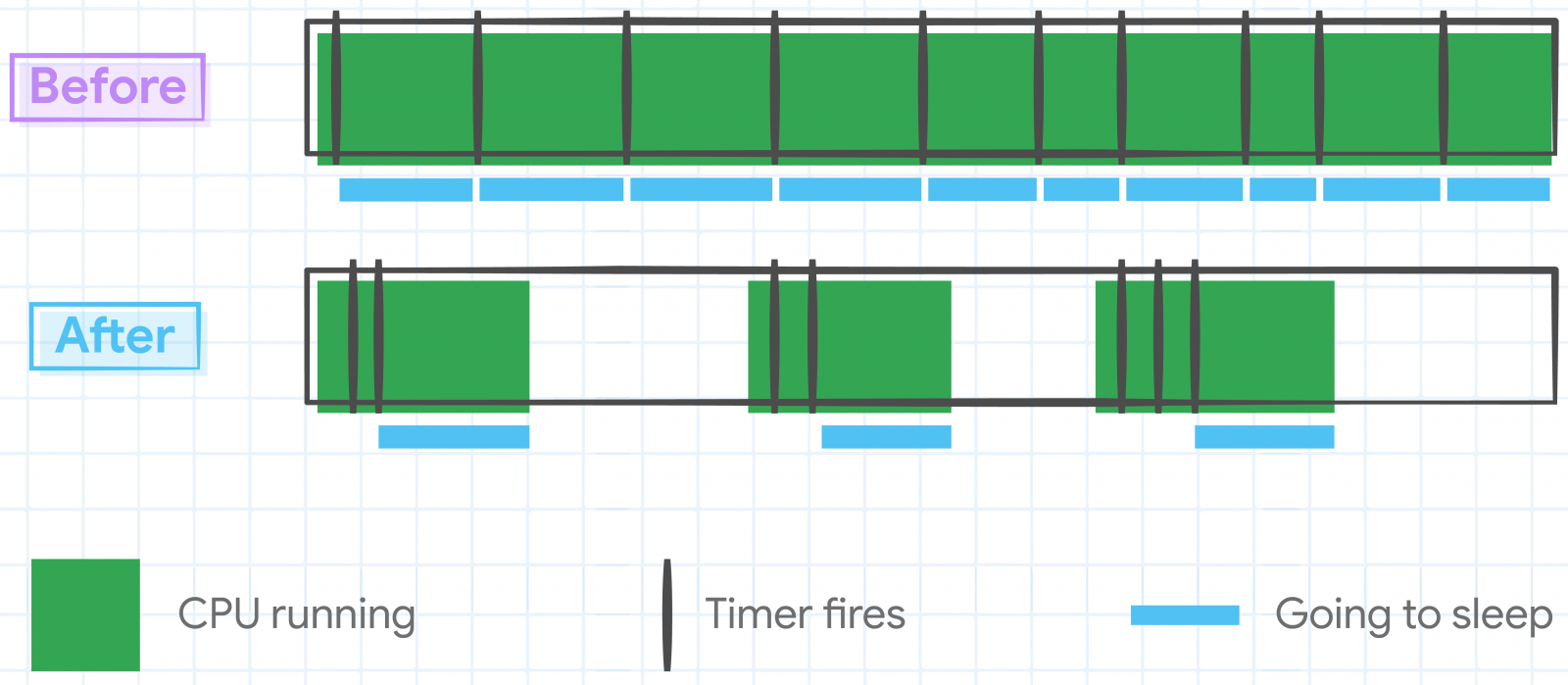
The second highlighted optimization involves tweaking JavaScript timers to reduce the number of times CPU cores are woken up, thereby reducing power consumption on Mac devices.
Some internal timers that were no longer needed were canceled altogether, allowing the CPU to go idle, a mode it never entered in previous Chrome versions.
Thirdly, Google’s engineers have optimized access patterns for data structures accessed more frequently with the same key, eliminating unnecessary repetitions and streamlining their performance.
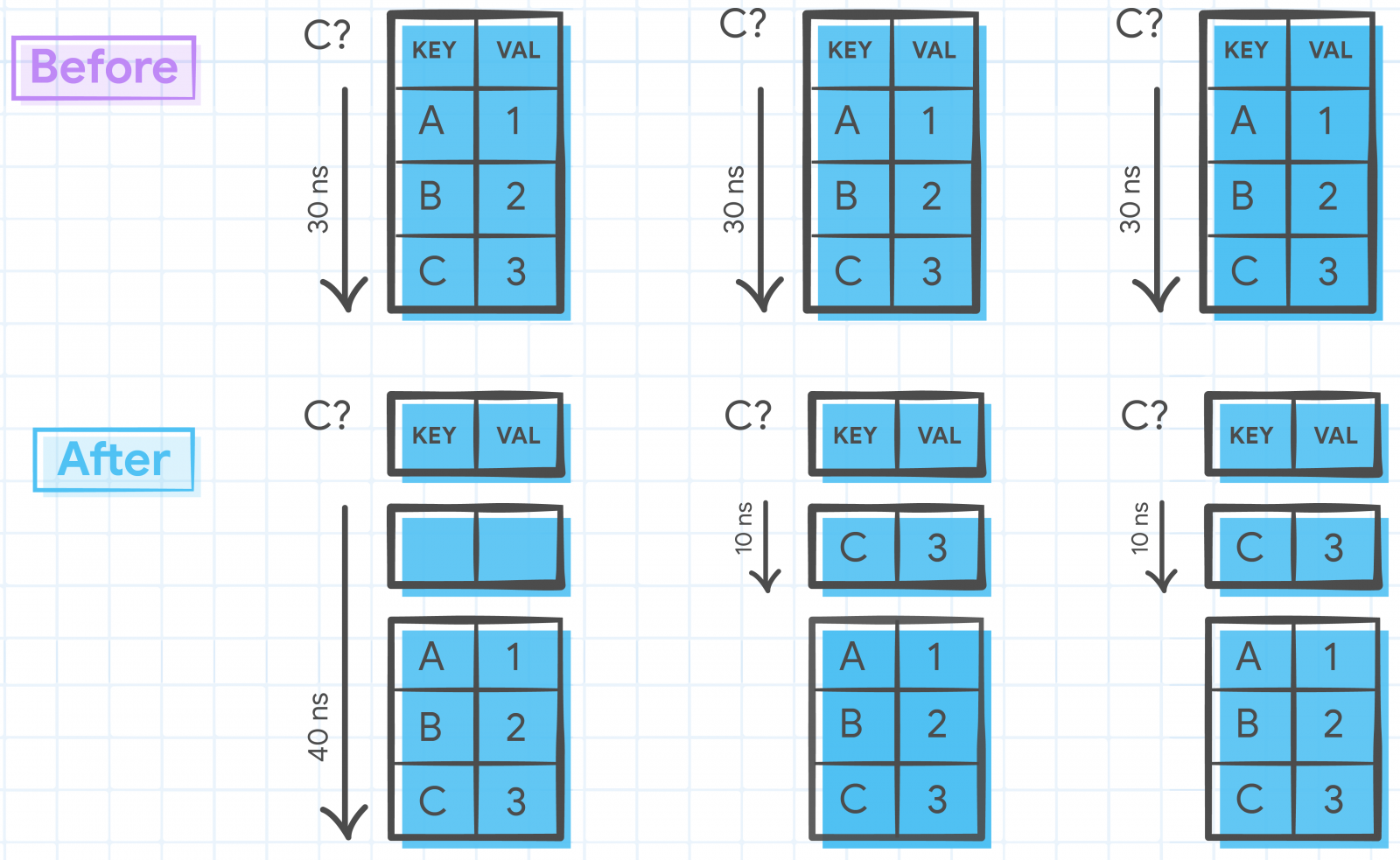
Finally, the latest Chrome for Macs features an intelligent redraw elimination system, detecting avoidable redraws that don’t have a visible impact early and bypassing them.
“We navigated on real-world sites with a bot and identified Document Object Model (DOM) change patterns that don’t affect pixels on the screen,” explains Google.
“We modified Chrome to detect those early and bypass the unnecessary style, layout, paint, raster and gpu steps.”
A similar redraw avoidance system was implemented on Chrome’s user interface elements, reducing energy consumption and extending battery life on Mac devices.
Google says these optimizations are just the start of their efforts to enhance Chrome’s power consumption, with plans for additional improvements in 2023 and the future.
Original Posts: Google Chrome optimizations improve battery life on Macs
Web hosting giant GoDaddy says it suffered a breach where unknown attackers have stolen source code and installed malware on its servers after breaching its cPanel shared hosting environment in a multi-year attack.
While GoDaddy discovered the security breach following customer reports in early December 2022 that their sites were being used to redirect to random domains, the attackers had access to the company’s network for multiple years.
“Based on our investigation, we believe these incidents are part of a multi-year campaign by a sophisticated threat actor group that, among other things, installed malware on our systems and obtained pieces of code related to some services within GoDaddy,” the hosting firm said in an SEC filing.
The company says that previous breaches disclosed in November 2021 and March 2020 are also linked to this multi-year campaign.
The November 2021 incident led to a data breach affecting 1.2 million Managed WordPress customers after attackers breached GoDaddy’s WordPress hosting environment using a compromised password.
They gained access to the email addresses of all impacted customers, their WordPress Admin passwords, sFTP and database credentials, and SSL private keys of a subset of active clients.
After the March 2020 breach, GoDaddy alerted 28,000 customers that an attacker used their web hosting account credentials in October 2019 to connect to their hosting account via SSH.
GoDaddy is now working with external cybersecurity forensics experts and law enforcement agencies worldwide as part of an ongoing investigation into the root cause of the breach.
GoDaddy says it also found additional evidence linking the threat actors to a broader campaign targeting other hosting companies worldwide over the years.
“We have evidence, and law enforcement has confirmed, that this incident was carried out by a sophisticated and organized group targeting hosting services like GoDaddy,” the hosting company said in a statement.
“According to information we have received, their apparent goal is to infect websites and servers with malware for phishing campaigns, malware distribution and other malicious activities.”
GoDaddy is one of the largest domain registrars, and it also provides hosting services to over 20 million customers worldwide.
Original Posts: GoDaddy: Hackers stole source code, installed malware in multi-year breach
Microsoft announced on Tuesday a new version of its Bing search engine powered by a next-generation OpenAI language model more powerful than ChatGPT and specially trained for web search.
“AI will fundamentally change every software category, starting with the largest category of all – search,” Microsoft Chairman and CEO Satya Nadella said today at a Redmond press event.
“Today, we’re launching Bing and Edge powered by AI copilot and chat, to help people get more from search and the web.”
Once you reach the top of the list and are accepted, you will receive an email notification indicating that you can now access the new Bing by going to Bing.com.
You can then start using it via the standard search box. The new Bing engine will also be available through the chat experience, which can be found at the top of the search user interface.
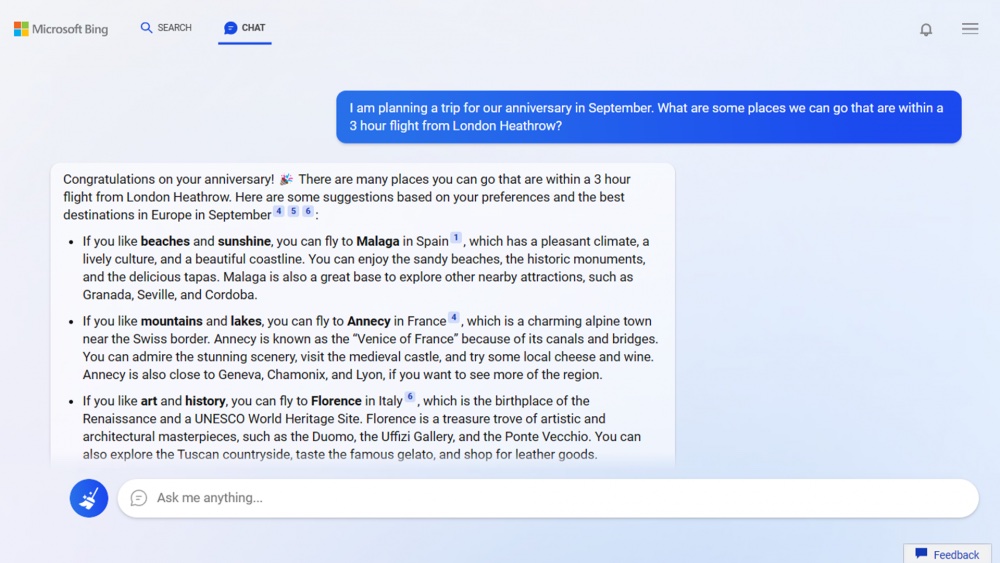
“Bing searches for relevant content across the web and then summarizes what it finds to generate a helpful response. It also cites its sources, so you’re able to see links to the web content it references,” Microsoft explains.
However, the company warns that “Bing will sometimes misrepresent the information it finds, and you may see responses that sound convincing but are incomplete, inaccurate, or inappropriate. Use your own judgment and double check the facts before making decisions or taking action based on Bing’s responses.”
The new Edge browser provides users with two new features named ‘chat’ and ‘compose’ available in the sidebar that will allow them to summarize the contents of the currently loaded page or generate content based on a prompt, respectively.
This feature is currently only in the Microsoft Edge Developer channel and can be accessed by clicking on the Bing logo above the sidebar. However, it requires being part of the preview, which is slowly adding new users.
Microsoft says that users can “get ahead in the line” by downloading the ‘Microsoft Defaults’ program, which sets Edge and Bing as your default browser and search engine, and by installing the Microsoft Bing app.
Microsoft also uses the AI model with the core Bing search-ranking engine, which, according to the company, has led to “the largest jump in relevance in two decades,” making searches more relevant and accurate.
The new Bing search engine is available today as part of a limited preview for desktop users. To test the new Edge web browser with the Bing copilot integration, download and install the Developer build from here.
Original Posts: Microsoft launches new AI chat-powered Bing and Edge browser
A relatively new ransomware operation known as Nevada seems to grow its capabilities quickly as security researchers noticed improved functionality for the locker targeting Windows and VMware ESXi systems.
Nevada ransomware started to be promoted on the RAMP darknet forums on December 10, 2022, inviting Russian and Chinese-speaking cybercriminals to join it for an 85% cut from paid ransoms.
For those affiliates who bring in a lot of victims, Nevada say they will increase their revenue share to 90%.
RAMP has been previously reported as a space where Russian and Chinese hackers promote their cybercrime operations or to communicate with peers.
Nevada ransomware features a Rust-based locker, real-time negotiation chat portal, separate domains in the Tor network for affiliates and victims.
Resecurity researchers analyzed the new malware and published a report on their findings. They say that while Nevada ransomware is explicit about excluding English-speaking affiliates, the operators are open to doing business with vetted access brokers from anywhere.
The Nevada ransomware variant that focuses on Windows machines is executed via console and supports a set of flags that give its operators some control over the encryption:
One interesting characteristic of Nevada ransomware is the set of system locales it spares from the encryption process. Typically, ransomware gangs exclude victims in Russia and CIS (Commonwealth of Independent States) countries. With this malware, the list extends to Albania, Hungary, Vietnam, Malaysia, Thailand, Turkey, and Iran.
The payload uses MPR.dll to collect information about network resources, adding shared directories in the encryption queue. Each drive, including hidden ones, is assigned a letter, and all files in them are added to the queue too.
After this stage, the encryptor is installed as a service, and then the breached system reboots into Windows safe mode with an active network connection.
The locker uses the Salsa20 algorithm to perform intermittent encryption on files larger than 512KB for quicker encryption.
Executables, DLLs, LNKs, SCRs, URLs, and INI files in Windows system folders and the user’s Program Files are excluded from encryption to avoid rendering the victim host unbootable.
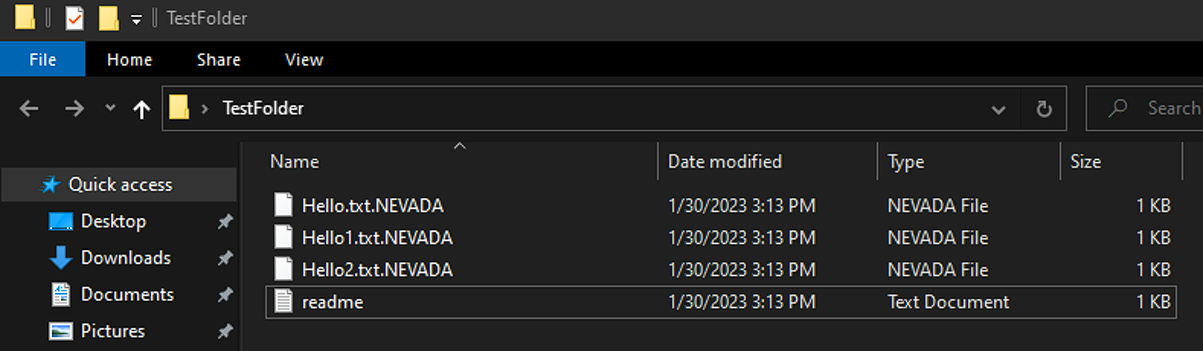
Encrypted files are appended the “.NEVADA” file extension and each folder hosts a ransom note that gives victims five days to meet the threat actor’s demands, else their stolen data would be published on Nevada’s data leak website.
.png)
The Linux/VMware ESXi version of Nevada ransomware uses the same encryption algorithm (Salsa20) as the Windows variant. It relies on a constant variable, an approach previously seen in Petya ransomware.
The Linux encryptor follows the same intermittent encryption system. fully encrypting only files smaller than 512KB.
Likely due to a bug in the Linux version, Nevada ransomware will skip all files sized between 512KB and 1.25MB, the researcher discovered.
The Linux locker supports the following arguments:
On Linux systems, the public key is stored at the end of the encrypted file in the form of an additional 38 bytes.
Resecurity says that similarities shared with Petya ransomware extend to encryption implementation bugs that might make it possible to retrieve the private key too, which would allow recovering the data without paying the ransom.
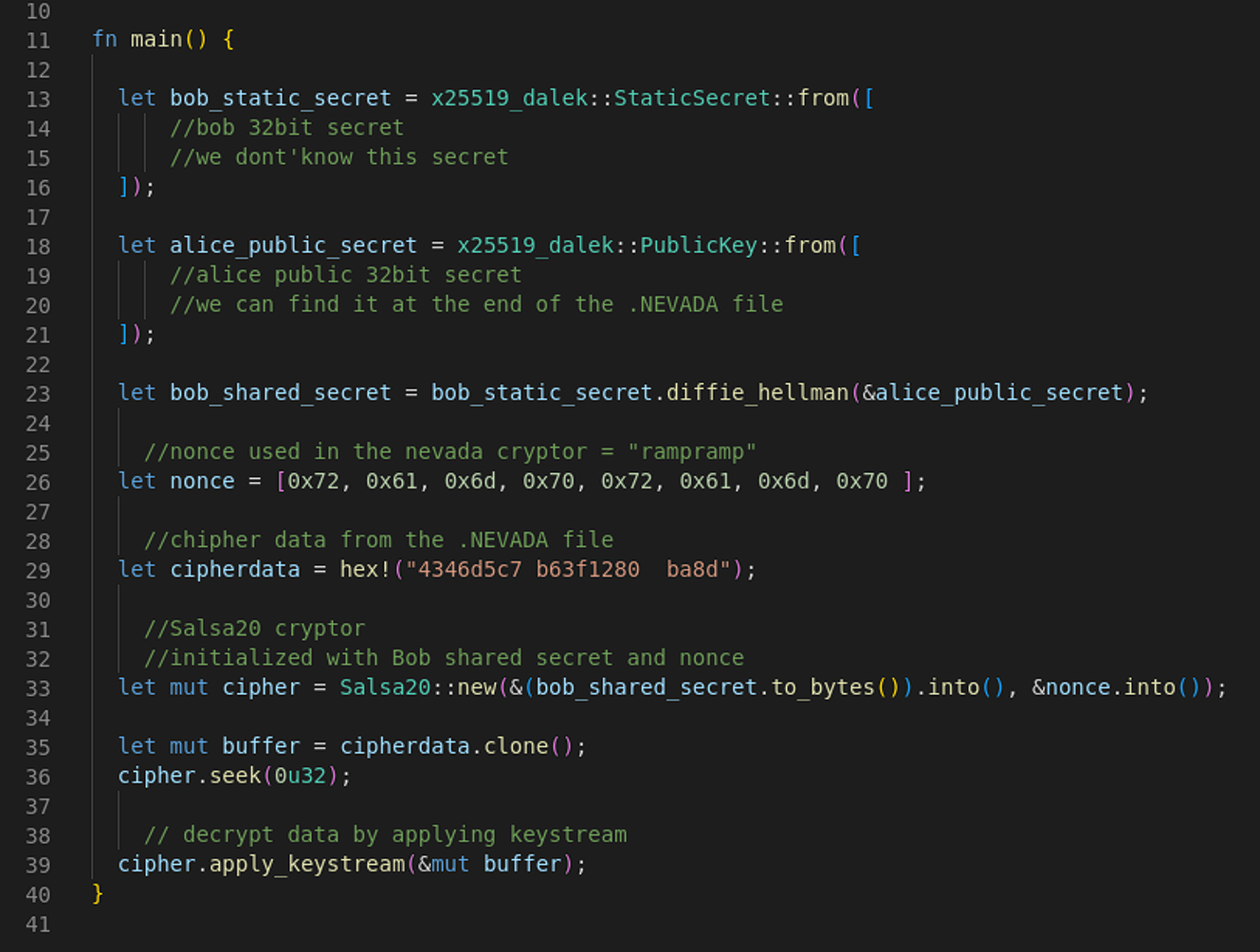
Nevada ransomware is still building its network of affiliates and initial access brokers, looking for skillful hackers.
Resecurity observed Nevada ransomware operators buying access to compromised endpoints and engaging a dedicated post-exploitation team to perform the intrusion.
The researchers note that this threat seems to continue its growth and should be closely monitored.
Original Posts: New Nevada Ransomware targets Windows and VMware ESXi systems
QNAP is warning customers to install QTS and QuTS firmware updates that fix a critical security vulnerability allowing remote attackers to inject malicious code on QNAP NAS devices.
“A vulnerability has been reported to affect QNAP devices running QTS 5.0.1 and QuTS hero h5.0.1. If exploited, this vulnerability allows remote attackers to inject malicious code,’ warns the QNAP security advisory.
The vendor hasn’t disclosed many details about the vulnerability or its exploitation potential, but the NIST portal describes it as a SQL injection flaw.
SQL injection flaws allow attackers to send specially crafted requests on vulnerable devices to modify legitimate SQL queries to perform unexpected behavior.
Furthermore, QNAP released a JSON file describing the severity of the vulnerability, which indicates it is exploitable in low-complexity attacks by remote attackers, without requiring user interaction or privileges on the targeted device.
QNAP says users’ devices running on QTS and QuTS hero should upgrade to the following versions to remain safe:
To perform the update, customers can log into their devices as the admin user and go to “Control Panel → System → Firmware Update.”
Under the “Live Update” section, click the “Check for Update” option and wait for the download and installation to complete.
Alternatively, QNAP users may download the update from QNAP’s Download Center after selecting the correct product type and model and applying it manually on their devices.
QNAP’s advisory has not marked CVE-2022-27596 as actively exploited in the wild.
However, due to the flaw’s severity, users are recommended to apply available security updates as soon as possible, as threat actors actively target QNAP vulnerabilities.
QNAP devices are already the target of ongoing ransomware campaigns known as DeadBolt and eCh0raix, which are known to abuse vulnerabilities to encrypt data on exposed NAS devices.
Original Posts: QNAP fixes critical bug letting hackers inject malicious code
Microsoft has started the forced rollout of Windows 11 22H2 to systems running Windows 11 21H2 that are approaching their end-of-support (EOS) date on October 10, 2023.
Redmond is regularly initiating automatic feature updates to ensure that it can continue to service these devices near their EOS date and to provide them with the latest updates, security updates, and improvements.
The automated feature update rollout phase comes after Windows 11 22H2 (known as the Windows 11 2022 update) has also become available for broad deployment today to users with eligible devices via Windows Update.
“Today we begin to automatically update consumer and non-managed business devices running Windows 11, version 21H2 Home and Pro editions to Windows 11, version 22H2,” Microsoft said in an update to the health dashboard.
“Since Windows 10, we have been helping Windows users stay up to date and secure with supported versions of Windows through automatic updates. We are utilizing this same approach for Windows 11 to help you stay protected and productive.”
The automatic updates will roll out gradually, starting with the devices running Windows 11 21H2 for the longest time.
“If you are interested in moving to Windows 11, version 22H2 right away, open Windows Update settings and select Check for updates. If your device is ready, you will see the option to Download and install,” Microsoft added today.
“If we detect that your device might have an issue, such as compatibility, we might put a safeguard hold in place. In this case, the update will not be installed automatically until the issue is resolved.”
Right now, the only compatibility hold blocking the Windows 11 2022 Update affects systems with specific driver versions for Intel Smart Sound Technology (Intel SST) on Intel 11th Gen Core processors that trigger blue screens of death (BSODs).
However, Microsoft provides a workaround for those who want to install Windows 11 22H2, requiring them to check if Intel has an updated driver for their systems.
The issue is resolved by updating the Intel SST drivers to version 10.30.00.5714 and later or 10.29.00.5714 and later.
After updating the affected Intel driver, it can take up to 48 hours before you can install the Windows 11 2022 Update on your system.
You can use this Windows support document or follow this guided walk-through to troubleshoot Windows 10 22H2 update problems or fix any errors you encounter.
Original Posts: Microsoft starts force upgrading Windows 11 21H2 devices
Apple has backported security patches addressing a remotely exploitable zero-day vulnerability to older iPhones and iPads.
Apple said that the flaw discovered by Clément Lecigne of Google’s Threat Analysis Group allows maliciously crafted webpages to perform arbitrary code execution (and likely gain access to sensitive information) on vulnerable devices.
Attackers can successfully exploit this flaw by tricking their targets into visiting a maliciously crafted website under their control.
Once achieved, arbitrary code execution could allow them to execute commands on the underlying operating system, deploy additional malware or spyware payloads, or trigger other malicious activity.
In a security advisory published today, Apple once again said that they’re aware of reports that this security flaw “may have been actively exploited.”
The company addressed the zero-day bug with improved state handling for the following devices: iPhone 5s, iPhone 6, iPhone 6 Plus, iPad Air, iPad mini 2, iPad mini 3, and iPod touch (6th generation).
Although Apple disclosed that it received reports of active exploitation, the company is yet to publish info regarding these attacks.
By withholding this info, Apple is likely aiming to allow as many users as possible to patch their devices before other attackers pick up on the zero-day’s details and start deploying custom exploits targeting vulnerable iPhones and iPads.
Even though this security flaw was most likely only used in targeted attacks, it’s still strongly recommended to install today’s security updates as soon as possible to block potential attack attempts.
Today, Apple also patched dozens of other security flaws in its Safari web browser and its latest macOS, iOS, and watchOS versions.
Original Posts: Apple fixes actively exploited iOS zero-day on older iPhones, iPads
A new Android malware named ‘Hook’ is being sold by cybercriminals, boasting it can remotely take over mobile devices in real-time using VNC (virtual network computing).
The new malware is promoted by the creator of Ermac, an Android banking trojan selling for $5,000/month that helps threat actors steal credentials from over 467 banking and crypto apps via overlaid login pages.
While the author of Hook claims the new malware was written from scratch, and despite having several additional features compared to Ermac, researchers at ThreatFabric dispute these claims and report seeing extensive code overlaps between the two families.
ThreatFabric explains that Hook contains most of Ermac’s code base, so it’s still a banking trojan. At the same time, it includes several unnecessary parts found in the older strain that indicate it re-used code in bulk.
Despite its origin, Hook is an evolution of Ermac, offering an extensive set of capabilities that make it a more dangerous threat to Android users.
One new feature of Hook compared to Ermac is the introduction of WebSocket communication that comes in addition to HTTP traffic used exclusively by Ermac. The network traffic is still encrypted using an AES-256-CBC hardcoded key.
The highlight addition, however, is the ‘VNC’ module that gives threat actors the capability to interact with the user interface of the compromised device in real-time.
This new system enables Hook’s operators to perform any action on the device, from PII exfiltration to monetary transactions.
“With this feature, Hook joins the ranks of malware families that are able to perform full DTO, and complete a full fraud chain, from PII exfiltration to transaction, with all the intermediate steps, without the need of additional channels,” warns ThreatFabric.
“This kind of operation is much harder to detect by fraud scoring engines, and is the main selling point for Android bankers.”
The catch is that Hook’s VNC requires Accessibility Service access to work, which might be hard to get on devices running Android 11 or later.
Hook’s new (in addition to Ermac’s) commands can perform the following actions:
Apart from the above, a “File Manager” command turns the malware into a file manager, allowing the threat actors to get a list of all files stored in the device and download specific files of their choice.
Another notable command that ThreatFabric found concerns WhatsApp, allowing Hook to log all messages in the popular IM app and even allowing the operators to send messages via the victim’s account.
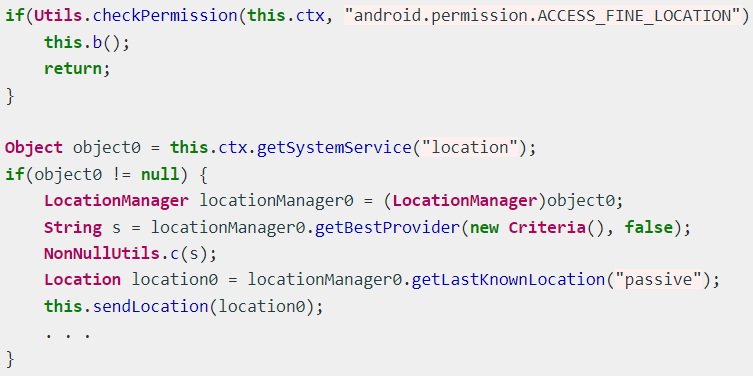
Finally, a new geolocation tracking system enables Hook operators to track the victim’s precise position by abusing the “Access Fine Location” permission.
Hook’s target banking applications impact users in the United States, Spain, Australia, Poland, Canada, Turkey, the UK, France, Italy, and Portugal.
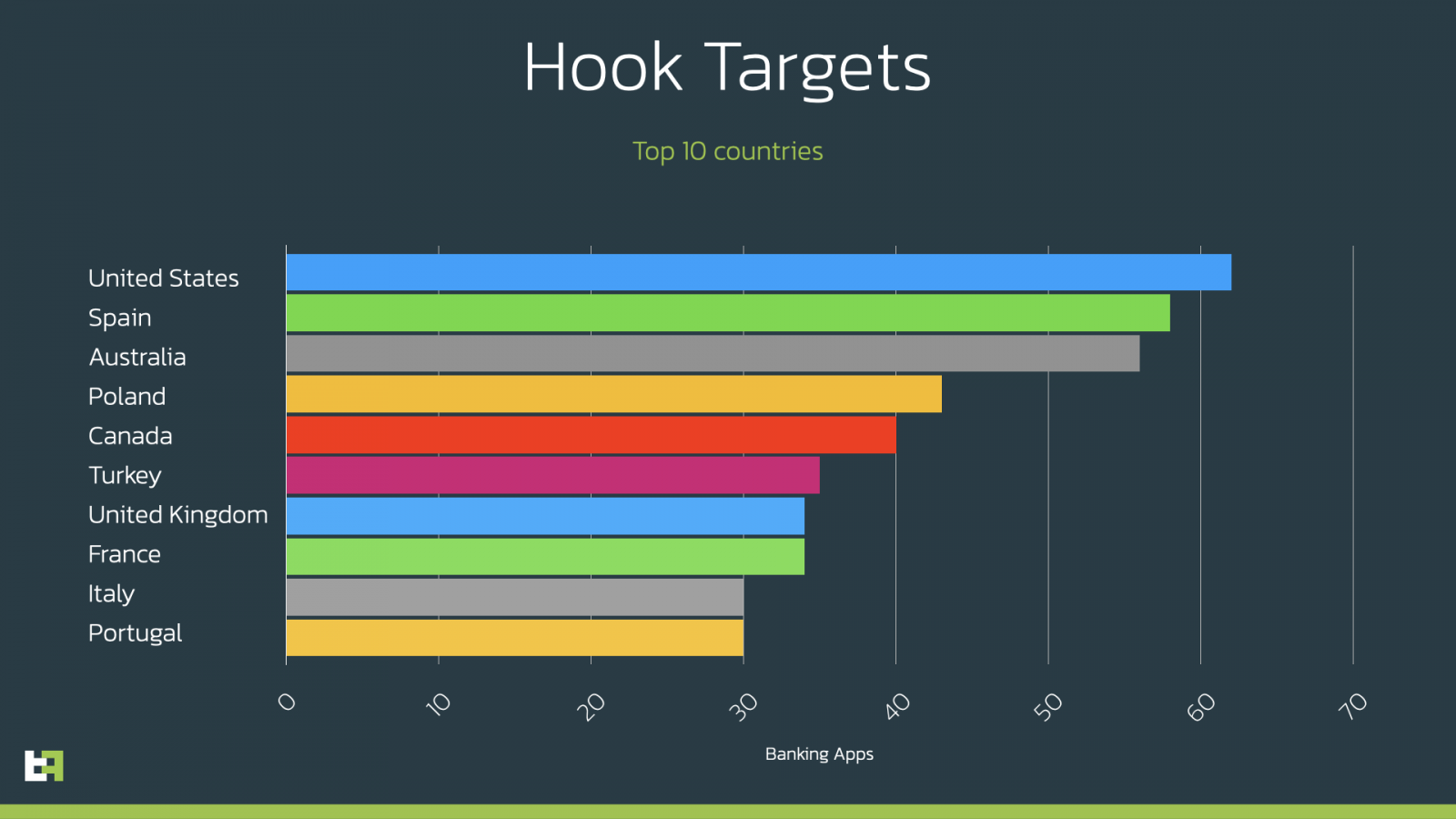
However, it is essential to note that Hook’s broad targeting scope covers the entire world. ThreatFabric listed all the apps Hook targets in the report’s appendix for those interested.
At this time, Hook is distributed as a Google Chrome APK under the package names “com.lojibiwawajinu.guna,” “com.damariwonomiwi.docebi,” “com.damariwonomiwi.docebi,” and “com.yecomevusaso.pisifo,” but of course, this could change at any moment.
To avoid becoming infected with Android malware, you should only install apps from the Google Play Store or those provided by your employer.
Original Posts: New ‘Hook’ Android malware lets hackers remotely control your phone.
« Previous 1 … 4 5 6 7 8 … 21 Next »