

Cybersecurity experts have sounded the alarm after uncovering what they’re calling the ‘mother of all breaches’ – a staggering leak of more than 16 billion records from some of the world’s biggest platforms.
The massive data dump includes passwords and sensitive info linked to government accounts, as well as major tech giants like Apple, Google, Facebook, and Telegram.
Some files were vaguely labelled things like “logins” or “credentials,” making it difficult for researchers to pin down exactly what’s been exposed. Still, the scale of the breach has sent shockwaves through the cybersecurity world.
Talk’s Ian Collins: “Researchers believe most of it was stolen using malware!”
This breach isn’t from one single event — it’s a mega compilation of data from various past hacks.
Sensitive information, including passwords and personal credentials, are part of the leak.
Experts warn of the increased risk of phishing, identity theft, and account takeovers.
Change your passwords, especially on major platforms like Google, Facebook, and Apple.
Use unique passwords for every account.
Turn on two-factor authentication (2FA) wherever possible.
Be cautious of suspicious emails, texts, or login requests.
Stay alert — this breach is a major wake-up call for individuals and businesses alike. If you’ve reused passwords or haven’t updated them recently, now is the time.
Watch on YouTube:
Microsoft is investigating an ongoing outage preventing users and admins from accessing some Microsoft 365 services and the admin center.
According to thousands of reports from affected customers logged by DownDetector, these ongoing issues block login attempts and impact Microsoft 365 suite websites and Outlook services.
“Further information can be found at https://status.cloud.microsoft, or under MO991872 if the admin center is accessible to you,” the company said.
“We’re investigating reports of an issue where some users and admins may be unable to access Microsoft 365 services or the Microsoft 365 admin center,” explains the Microsoft 365 Admin Center message.
According to Microsoft, the list of likely affected services includes:
While the company has yet to provide more information on the number of users affected by this outage and its extent, these problems are tagged as an “incident” described by Microsoft as “critical service issues, typically involving noticeable user impact.”
In December, a Microsoft 365 outage shut down the Office web apps and the admin center, and earlier this month, a Multi-Factor Authentication (MFA) outage prevented customers from accessing Microsoft 365 Office apps.
In November, another Microsoft 365 outage affected multiple services and features worldwide, including Microsoft Teams, Exchange Online, SharePoint Online, OneDrive, Purview, Copilot, and Outlook Web and Desktop.
Update January 29, 13:44 EST: Microsoft says it received reports that these ongoing issues have been resolved for some users.
“We’re analyzing available service telemetry to identify why the issue initially occurred and we’re also working to identify whether additional actions are required to resolve the impact for all users.”
Update January 29, 14:44 EST: Microsoft updated the M365 Admin Center to say the incident has been mitigated.
“After further investigation, we confirmed that impact was limited to admins attempting to access the Microsoft 365 admin center, and we’ve updated the Title, User impact, and Scope of impact sections of this communication accordingly,” it stated.
“We’ve identified a recent configuration change that contained an error, which prevented access requests from completing as expected. We reverted this change and after a period of extended monitoring, we’ve confirmed that the issue is resolved for all users.”
Original Post: Microsoft investigates Microsoft 365 outage affecting users, admins
Wary of the growing adoption of AI in the business world? Worried about losing your job to technology?
You’d better get used to it because 77% of hiring managers say AI is a beneficial resume skill for 2024, according to a new report from ResumeTemplates.com. In fact, six out of 10 employers say they’d choose a less-experienced candidate, providing they had AI skills.
From automating routine tasks to enhancing decision-making processes, the growing prevalence of AI is reshaping how businesses operate and employees engage with their professional responsibilities.
ResumeTemplates, which surveyed 780 hiring managers for the study, added that 73% of companies are expanding their use of AI in 2024.
Many employers believe AI is a skill even entry-level candidates should have, the report said. Nearly 30% deemed it “very important,” while 40% say it’s “somewhat important.”
“Possessing at least a basic understanding of a specific domain, in combination with having AI skills, can enable candidates to compete with more experienced counterparts,” said Andrew Stoner, ResumeTemplates’ executive resume writer and career coach.
Stoner said candidates with less experience who are looking to stand out in the hiring process should highlight job-specific, relevant skills on their resume and provide solid examples during the interview process.
“Obtaining in-demand professional or technical certifications is another way candidates can level up,” he said. “And AI-generated work samples or simulations might be a new strategy for candidates to demonstrate their skills.”
Wary of the growing adoption of AI in the business world? Worried about losing your job to technology?
You’d better get used to it because 77% of hiring managers say AI is a beneficial resume skill for 2024, according to a new report from ResumeTemplates.com. In fact, six out of 10 employers say they’d choose a less-experienced candidate, providing they had AI skills.
From automating routine tasks to enhancing decision-making processes, the growing prevalence of AI is reshaping how businesses operate and employees engage with their professional responsibilities.
ResumeTemplates, which surveyed 780 hiring managers for the study, added that 73% of companies are expanding their use of AI in 2024.
Many employers believe AI is a skill even entry-level candidates should have, the report said. Nearly 30% deemed it “very important,” while 40% say it’s “somewhat important.”
“Possessing at least a basic understanding of a specific domain, in combination with having AI skills, can enable candidates to compete with more experienced counterparts,” said Andrew Stoner, ResumeTemplates’ executive resume writer and career coach.
“Obtaining in-demand professional or technical certifications is another way candidates can level up,” he said. “And AI-generated work samples or simulations might be a new strategy for candidates to demonstrate their skills.”
Original Posts: Report: Hiring managers favor applicants with AI skills
Microsoft’s November 2023 Patch Tuesday, which includes security updates for a total of 58 flaws and five zero-day vulnerabilities.
While fourteen remote code execution (RCE) bugs were fixed, Microsoft only rated one as critical. The three critical flaws fixed today are an Azure information disclosure bug, an RCE in Windows Internet Connection Sharing (ICS), and a Hyper-V escape flaw that allows the executions of programs on the host with SYSTEM privileges.
The number of bugs in each vulnerability category is listed below:
The total count of 58 flaws does not include 5 Mariner security updates and 20 Microsoft Edge security updates released earlier this month.
This month’s Patch Tuesday fixes five zero-day vulnerabilities, with three exploited in attacks and three publicly disclosed.
Microsoft classifies a vulnerability as a zero-day if it is publicly disclosed or actively exploited with no official fix available.
The three actively exploited zero-day vulnerabilities in today’s updates are:
CVE-2023-36036 – Windows Cloud Files Mini Filter Driver Elevation of Privilege Vulnerability
Microsoft has fixed an actively exploited Windows Cloud Files Mini Filter Elevation of Privileges bug.
“An attacker who successfully exploited this vulnerability could gain SYSTEM privileges,” explains Microsoft.
It is not known how the flaw was abused in attacks or by what threat actor.
The flaw was discovered internally by the Microsoft Threat Intelligence Microsoft Security Response Center.
CVE-2023-36033 – Windows DWM Core Library Elevation of Privilege Vulnerability
Microsoft has fixed an actively exploited and publicly disclosed Windows DWM Core Library vulnerability that can be used to elevate privileges to SYSTEM.
“An attacker who successfully exploited this vulnerability could gain SYSTEM privileges,” explains Microsoft.
Microsoft says that the flaw was discovered by Quan Jin(@jq0904) with DBAPPSecurity WeBin Lab but did not share details on how they were used in attacks.
CVE-2023-36025 – Windows SmartScreen Security Feature Bypass Vulnerability
Microsoft has fixed an actively exploited Windows SmartScreen flaw that allows a malicious Internet Shortcut to bypass security checks and warnings.
“The attacker would be able to bypass Windows Defender SmartScreen checks and their associated prompts,” explains Microsoft.
“The user would have to click on a specially crafted Internet Shortcut (.URL) or a hyperlink pointing to an Internet Shortcut file to be compromised by the attacker,” continues Microsoft.
Microsoft says that the flaw was discovered by Will Metcalf (Splunk), Microsoft Threat Intelligence, and the Microsoft Office Product Group Security Team.
BleepingComputer contacted Splunk about the flaw to learn how it was exploited.
In addition, Microsoft says that two other publicly disclosed zero-day bugs, ‘CVE-2023-36413 – Microsoft Office Security Feature Bypass Vulnerability’ and the ‘CVE-2023-36038 — ASP.NET Core Denial of Service Vulnerability,’ were also fixed as part of today’s Patch Tuesday.
However, Microsoft says that they were not actively exploited in attacks.
Original Posts: Microsoft November 2023 Patch Tuesday fixes 5 zero-days, 58 flaws
Google is testing a new feature in the Chrome browser that will warn users when an installed extension has been removed from the Chrome Web Store, usually indicative of it being malware.
An unending supply of unwanted browser extensions is published on the Chrome Web Store and promoted through popup and redirect ads.
These extensions are made by scam companies and threat actors who use them to inject advertisements, track your search history, redirect you to affiliate pages, or in more severe cases, steal your Gmail emails and Facebook accounts
The problem is that these extensions are churned out quickly, with the developers releasing new ones just as Google removes old ones from the Chrome Web Store.
Unfortunately, if you installed one of these extensions, they will still be installed in your browser, even after Google detects them as malware and removes them from the store.
Due to this, Google is now bringing its Safety Check feature to browser extensions, warning Chrome users when an extension has been detected as malware or removed from the store and that they should be uninstalled from the browser.
This feature will go live in Chrome 117, but you can now test it in Chrome 116 by enabling the browser’s experimental ‘Extensions Module in Safety Check’ feature.
To enable the feature, simply copy the Chrome URL, ‘chrome://flags/#safety-check-extensions’, into the address bar and press enter. You will be brought to the Chrome Flags page with the ‘Extensions Module in Safety Check’ feature highlighted.
Now set it to enabled and restart the browser when prompted to enable the feature.
Once enabled, a new option will appear under the ‘Privacy and security’ settings page that prompts you to review any extensions removed from the Chrome Web Store, as shown below.
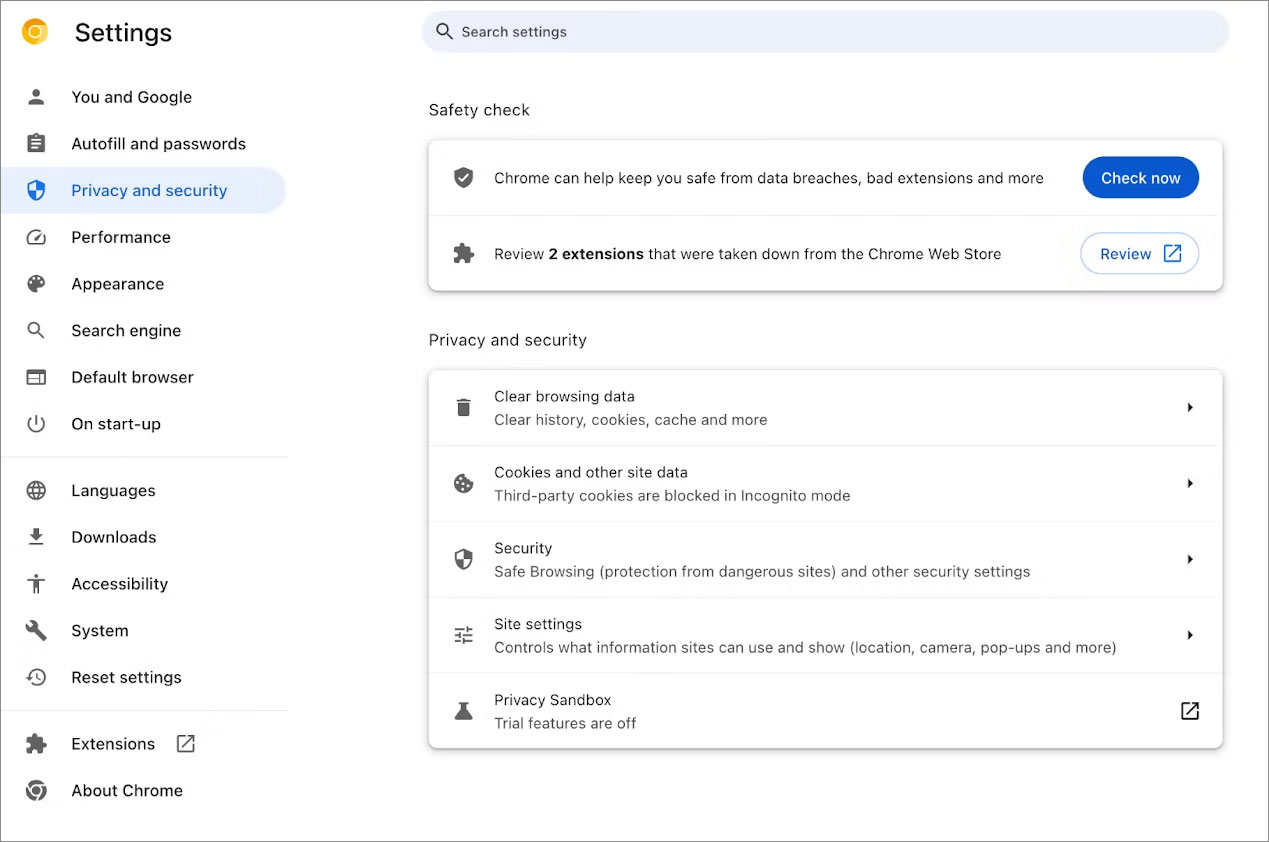
Clicking this link will bring you to your extension page, listing the removed extensions and why they were removed and prompting you to uninstall them.
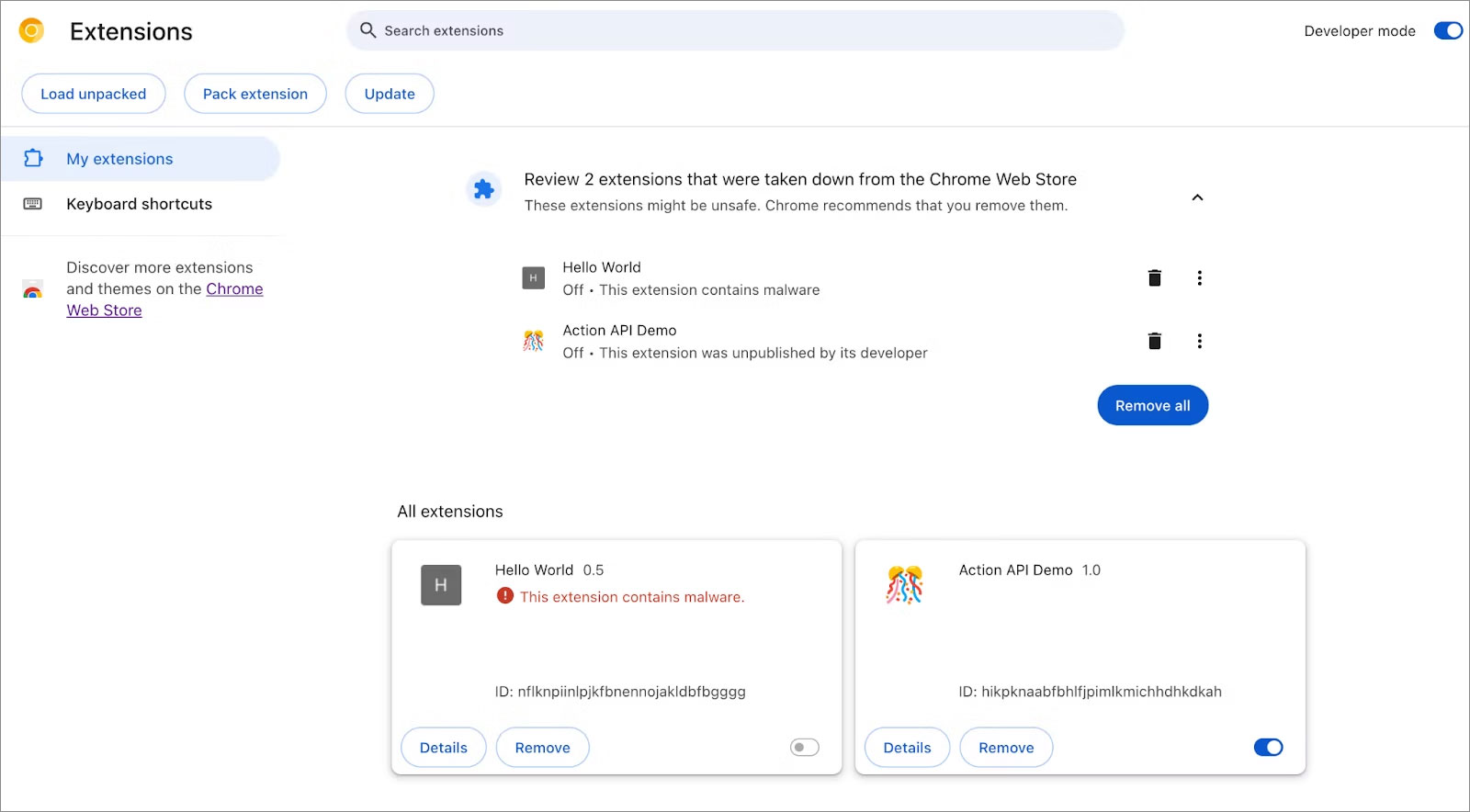
Google says that extensions can be removed from the Chrome Web Store because they were unpublished by the developer, violated policies, or were detected as malware.
For extensions detected as malware, it is strongly advised that you remove them immediately to not only protect your data but also to prevent your computer from facing future attacks.
For those that are removed for other reasons, it is advised that you remove them as well, as they are no longer supported or break other policies that are not strictly malware but are not necessarily helpful.
Google has a dedicated Chrome Web Store policies page detailing what content or behavior could lead to an extension being removed from the store.
Google has changed the Google Chrome security updates schedule from bi-weekly to weekly to address the growing patch gap problem that allows threat actors extra time to exploit published n-day and zero-day flaws.
This new schedule will start with Google Chrome 116, scheduled for release today.
Google explains that Chromium is an open-source project, allowing anyone to view its source code and scrutinize developer discussions, commits, and fixes made by contributors in real time.
These changes, fixes, and security updates are then added to Chrome’s development releases (Beta/Canary), where they are tested for stability, performance, or compatibility issues before they can be pushed to the stable Chrome release.
However, this transparency comes with a cost, as it also allows advanced threat actors to identify flaws before fixes reach a massive user base of stable Chrome releases and exploit them in the wild.
“Bad actors could possibly take advantage of the visibility into these fixes and develop exploits to apply against browser users who haven’t yet received the fix,” reads Google’s announcement.
“This exploitation of a known and patched security issue is referred to as n-day exploitation.”
The patch gap is the time it takes a security fix to be released for testing and for it to finally be pushed out to the main population in public releases of software.
Google identified the problem years ago when the patch gap averaged 35 days, and in 2020. With the release of Chrome 77, it switched to biweekly updates to try to reduce this number.
With the switch to weekly stable updates, Google further minimizes the patch gap and reduces the window of n-day exploitation opportunity to a single week.
While this is definitely a step in the right direction and will positively affect Chrome security, it’s essential to underline that it’s not ideal in the sense that it won’t stop all n-day exploitation.
Reducing the interval between updates will stop the exploitation of flaws that demand more complex exploitation paths, which in turn require more time to develop.
However, there are some vulnerabilities for which malicious actors can build an effective exploit using known techniques, and these cases will remain a problem.
Even in those cases, though, active exploitation will still be reduced to a maximum of seven days in the worst-case scenario, given that users apply security updates as soon as they become available.
“Not all security bug fixes are used for n-day exploitation. But we don’t know which bugs are exploited in practice, and which aren’t, so we treat all critical and high severity bugs as if they will be exploited,” explains Chrome Security Team member Amy Ressler.
“A lot of work goes into making sure these bugs get triaged and fixed as soon as possible.”
“Rather than having fixes sitting and waiting to be included in the next bi-weekly update, weekly updates will allow us to get important security bug fixes to you sooner, and better protect you and your most sensitive data.”
Ultimately, the new update frequency will decrease the need for unplanned updates, enabling users and system administrators to adhere to a more consistent security maintenance schedule.
The vulnerability patch gap has also become a massive problem for Android, with Google recently warning that n-day flaws have become as dangerous as zero-days.
Unfortunately, the Android ecosystem makes it much harder for Google to control, as in many cases, a patch will be released, and it will take manufacturers months to introduce it into their phone’s operating systems.
Original Posts: Google to fight hackers with weekly Chrome security updates
Microsoft has quietly announced an enhancement to the Edge browser’s dark mode, making it even darker.
The current dark mode, characterized by its grey tones, is set to be replaced with a richer black version, providing users with an even darker browsing experience.
This update is currently available for testing in Edge Canary, Microsoft’s experimental version of the Edge browser. It is used to test and develop new features before they’re rolled out to the general public.
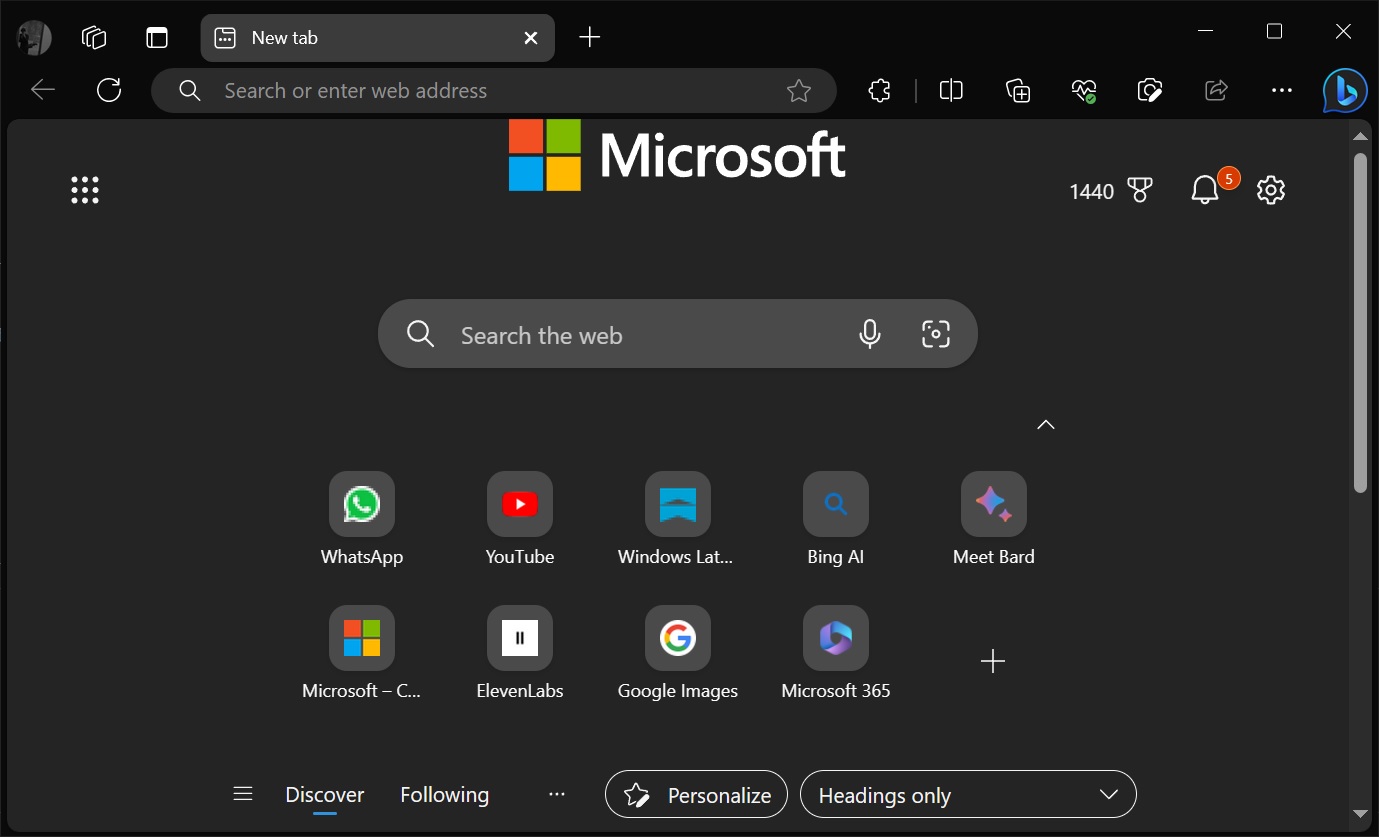
This update aims to provide a more comfortable viewing experience in low light settings and to give the browser a sleek, modern appearance.
This move towards a black version of dark mode further demonstrates Microsoft’s commitment to user customization and choice, and it will no doubt be welcomed by those who prefer the aesthetic and practical benefits of a darker interface.
The last big update for Edge added a new ‘Edge Secure Network’ feature with up to 5GB of data, significantly increasing from the previously offered 1GB. This new VPN-like feature uses Cloudflare’s routing to encrypt your internet connection and secure your data against online threats like hacking.
Microsoft is also adding a new mouse gestures feature to the browser, allowing users to control the browser with the mouse.
Original Posts: Microsoft Edge is getting a ‘darker’ dark mode theme
Microsoft has released the July 2023 optional cumulative update for Windows 11, version 22H2, with fixes for 27 issues, including ones affecting VPN performance and display or audio devices.
KB5028254 is a monthly non-security preview release that allows Windows administrators and users to test improvements included in the upcoming August 2023 Patch Tuesday release.
According to Microsoft, it addresses issues causing audio and display devices to disappear after the systems resume from sleep.
“There might be excessive Address Resolution Protocol (ARP) requests to the network gateway,” Redmond says.
“This occurs when the VPN is on a wireless mesh network that uses an aggressive throttling algorithm. Because of this, network performance is poor.”
This update also makes brightness settings more accurate and ensures that Widgets no longer unpin from the Windows taskbar unexpectedly.
It’s also important to note that this monthly “C” update is optional and, unlike Patch Tuesday releases, does not include any security-related fixes.
To install KB5028254, you can go to Settings > Windows Update, where they will find the ‘Download and install’ button after checking for updates.
You can also download the update from the Microsoft Update Catalog and install it manually. After installing this update, Windows 11 22H2 will be updated to build 22621.2070.
Today’s preview release comes with additional fixes and improvements, with some of the most significant ones outlined below:
The complete list of fixes and improvements can be found in the KB5028254 support bulletin published by Microsoft.
Today’s preview release comes with additional fixes and improvements, with some of the most significant ones outlined below:
The complete list of fixes and improvements can be found in the KB5028254 support bulletin published by Microsoft today.
Original Posts: Windows 11 KB5028254 update fixes VPN performance issues, 27 bugs
Apple has commenced the rollout of iOS 16.6 and iPadOS 16.6, the latest software updates for iPhone and iPad. These updates bring essential fixes for vulnerabilities impacting Apple’s Neural Engine, and kernel-level patches addressing flaws that could potentially compromise the security of some devices. Additionally, Apple has also pushed macOS 13.5, watchOS 9.6, and tvOS 16.6 updates, all of which contain significant security fixes. Here is all we know.
With the latest updates, users can now download the latest software on their compatible devices. Apple strongly recommends users to update their devices due to the critical security fixes included in these updates. To do this, users simply need to open the Settings app, visit the General section > Software Update > Download and Install.
The most recent updates from Apple include essential security patches for vulnerabilities linked to the Neural Engine, which is responsible for natural language processing and on-device machine learning. These patches effectively prevent malicious code from being executed on the device through apps. Additionally, the Find My app has been fortified with fixes that safeguard sensitive location information from being accessed by unauthorized apps.
People also need to download macOS 13.5 update as it brings vital security measures to fix vulnerabilities that could enable a sandboxed process to bypass security restrictions or allow unauthorized access to user-sensitive data with the help of the Voice Memos app.
Furthermore, Apple has also rolled out updates to fix multiple vulnerabilities affecting WebKit, which is the company’s open-source browser engine powering Safari. The WebKit fixes are crucial in preventing malicious code execution and the disclosure of sensitive information when the browser processes web content.
Apple has taken particular notice of reports claiming that some people are taking advantage of such security issues. In light of this, the company emphasizes that users with compatible iPhone, iPad, Mac, Apple Watch, and Apple TV models should immediately download and install the updates to shield themselves from potential security breaches.
In conclusion, the rollout of iOS 16.6, iPadOS 16.6, macOS 13.5, watchOS 9.6, and tvOS 16.6 provides critical security fixes for various vulnerabilities across Apple’s software ecosystem. Users are urged to update their devices promptly to protect themselves from potential security threats and take advantage of the latest improvements and enhancements.
Original Posts: Apple rolls out important iOS 16.6 update to fix many security issues, recommends users to install it
Microsoft will retire the Windows Mail and Calendar applications on Windows 10 and Windows 11 at the end of the year, first auto-migrating users to the new Outlook for Windows app in August.
Initially developed for Windows 10, Windows Mail and Calendar are built-in Windows applications that provide an easy-to-use application for retrieving your email and scheduling events, tasks, and appointments.
With the release of Windows 11, Microsoft continued to bundle the Mail and Calendar apps with the operating, even though it is not considered a modern email application.
However, this is about to change, with Microsoft confirming that they are moving forward with plans to retire both apps and transition users to a new Outlook for Windows app already available for testing.
Microsoft began alerting consumers and enterprise customers that they are retiring the Windows Mail and Calendar apps in 2024, recommending they start testing the new Outlook app.
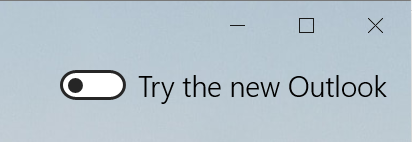
Windows users can test the new app by enabling a toggle in the upper right-hand corner of Windows Mail to automatically install the new Outlook app and import your settings from the Mail application.
At the same time, Microsoft issued a Microsoft 365 MC590123 advisory warning customers that they would automatically begin replacing the Mail and Calendar with the Outlook app in September 2024.
Microsoft also said that users will begin seeing “tips” alerting them of the change and prompting them to try the new Outlook app.
A day later, after an outcry from users, Microsoft said that they were reevaluating the timing of this change.
“We are reevaluating the timing and implementation of this change and will provide updated information shortly. Thank you for your patience,” said Microsoft in an update to the advisory.
In a new Microsoft 365 MC650424 advisory, Microsoft is now alerting customers that they are moving forward with the migration.
“The Mail and Calendar apps for Windows are being replaced with the new Outlook for Windows.”
“At the end of 2024 we will be ending support for the Mail and Calendar apps for Windows. The new Outlook for Windows helps people be more productive and in control of their inbox.”
This new message also moves up the timeline, stating that Microsoft will start transitioning Mail and Calendar users to the new Outlook app in August 2023.
“In late August of 2023, we will also begin a process of auto-migrating Mail & Calendar app users to the new Outlook for Windows with an option to go back if they choose,” reads the MC650424 bulletin.
“Users can go back to the current Mail and Calendar apps by clicking the toggle in the new Outlook for Windows.”
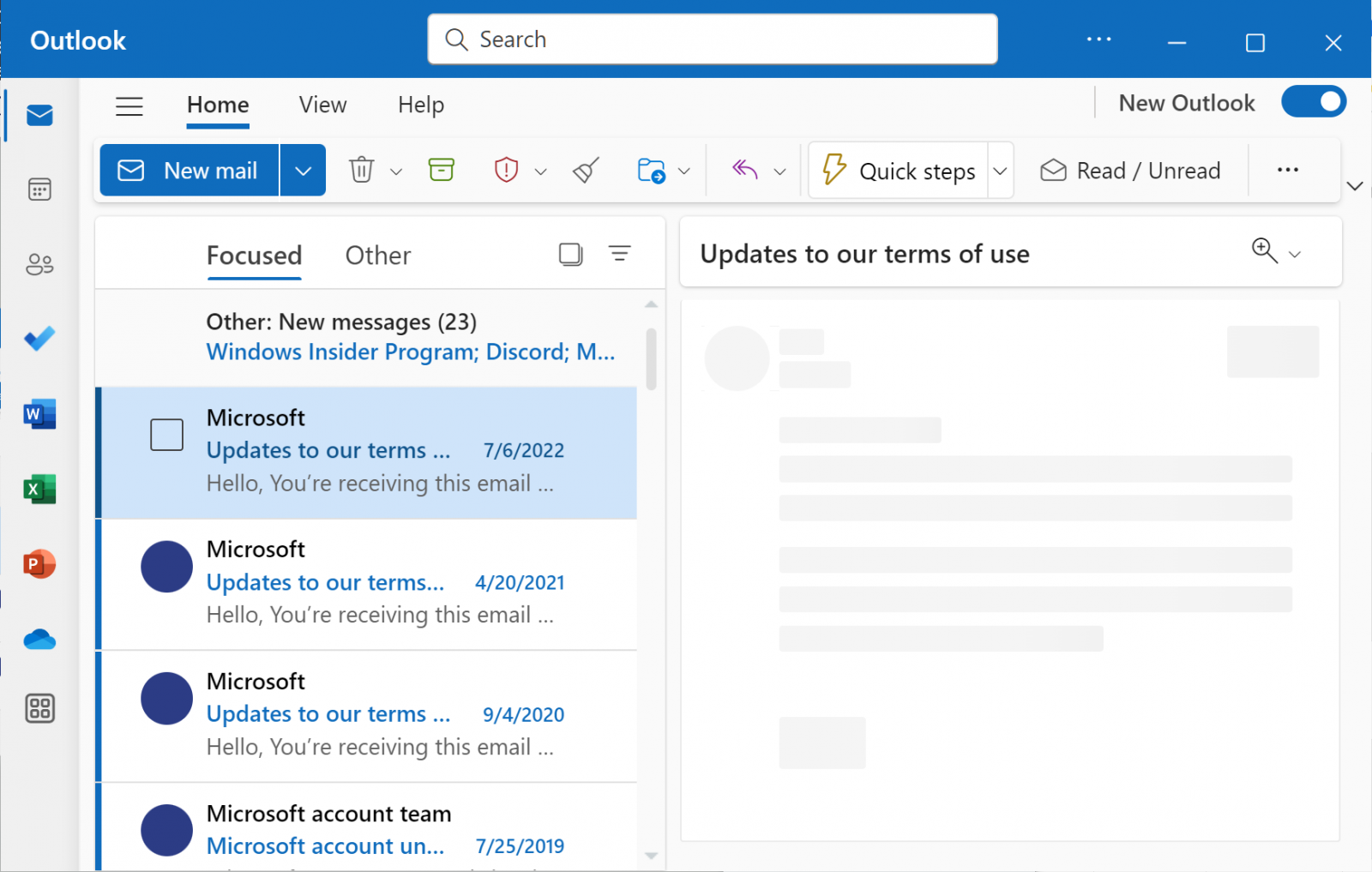
Regardless of whether you decide to test the new Outlook app now or wait, users will automatically be migrated at the end of the year.
At that time, Windows Mail and Calendar will no longer be supported or available for download. Furthermore, all new Windows 11 devices will come with Outlook for Windows as the default mailbox application free.
Microsoft reiterated that these changes will not affect regular Outlook desktop application users but only Windows Mail and Calendar users.
For those users who decide to switch to the Outlook app, it does come with additional features, such as better integration with other email providers, the ability to personalize the interface, new calendar features, and automatic support for package delivery and airplane reservation tracking.
Original Post: Microsoft force-migrating Windows Mail & Calendar apps to Outlook app in August