
Attackers are using Eval PHP, an outdated legitimate WordPress plugin, to compromise websites by injecting stealthy backdoors.
Eval PHP is an old WordPress plugin that allows site admins to embed PHP code on pages and posts of WordPress sites and then execute the code when the page is opened in the browser.
The plugin has not been updated in the past decade and is generally considered abandonware, yet it is still available through the WordPress plugins repository.
According to website security firm Sucuri, the trend of using Eval PHP to embed malicious code on seemingly innocuous WordPress pages surged in April 2023, with the WordPress plugin now having an average of 4,000 malicious installations per day.
The main advantage of this method versus conventional backdoor injections is that Eval PHP may be reused to reinfect cleaned sites while keeping the point of compromise relatively hidden.
PHP code injections detected over the last couple of weeks deliver a previously documented payload that gives the attackers remote code execution capabilities over the compromised site.
The malicious code is injected into the targeted websites’ databases, specifically into the ‘wp_posts’ table. This makes it harder to detect as it evades standard website security measures like file integrity monitoring, server-side scans, etc.
To do that, the threat actors use a compromised or newly created administrator account to install Eval PHP, allowing them to insert PHP code into pages and posts of the breached site using [evalphp] shortcodes.

Once the code runs, it drops the backdoor (3e9c0ca6bbe9.php) in the site root. The name of the backdoor may differ between different attacks.
The malicious Eval PHP plugin installations are triggered from the following IP addresses:
The backdoor does not use POST requests for C2 communication to evade detection but, instead, it passes data through cookies and GET requests without visible parameters.
Moreover, the malicious [evalphp] shortcodes are planted in saved drafts hidden in the SQL dump of the “wp_posts” table and not on published posts. This is still enough to execute the code that injects the backdoor into the website’s database.
Sucuri highlights the need to delist old and unmaintained plugins that threat actors can easily abuse for malicious purposes and points out that Eval PHP isn’t the only risky case.
Until those responsible for managing the WordPress plugin repository decide to take action, website owners are recommended to take action to secure their admin panels, keep their WordPress installation up to date, and use a web application firewall.
Original Posts: Attackers use abandoned WordPress plugin to backdoor websites
Microsoft is investigating an ongoing outage blocking customers worldwide from accessing and using web apps like Excel Online and online services.
The list of affected services includes Microsoft 365 suite, Exchange Online, SharePoint Online, Yammer Enterprise, Planner, Microsoft Teams, and Microsoft 365 for the web.
According to reports, customers are experiencing problems when trying to sign into their accounts and will see that no web apps are available once in.
“We’re investigating access issues with Microsoft 365 Online apps and the Teams admin center. Further information can be found under OO544150 within the Microsoft 365 admin center,” the company tweeted earlier today.
“Users may be intermittently unable to view or access web apps in Microsoft 365. We’re reviewing service monitoring telemetry to isolate the root cause and develop a remediation plan,” the admin center incident report says.
In some cases, a banner displayed at the top of the screen asks “new” users to reach out to their IT department to help with the issue.
“New to Microsoft 365? This is your Microsoft 365 home page where you can see and access all of your apps. If it’s empty, it could be that your user license was very recently assigned to you,” the notification reads.
“Wait 10 minutes and refresh this page. If you still don’t see any apps, contact your IT department. They can help you get up and running.”
According to the latest updates provided by Microsoft in the admin center, the out was caused by caching infrastructure performing below acceptable performance thresholds and leading to timeout exceptions.
“Analysis of diagnostic data has identified an unusually high number of timeout exceptions within our caching and Azure Active Directory (AAD) infrastructure. We’re working to isolate the cause of these exceptions whilst identifying steps to remediate impact,” Microsoft said.
Another outage took down multiple Microsoft 365 services in January after a router IP address change caused packet forwarding issues between routers in Microsoft’s Wide Area Network (WAN).
Services affected by the January 2023 outage included Microsoft Teams, Exchange Online, Outlook, SharePoint Online, OneDrive, the Microsoft 365 Admin Center, Microsoft Graph, Microsoft Intune, and several Microsoft Defender products.
Update April 20, 13:23 EDT: Microsoft is investigating high CPU usage impacting infrastructure processing back-end navigation feature APIs.
Until the outage is resolved, customers can access the Microsoft 365 admin center via https://admin.microsoft.com.
Original Posts: Microsoft 365 outage blocks access to web apps and services
Google has released an emergency Chrome security update to address the first zero-day vulnerability exploited in attacks since the start of the year.
“Google is aware that an exploit for CVE-2023-2033 exists in the wild,” the search giant said in a security advisory published on Friday.
The new version is rolling out to users in the Stable Desktop channel, and it will reach the entire user base over the coming days or weeks.
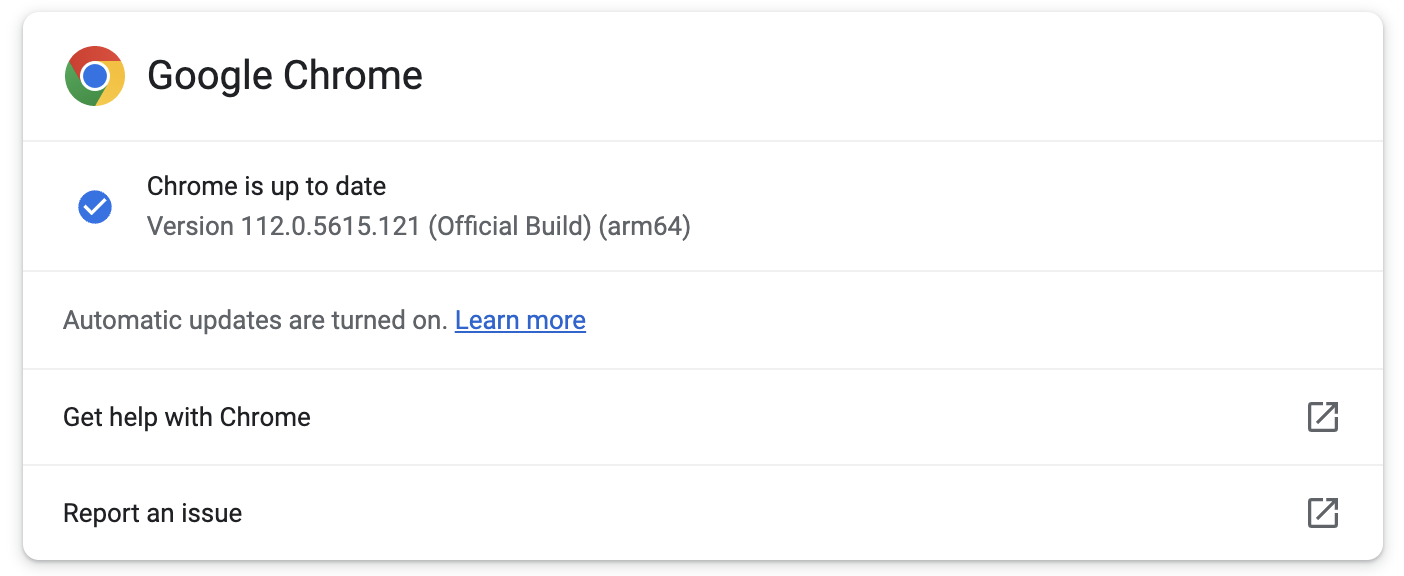
Chrome users should upgrade to version 112.0.5615.121 as soon as possible, as it addresses the CVE-2023-2033 vulnerability on Windows, Mac, and Linux systems.
This update was immediately available when BleepingComputer checked for new updates from the Chrome menu > Help > About Google Chrome.
The web browser will also automatically check for new updates and install them without requiring user interaction after a restart.
The high-severity zero-day vulnerability (CVE-2023-2033) is due to a high-severity type confusion weakness in the Chrome V8 JavaScript engine.
The bug was reported by Clement Lecigne of Google’s Threat Analysis Group (TAG), whose primary goal is to defend Google customers from state-sponsored attacks.
Google TAG frequently discovers and reports zero-day bugs exploited in highly-targeted attacks by government-sponsored threat actors aiming to install spyware on devices of high-risk individuals, including journalists, opposition politicians, and dissidents worldwide.
Although type confusion flaws would generally allow attackers to trigger browser crashes after successful exploitation by reading or writing memory out of buffer bounds, threat actors can also exploit them for arbitrary code execution on compromised devices.
While Google said it knows of CVE-2023-2033 zero-day exploits used in attacks, the company has yet to share further information regarding these incidents.
“Access to bug details and links may be kept restricted until a majority of users are updated with a fix,” Google said.
“We will also retain restrictions if the bug exists in a third-party library that other projects similarly depend on, but haven’t yet fixed.”
This will allow Google Chrome users to upgrade their browsers and block attack attempts until technical details are released, allowing more threat actors to develop their own exploits.
Original Posts: Google Chrome emergency update fixes first zero-day of 2023
Apple has released emergency updates to backport security patches released on Friday, addressing two actively exploited zero-day flaws also affecting older iPhones, iPads, and Macs.
“Apple is aware of a report that this issue may have been actively exploited,” the company said in security advisories published on Monday.
The first (tracked as CVE-2023-28206) is an out-of-bounds write weakness in IOSurfaceAccelerator that enables threat actors to execute arbitrary code with kernel privileges on targeted devices via maliciously crafted apps.
The second zero-day (CVE-2023-28205) is a WebKit use after free that can let threat actors execute malicious code on compromised iPhones, Macs, or iPads after tricking their targets into loading malicious web pages.
Today, Apple addressed the zero-days in iOS 15.7.5 and iPadOS 15.7.5, macOS Monterey 12.6.5, and macOS Big Sur 11.7.6 by improving input validation and memory management.
The company says the bugs are now also patched on the following list of devices:
The flaws were reported by security researchers with Google’s Threat Analysis Group and Amnesty International’s Security Lab, who discovered them being exploited in attacks as part of an exploit chain.
Both organizations often report on government-backed threat actors who use similar tactics and vulnerabilities to install spyware onto the devices of high-risk individuals worldwide, such as journalists, politicians, and dissidents.
For instance, they recently shared details on campaigns abusing two exploit chains targeting Android, iOS, and Chrome bugs to install commercial surveillance malware.
CISA also ordered federal agencies to patch their devices against these two security vulnerabilities, known as being actively exploited in the wild to hack iPhones, Macs, and iPads.
In mid-February, Apple patched another WebKit zero-day (CVE-2023-23529) that was in attacks to trigger crashes and gain code execution on vulnerable iOS, iPadOS, and macOS devices.
Original Posts: Apple fixes recently disclosed zero-days on older iPhones and iPads
Google has announced a new Google Play Store data deletion policy that will require Android developers to provide users with an online option to delete their accounts and in-app data.
According to the new policy, starting in early 2024, Google Play users will have better control over their data since every store listing will display links in the “Data deletion” area, allowing them to ask for their accounts and/or data to be deleted.
Developers who provide an in-app account deletion experience will also have to offer a web-based option since Google wants to allow users to delete their data without reinstalling each app.
“As the new policy states, when you fulfill a request to delete an account, you must also delete the data associated with that account,” Google explained.
“The feature also gives developers a way to provide more choice: users who may not want to delete their account entirely can choose to delete other data only where applicable (such as activity history, images, or videos).
“For developers that need to retain certain data for legitimate reasons such as security, fraud prevention, or regulatory compliance, you must clearly disclose those data retention practices.”
The new Play Store rule will be going into full effect next year, with the developers first being required to share more details on their data deletion practices by December 7.
Starting in early 2024, users will be able to see the submitted data deletion information in the apps’ store listings, including refreshed data deletion badges in the new Data deletion area, as well as the Data safety section.
Those who do not file the required deletion practice info in time will no longer be able to publish new apps or release app updates.
While developers can ask for an extension via the Play Console until May 31, 2024, after this date, non-compliant apps may face removal from Google Play.
Google’s announcement follows a similar move made by Apple, which, starting June 2022, has been requiring developers of apps with an account creation option to also provide the users with a way to delete their accounts but only from within apps.
Original Posts: Google will require Android apps to let you delete your account
Microsoft announced today that the recently introduced Edge Workspaces feature, which allows users to share groups of tabs with friends and family, is now available as part of a limited public preview.
First revealed in an enterprise public preview at the company’s October 2022 Ignite conference for developers and IT professionals, Microsoft Edge Workspaces is designed to provide groups of people with access to the same set of tabs after signing into their Microsoft account.
“Edge Workspaces can help you streamline a task or project, like a trip, in one place versus having to share links with each other back and forth.
“In Workspaces, you can create a single, shared view of your group’s web pages and documents within a unique browser window, with real-time updates.”
After joining a workspace, all users can add new tabs, documents, and favorites, and they can also keep track of activity linked to this shared set of browser tabs via real-time updates.
It should also be noted that the Edge Workspaces collaborative browsing feature does not involve browser screen-sharing or the sharing of browser data among participants.
Each of them will only be able to view content they are authorized to access, with access to Edge Workspaces requiring signing in with a Microsoft account.
Thus, everyone must use their credentials to log in and access email or content, and they will also have to request permission to view a Microsoft 365 document if they are not already authorized.
Microsoft added that Edge Workspaces would not distribute confidential data, such as cookies or credentials, to other users with access to the workspace.
You can get access to the Microsoft Edge Workspace public preview here, but there are some caveats:
Microsoft also says the Edge Workspace feature will only be available on Windows and macOS, with the currently limited group of testers to expand during the next several months.
Original Posts: Microsoft Edge Workspaces now available in limited public preview
Microsoft has shared more information on what malicious embedded files OneNote will soon block to defend users against ongoing phishing attacks pushing malware.
The company first revealed that OneNote will get enhanced security in a Microsoft 365 roadmap entry published three weeks ago, on March 10, following recent and ongoing waves of phishing attacks pushing malware.
Today, the company shared more details regarding what specific file extensions will be blocked once the new OneNote security improvements roll out.
Microsoft says it will align the files considered dangerous and blocked in OneNote with those blocked by Outlook, Word, Excel, and PowerPoint.
The complete list includes 120 extensions according to this Microsoft 365 support document:
.ade, .adp, .app, .application, .appref-ms, .asp, .aspx, .asx, .bas, .bat, .bgi, .cab, .cer, .chm, .cmd, .cnt, .com, .cpl, .crt, .csh, .der, .diagcab, .exe, .fxp, .gadget, .grp, .hlp, .hpj, .hta, .htc, .inf, .ins, .iso, .isp, .its, .jar, .jnlp, .js, .jse, .ksh, .lnk, .mad, .maf, .mag, .mam, .maq, .mar, .mas, .mat, .mau, .mav, .maw, .mcf, .mda, .mdb, .mde, .mdt, .mdw, .mdz, .msc, .msh, .msh1, .msh2, .mshxml, .msh1xml, .msh2xml, .msi, .msp, .mst, .msu, .ops, .osd, .pcd, .pif, .pl, .plg, .prf, .prg, .printerexport, .ps1, .ps1xml, .ps2, .ps2xml, .psc1, .psc2, .psd1, .psdm1, .pst, .py, .pyc, .pyo, .pyw, .pyz, .pyzw, .reg, .scf, .scr, .sct, .shb, .shs, .theme, .tmp, .url, .vb, .vbe, .vbp, .vbs, .vhd, .vhdx, .vsmacros, .vsw, .webpnp, .website, .ws, .wsc, .wsf, .wsh, .xbap, .xll, .xnkWhile previously, OneNote warned users that opening attachments could harm their data but still allowed them to open the embedded files tagged as dangerous, after the security improvement rolls out, users will no longer have the choice to open files with dangerous extensions.
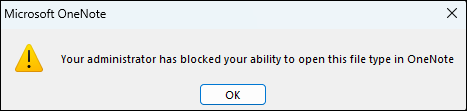
Users will be shown a warning dialog when a file gets blocked, saying, “Your administrator has blocked your ability to open this file type in OneNote.”
Microsoft says the change will begin rolling out in Version 2304 in Current Channel (Preview) to OneNote for Microsoft 365 on Windows devices between late April 2023 and late May 2023.
The security improvement will also be available in retail versions of Office 2021, Office 2019, and Office 2016 (Current Channel) but not in volume-licensed versions of Office, like Office Standard 2019 or Office LTSC Professional Plus 2021.
However, it will not be available in OneNote on the web, OneNote for Windows 10, OneNote on a Mac, or OneNote on Android or iOS devices.
| Update channel | Version | Release date |
| Current Channel (Preview) | Version 2304 | First half of April 2023 |
| Current Channel | Version 2304 | Second half of April 2023 |
| Monthly Enterprise Channel | Version 2304 | June 13, 2023 |
| Semi-Annual Enterprise Channel (Preview) | Version 2308 | September 12, 2023 |
| Semi-Annual Enterprise Channel | Version 2308 | January 9, 2024 |
To block additional file extensions you might consider dangerous, activate the ‘Block additional file extensions for OLE embedding’ policy under User Configuration\Policies\Administrative Templates\Microsoft Office 2016\Security Settings and select the extensions you want to be blocked.
On the other hand, if you need to allow specific file extensions that will soon be blocked by default, you can toggle on the ‘Allow file extensions for OLE embedding’ policy from the same location in the Group Policy Management Console and specify which extensions you wish to allow.
You can also use the Cloud Policy service for Microsoft 365 to tailor the policies to your preferences. All changes you make will also affect other applications, including Word, Excel, and PowerPoint.
These policies are only available for Microsoft 365 Apps for enterprise users, as they aren’t available in Microsoft Apps for Business.
Microsoft Office group policies can also be used to restrict the launching of OneNote embedded file attachments until the new security improvements are rollout.
Original Posts: Microsoft OneNote will block 120 dangerous file extensions
Microsoft Defender is mistakenly flagging legitimate links as malicious, and some customers have already received dozens of alert emails since the issues began over five hours ago.
As the company confirmed earlier today on Twitter, its engineers are investigating this service incident as a false positive.
“We’re investigating an issue where legitimate URL links are being incorrectly marked as malicious by the Microsoft Defender service. Additionally, some of the alerts are not showing content as expected.”
“We’ve confirmed that users are still able to access the legitimate URLs despite the false positive alerts. We’re investigating why and what part of the service is incorrectly identifying legitimate URLs as malicious.”
In an update added to the Microsoft 365 Admin Center portal, Redmond confirmed that admins would likely receive an increased number of high-severity alert email messages saying that ‘A potentially malicious URL click was detected.’

The company also confirmed reports of issues accessing the alerts’ details when clicking the ‘View alerts’ link in the emails.
“We’re reviewing service monitoring telemetry to isolate the root cause and develop a remediation plan,” Microsoft added. “Impact is specific to any admin served through the affected infrastructure.”
Earlier today, Redmond issued another service degradation advisory via the admin center portal, notifying admins that the alerts and Incidents pages might be inaccessible.
Original Posts: Microsoft Defender mistakenly tagging URLs as malicious
A new info-stealing malware named MacStealer is targeting Mac users, stealing their credentials stored in the iCloud KeyChain and web browsers, cryptocurrency wallets, and potentially sensitive files.
MacStealer is being distributed as a malware-as-a-service (MaaS), where the developer sells premade builds for $100, allowing purchasers to spread the malware in their campaigns.
According to the Uptycs threat research team that discovered the new macOS malware, it can run on macOS Catalina (10.15) and up to the latest version of Apple’s OS, Ventura (13.2).
MacStealer was discovered by Uptycs analysts on a dark web hacking forum where the developer has been promoting it since the beginning of the month.
The seller claims the malware is still in an early beta development phase and offers no panels or builders. Instead, it sells pre-built DMG payloads that can infect macOS Catalina, Big Sur, Monterey, and Ventura.
The threat actor uses the lack of a builder and panel to justify the low price of $100 for the malware but promises that more advanced features will arrive soon.
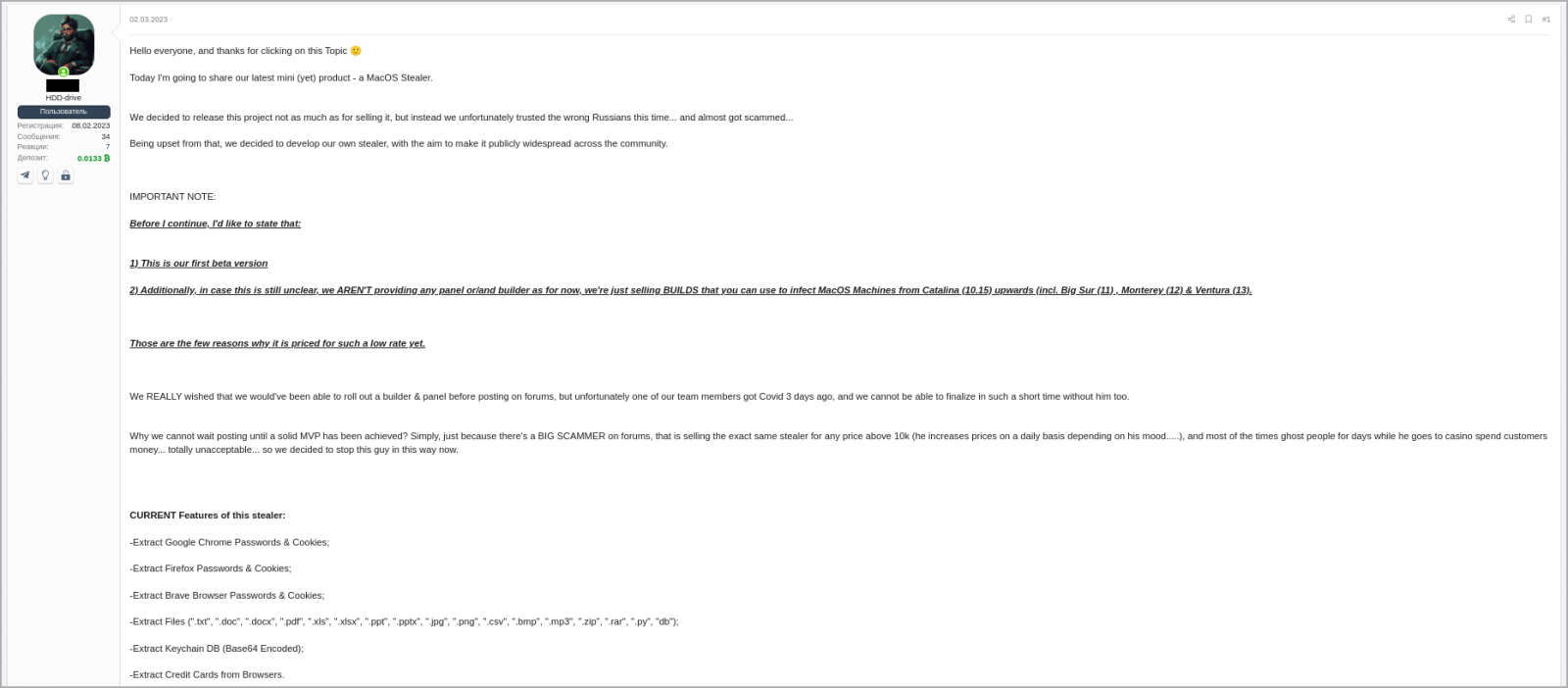
The malware developer claims that MacStealer can steal the following data from compromised systems:
The Keychain database is a secure storage system in macOS that holds users’ passwords, private keys, and certificates, encrypting it with their login password. The feature can then automatically enter login credentials on web pages and apps.
The threat actors distribute MacStealer as an unsigned DMG file that poses as something the victim is tricked into executing on their macOS.
Upon doing so, a fake password prompt is served to the victim to run a command that allows the malware to collect passwords from the compromised machine.
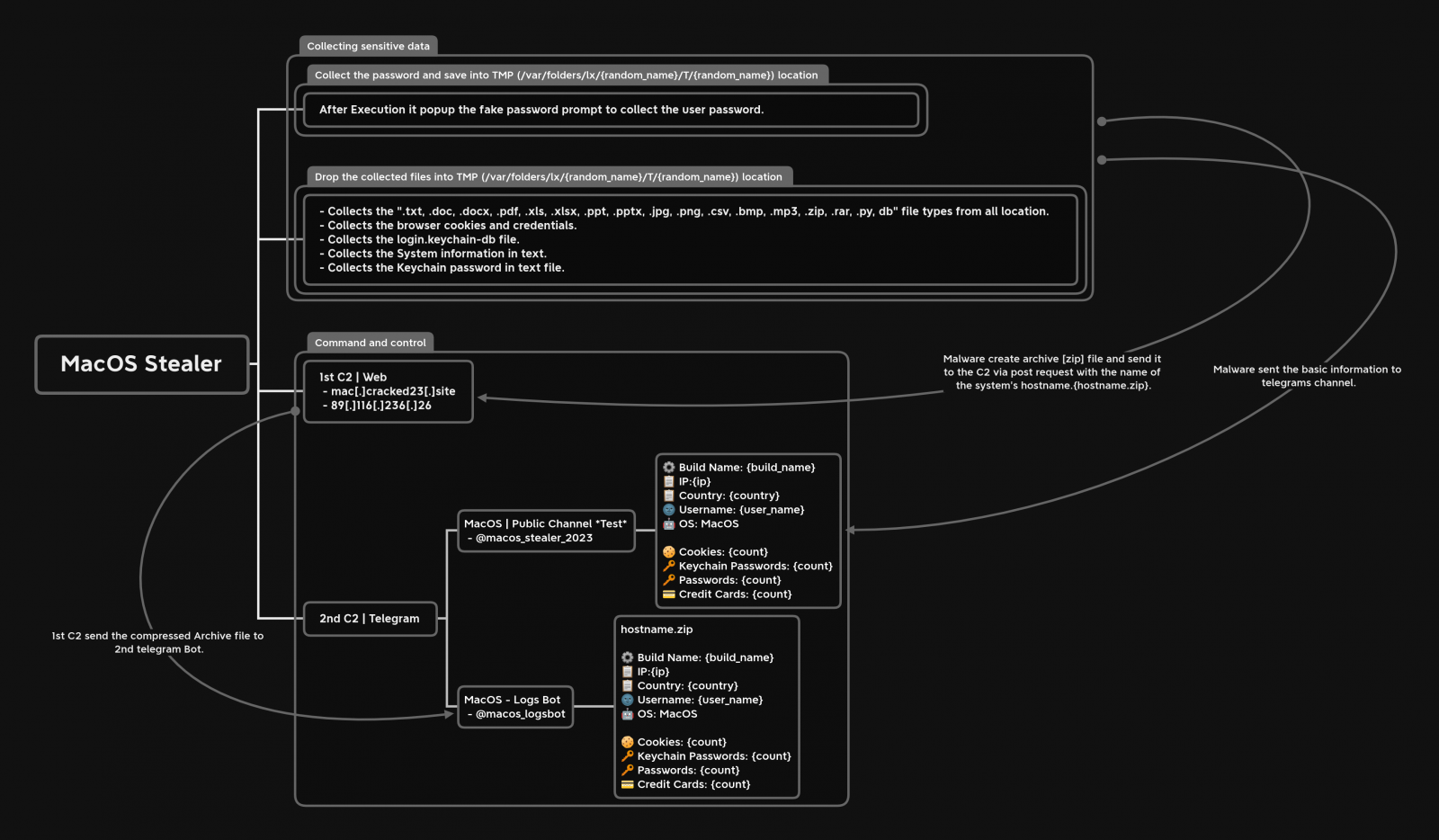
The malware then collects all of the data mentioned in the previous section, stores them in a ZIP file, and sends the stolen data to remote command and control servers to be collected later by the threat actor.
Upon doing so, a fake password prompt is served to the victim to run a command that allows the malware to collect passwords from the compromised machine.
The malware then collects all of the data mentioned in the previous section, stores them in a ZIP file, and sends the stolen data to remote command and control servers to be collected later by the threat actor.
At the same time, MacStealer sends some basic information to a pre-configured Telegram channel, allowing the operator to be quickly notified when new data is stolen and download the ZIP file.
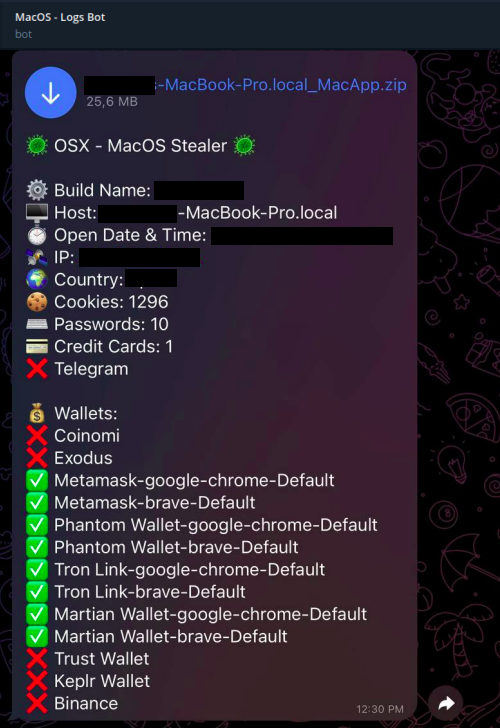
While most MaaS operations target Windows users, macOS isn’t immune to such threats, so its users should remain vigilant and avoid downloading files from untrustworthy websites.
Last month, security researcher iamdeadlyz also discovered a new Mac information-stealing malware distributed in a phishing campaign targeting players of ‘The Sandbox’ blockchain game.
That information stealer also targeted credentials saved in browsers and cryptocurrency wallets, including Exodus, Phantom, Atomic, Electrum, and MetaMask.
With cryptocurrency wallets being highly targeted by threat actors, we will likely see further malware developers targeting macOS in their search for cryptocurrency wallets to steal.
Original Posts: New MacStealer macOS malware steals passwords from iCloud Keychain
Microsoft is working on a non-custodial built-in Ethereum crypto wallet for Microsoft Edge to allow users to send and receive cryptocurrency and NFTs.
Public keys can be shared with others to receive payments, while private keys should be kept secret and can be used to authorize transactions when you want to spend your cryptocurrency.
Microsoft sleuth Albacore who first spotted the new Edge Crypto Wallet tweeted some screenshots and expressed his puzzlement about the possibility of it ending up as a new Microsoft Edge feature.
It is not yet rolling out to Insiders, and it’s most likely only available to Microsoft Edge Dev Channel users as part of a very limited test phase.
“This is a non-custodial wallet, meaning you are in complete control of your funds. We will not have access to your password and recovery key. It is embedded in Edge, making it easy to use without installing any extension,” Microsoft says during the onboarding process.
“As a tester, you will use your own funds. In the event of a loss of funds, Microsoft will not reimburse any loss. This is a confidential project and no details should be shared externally.”
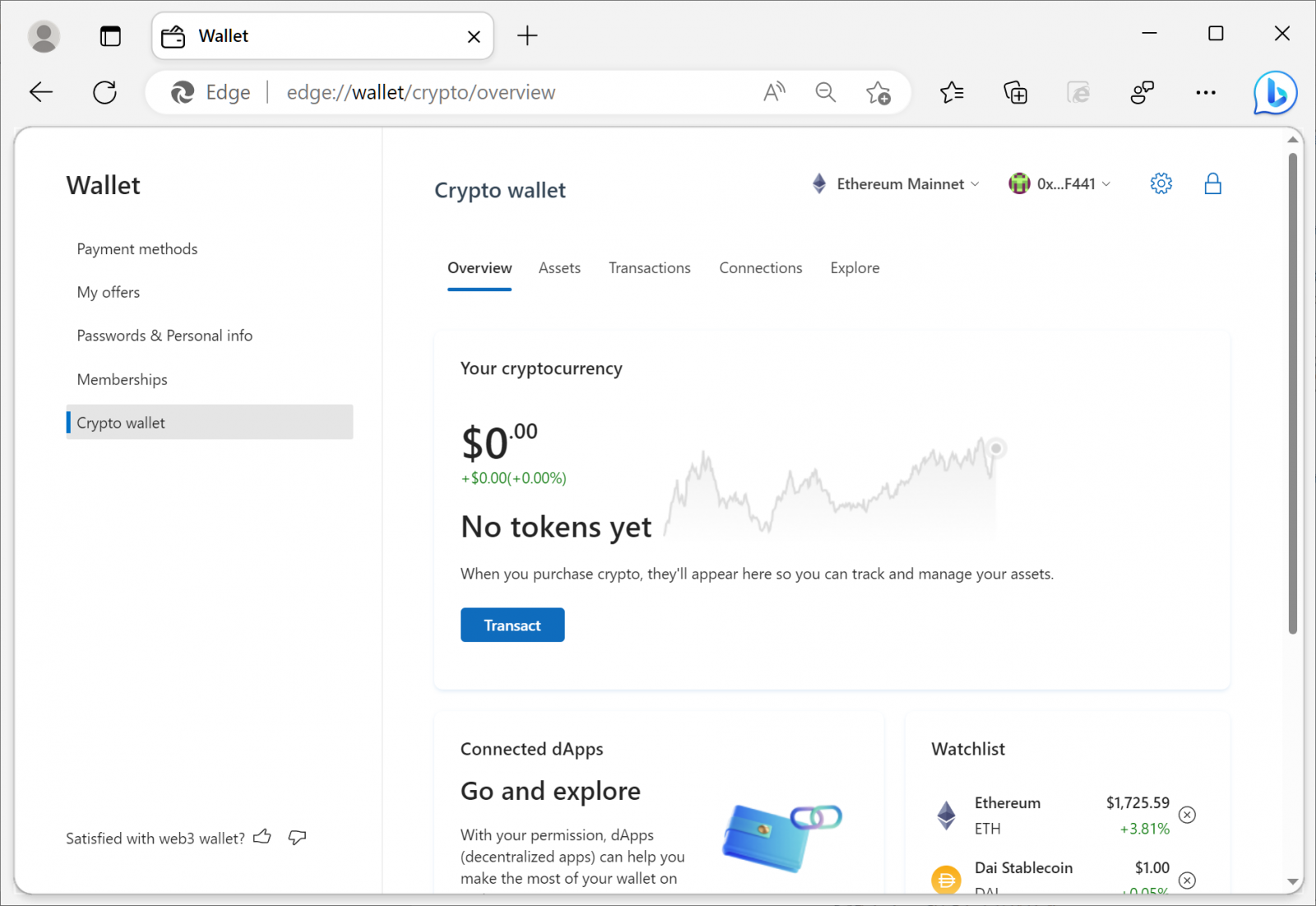
BleepingComputer tested the new feature, and during onboarding, testers are asked to generate a password to secure their assets and a 12-word recovery phrase to recover their crypto wallet if they forget the password.
After finishing the onboarding process, the wallet generates an Ethereum address to allow users to receive funds through the Ethereum network.
“This alphanumeric address identifies your wallet and is used for transactions—like buying or receiving cryptocurrency. You can also use the QR code to share your public address,” Microsoft says.
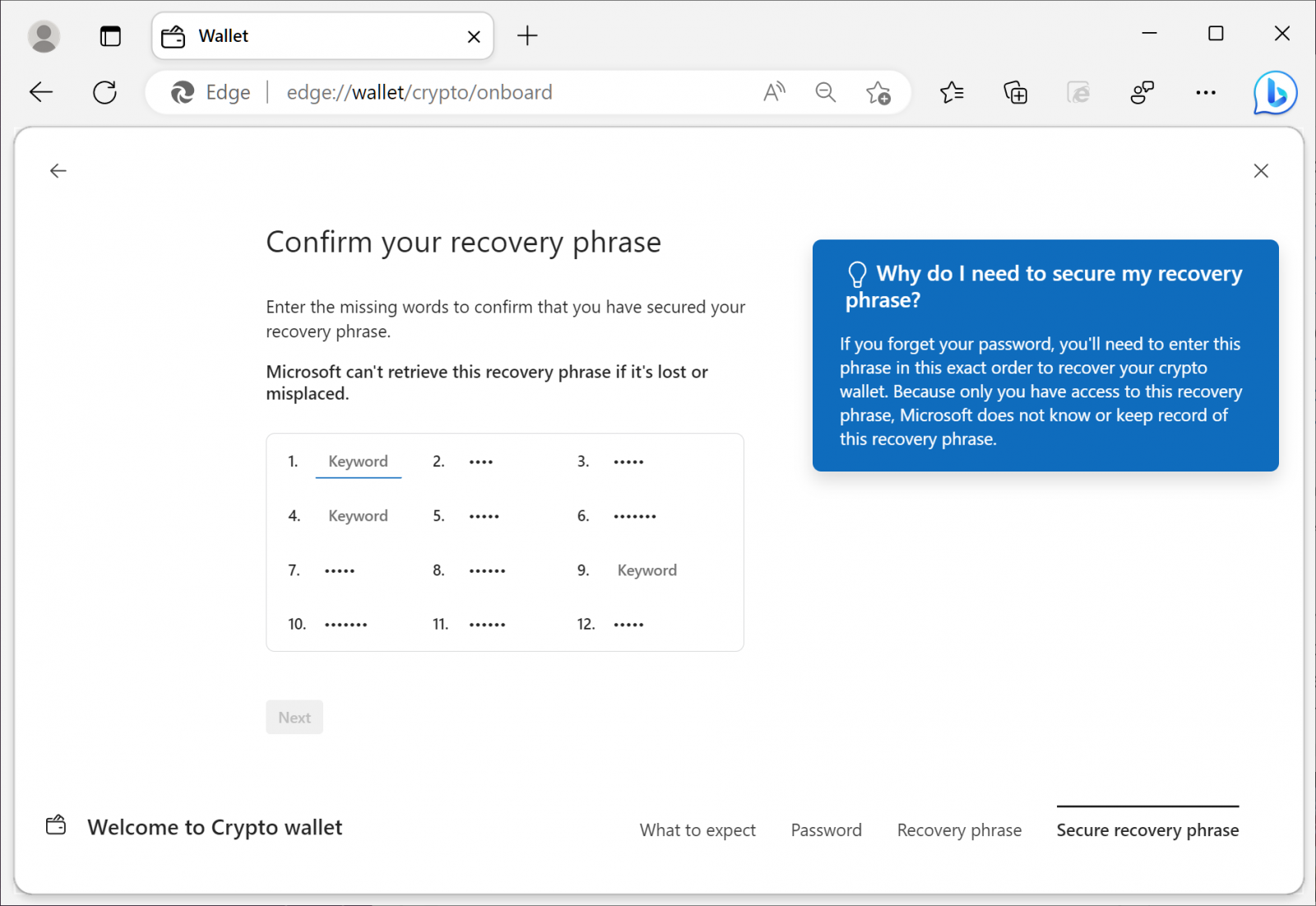
Like other cryptocurrency wallets, Microsoft Edge’s Crypto Wallet supports multiple Ethereum accounts, allowing you to switch between them as needed.
Tested can set their default crypto wallet to the built-in Edge one or an Extension wallet, depending on how they want to manage their assets.
The Edge crypto wallet can also connect to decentralized apps (dApps) and has a news section to keep track of the latest developments in cryptocurrency.
Microsoft has partnered with Consensys to offer a built-in cryptocurrency swap feature between Ethereum, Dai Stablecoin, Uniswap, USD Coin, and Tether Coin.
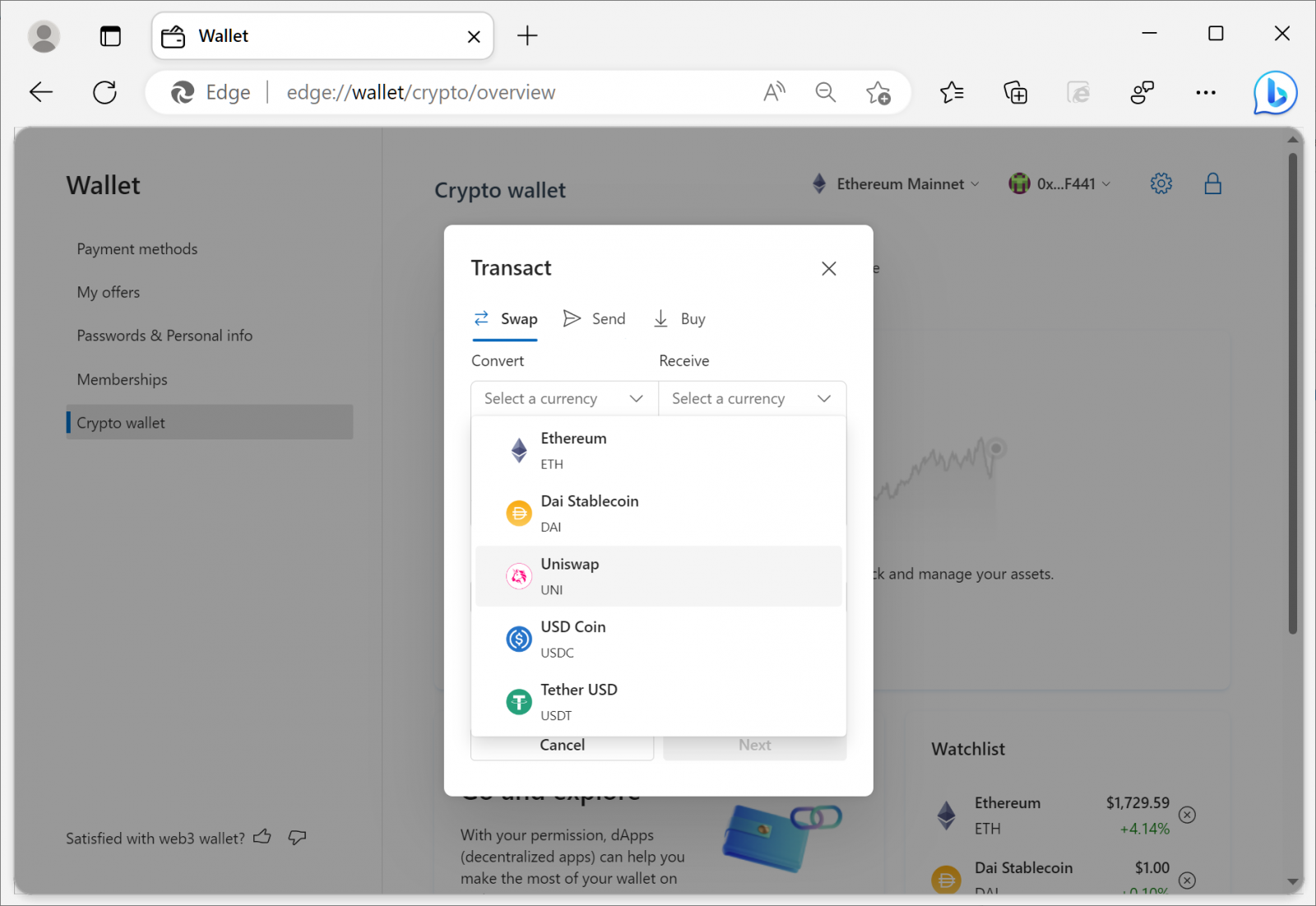
Additionally, strings in the Edge Developer build a show that Redmond might provide support for a Bitcoin wallet in the future.
”We encourage you to test our first Web3 wallet and provide candid feedback along the journey. As the first testers you have the unique opportunity to shape our foray into cryptocurrencies and NFTs,” Redmond added.
Original Posts: Microsoft is testing a built-in crypto wallet in Microsoft Edge
« Previous 1 … 3 4 5 6 7 … 21 Next »