
Security researchers have discovered a malicious campaign by the ‘Witchetty’ hacking group, which uses steganography to hide a backdoor malware in a Windows logo.
In this campaign, the hackers refreshed their toolkit to target different vulnerabilities and used steganography to hide their malicious payload from antivirus software.
Steganography is the act of hiding data within other non-secret, public information or computer files, such as an image, to evade detection. For example, a hacker can create a working image file that displays correctly on the computer but also includes malicious code that can be extracted from it.
In the campaign discovered by Symantec, Witchetty is using steganography to hide an XOR-encrypted backdoor malware in an old Windows logo bitmap image.
The file is hosted on a trusted cloud service instead of the threat actor’s command and control (C2) server, so the chances of raising security alarms while fetching it are minimized.
“Disguising the payload in this fashion allowed the attackers to host it on a free, trusted service,” Symantec explains in its report.
“Downloads from trusted hosts such as GitHub are far less likely to raise red flags than downloads from an attacker-controlled command-and-control (C&C) server.”
Next, the threat actors fetch the backdoor hiding in the image file, which enables them to do the following:
Witchetty also introduced a custom proxy utility that causes the infected computer to act “as the server and connects to a C&C server acting as a client, instead of the other way around.”
Other tools include a custom port scanner and a custom persistence utility that adds itself in the registry as “NVIDIA display core component.”
Along with the custom tools, Witchetty uses standard utilities like Mimikatzand to dump credentials from LSASS and abuses “lolbins” on the host, like CMD, WMIC, and PowerShell.
TA410 and Witchetty remain active threats to governments and state organizations in Asia, Africa, and around the globe. The best way to prevent its attacks is to apply security updates as they are released.
In the campaign discovered by Symantec, the hackers rely on exploiting last year’s vulnerabilities to breach the target network, taking advantage of the poor administration of publicly exposed servers.
Original posts: Hacking group hides backdoor malware inside Windows logo image
Russian telecom watchdog Roskomnadzor demanded explanations today from Apple regarding the removal of all VK apps, including the app for the country’s largest social network VKontakte, from its App Store on Monday.
Two of the apps removed from the Apple Store, the VKontakte social network application and the Mail.ru mail app, are included on the Russian Ministry of Digital Development’s list of apps with mandatory pre-installation on mobile devices in Russia.
VKontakte is used by more than 75 million users each month, and, based on the watchdog’s stats, it’s the most popular social network in Russia.
“The consequence of the actions of the American corporation was the loss by millions of Russian users of the opportunity to use the VKontakte social network and other applications, including: VK Music, VK Clips, VK Messenger, VK Admin, Mail.ru,” Roskomnadzor said.
“The agency believes that such discriminatory restrictions violate the rights of Russian Internet users to freely receive information and communicate, and are unacceptable.”
VK added in a statement that its apps will still work for iOS users who have already installed them even though they’re no longer available for download and update in Apple’s App Store.
Russians who want to use the VKontakte social network can still do so via the platform’s mobile site and desktop apps.
“Their core functionality will be familiar and stable. There may be difficulties with the work of notifications and payments. VK specialists are working on it,” VK said.
“In recent months, we have implemented key updates to our main products that will allow applications to stay relevant for a long time.”
Roskomnadzor request for explanations follows another one made by Russia’s Ministry of Digital Affairs, which also asked Apple to share the reasons behind its decision to remove VK’s apps from the App Store, per Russian state-affiliated news outlet RT.
Apple confirmed VK’s removal from its App Store and said it was forced to do so to comply with recent UK-imposed sanctions against Russian entities, some of which are linked to VK (Vladimir Sergeevich Kiriyenko, the company’s CEO, is also under UK sanctions since March).
“These apps are being distributed by developers majority-owned or majority-controlled by one or more parties sanctioned by the UK government,” Apple spokesperson Adam Dema told The Verge.
“In order to comply with these sanctions, Apple terminated the developer accounts associated with these apps, and the apps cannot be downloaded from any App Store, regardless of location. Users who have already downloaded these apps may continue to use them.”
In March, Roskomnadzor announced it banned the Instagram, Facebook, and Twitter social networks in Russia after they booted pro-Kremlin media outlets and news agencies from their platforms and allowed calls for violence against Russian invaders and the Russian and Belarusian presidents.
The Russian Internet watchdog also blocked access to multiple foreign news outlets in the country, including Voice of America, BBC, DW, and Radio Free Europe/Radio Liberty, accusing them of allegedly spreading fake news regarding the ongoing invasion of Ukraine.
Original Posts: Russia demands answers after Apple kicks VK apps from App Store
Security researchers have discovered 75 applications on Google Play and another ten on Apple’s App Store engaged in ad fraud. Collectively, they add to 13 million installations.
Apart from flooding mobile users with advertisements, both visible and hidden, the fraudulent apps also generated revenue by impersonating legitimate apps and impressions.
Researchers from HUMAN’s Satori Threat Intelligence team identified a collection of mobile apps that are part of a new ad fraud campaign that they named ‘Scylla’.
The analysts believe Scylla is the third wave of an operation they found in August 2019 and dubbed ‘Poseidon’. The second wave, apparently from the same threat actor, was called ‘Charybdis’ and culminated towards the end of 2020.
The Satori team have informed Google and Apple about their findings and the apps have been removed from the official Android and iOS stores.
On Android devices, unless you have the Play Protect security option disabled, the apps should be detected automatically.
For iOS, Apple is not clear on how to remove adware apps already installed on the device. Human is recommending users remove the fraudulent apps if present on their devices. A short list with the most downloaded of them is present below:
iOS app list:
Android app list (1+ million downloads)
The full list of applications part of the Scylla ad-fraud wave is available in HUMAN’s report.
Users should monitor their apps for malicious or unwanted apps by looking for some signs that typically indicate an issue such as rapid battery drainage and increased internet data usage, or apps you don’t remember installing.
It is also recommended to check the list of installed apps and remove those you don’t remember installing or come from an unfamiliar vendor.
Original Posts: Adware on Google Play and Apple Store installed 13 million times
Microsoft is investigating a known issue affecting Outlook for Microsoft 365 users and preventing them from creating Teams meetings using the app’s ribbon menu.
The Teams Meeting add-in, as its name says, can be found in the Calendar view and it enables Outlook users to schedule a Teams meeting from Outlook.
This issue occurs because the Teams Meeting add-in for Outlook becomes disabled, which leads to the meeting creation option being removed from the menu.
“When you attempt to create a Teams meeting in Outlook Desktop you find that the option is missing on the ribbon,” Microsoft said in a support article published over the weekend.
While Redmond is still investigating the cause behind this ongoing issue, customers say that the add-in is likely disabled automatically after causing Outlook to crash, and no amount of repairing, uninstalling, and reinstalling the app can help fix this.
“The Outlook and Teams Product Teams are investigating this issue further to determine why the Teams Meeting add-in is being disabled,” Microsoft said. “We will update this topic when we know the final resolution.”
The company also shared a workaround to allow customers experiencing issues with this Outlook add-in, which requires users to manually turn the add-in back on and add a registry key to prevent it from being auto-disabled again.
The toggle on the Teams Meeting add-in from Outlook, you need to go through the following steps:
To block Outlook from disabling the add-in again, you have to add a new registry key:
Original Posts: Microsoft Outlook is disabling Teams Meeting add-in, how to fix
Windows 11 version 22H2 is arriving soon and it won’t be a massive release, but there will be several quality improvements and bug fixes. Microsoft has already confirmed the features coming to Windows 11 with version 22H2 and users can test them by joining the Windows Insider Program.
One of the new features is the redesigned Task Manager. In Windows 11 22H2, Microsoft has refreshed Task Manager with a new design based on Fluent UI and WinUI.
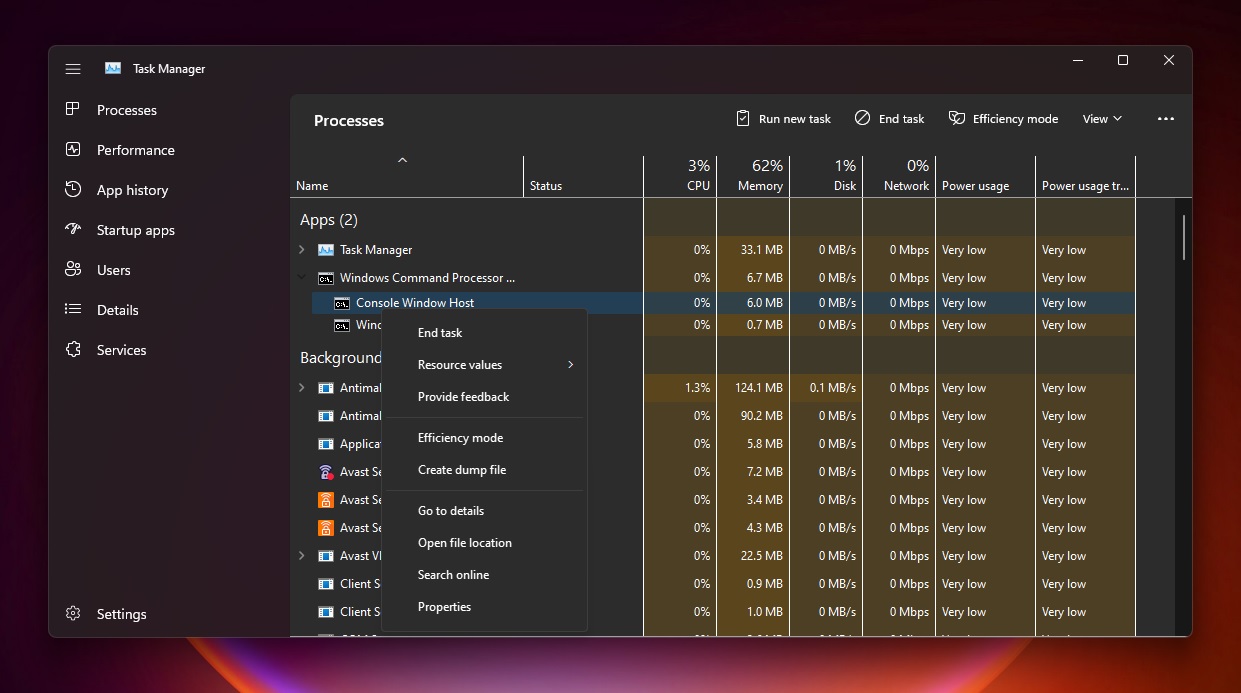
This would make the Task Manager easily accessible on touchscreen devices.
The top area of the Task Manager now displays the brand and name of the device, its model (if available), a picture of the device, and CPU or RAM being used.
In addition to a new design, Task Manager is also getting Efficiency mode. This is a new feature that would give you options to ensure certain running processes won’t stress the CPU out, leading to faster foreground responsiveness and better energy efficiency.
With Efficiency mode, Microsoft is hoping to give power users control of process resource consumption.
Original Posts: Hands on with Windows 11’s new Task Manager
Microsoft’s September 2022 Patch Tuesday, and with it comes fixes for an actively exploited Windows vulnerability and a total of 63 flaws.
Five of the 63 vulnerabilities fixed in today’s update are classified as ‘Critical’ as they allow remote code execution, one of the most severe types of vulnerabilities.
The number of bugs in each vulnerability category is listed below:
The above counts do not include sixteen vulnerabilities fixed in Microsoft Edge before Patch Tuesday.
This month’s Patch Tuesday fixes two publicly disclosed zero-day vulnerabilities, with one actively exploited in attacks.
Microsoft classifies a vulnerability as a zero-day if it is publicly disclosed or actively exploited with no official fix available.
The actively exploited zero-day vulnerability fixed today is tracked as ‘CVE-2022-37969 – Windows Common Log File System Driver Elevation of Privilege Vulnerability.’
“An attacker who successfully exploited this vulnerability could gain SYSTEM privileges,” reads Microsoft’s advisory.
The exploited vulnerability was discovered by researchers at DBAPPSecurity, Mandiant, CrowdStrike, and Zscaler.
Mandiant told BleepingComputer that they discovered the zero-day during a proactive Offensive Task Force exploit hunting mission.
“We found this 0Day bug during a proactive Offensive Task Force exploit hunting mission. An escalation of privilege (EOP) exploit was found in the wild, exploiting this Common Log File System (CLFS) vulnerability,” explained Dhanesh Kizhakkinan, Senior Principal Vulnerability Engineer at Mandiant.
“The exploit seems to stand-alone and not part of a chain (like browser + EOP).”
The other publicly disclosed vulnerability is tracked as ‘CVE-2022-23960 – Arm: CVE-2022-23960 Cache Speculation Restriction Vulnerability.’
Other vendors who released updates in September 2022 include:
Below is the complete list of resolved vulnerabilities and released advisories in the September 2022 Patch Tuesday updates. To access the full description of each vulnerability and the systems that it affects, you can view the full report here.
| Tag | CVE ID | CVE Title | Severity |
|---|---|---|---|
| .NET and Visual Studio | CVE-2022-38013 | .NET Core and Visual Studio Denial of Service Vulnerability | Important |
| .NET Framework | CVE-2022-26929 | .NET Framework Remote Code Execution Vulnerability | Important |
| Azure Arc | CVE-2022-38007 | Azure Guest Configuration and Azure Arc-enabled servers Elevation of Privilege Vulnerability | Important |
| Cache Speculation | CVE-2022-23960 | Arm: CVE-2022-23960 Cache Speculation Restriction Vulnerability | Important |
| HTTP.sys | CVE-2022-35838 | HTTP V3 Denial of Service Vulnerability | Important |
| Microsoft Dynamics | CVE-2022-35805 | Microsoft Dynamics CRM (on-premises) Remote Code Execution Vulnerability | Critical |
| Microsoft Dynamics | CVE-2022-34700 | Microsoft Dynamics CRM (on-premises) Remote Code Execution Vulnerability | Critical |
| Microsoft Edge (Chromium-based) | CVE-2022-3053 | Chromium: CVE-2022-3053 Inappropriate implementation in Pointer Lock | Unknown |
| Microsoft Edge (Chromium-based) | CVE-2022-3047 | Chromium: CVE-2022-3047 Insufficient policy enforcement in Extensions API | Unknown |
| Microsoft Edge (Chromium-based) | CVE-2022-3054 | Chromium: CVE-2022-3054 Insufficient policy enforcement in DevTools | Unknown |
| Microsoft Edge (Chromium-based) | CVE-2022-3041 | Chromium: CVE-2022-3041 Use after free in WebSQL | Unknown |
| Microsoft Edge (Chromium-based) | CVE-2022-3040 | Chromium: CVE-2022-3040 Use after free in Layout | Unknown |
| Microsoft Edge (Chromium-based) | CVE-2022-3046 | Chromium: CVE-2022-3046 Use after free in Browser Tag | Unknown |
| Microsoft Edge (Chromium-based) | CVE-2022-3039 | Chromium: CVE-2022-3039 Use after free in WebSQL | Unknown |
| Microsoft Edge (Chromium-based) | CVE-2022-3045 | Chromium: CVE-2022-3045 Insufficient validation of untrusted input in V8 | Unknown |
| Microsoft Edge (Chromium-based) | CVE-2022-3044 | Chromium: CVE-2022-3044 Inappropriate implementation in Site Isolation | Unknown |
| Microsoft Edge (Chromium-based) | CVE-2022-3057 | Chromium: CVE-2022-3057 Inappropriate implementation in iframe Sandbox | Unknown |
| Microsoft Edge (Chromium-based) | CVE-2022-3075 | Chromium: CVE-2022-3075 Insufficient data validation in Mojo | Unknown |
| Microsoft Edge (Chromium-based) | CVE-2022-3058 | Chromium: CVE-2022-3058 Use after free in Sign-In Flow | Unknown |
| Microsoft Edge (Chromium-based) | CVE-2022-3038 | Chromium: CVE-2022-3038 Use after free in Network Service | Unknown |
| Microsoft Edge (Chromium-based) | CVE-2022-3056 | Chromium: CVE-2022-3056 Insufficient policy enforcement in Content Security Policy | Unknown |
| Microsoft Edge (Chromium-based) | CVE-2022-3055 | Chromium: CVE-2022-3055 Use after free in Passwords | Unknown |
| Microsoft Edge (Chromium-based) | CVE-2022-38012 | Microsoft Edge (Chromium-based) Remote Code Execution Vulnerability | Low |
| Microsoft Graphics Component | CVE-2022-37954 | DirectX Graphics Kernel Elevation of Privilege Vulnerability | Important |
| Microsoft Graphics Component | CVE-2022-38006 | Windows Graphics Component Information Disclosure Vulnerability | Important |
| Microsoft Graphics Component | CVE-2022-34729 | Windows GDI Elevation of Privilege Vulnerability | Important |
| Microsoft Graphics Component | CVE-2022-34728 | Windows Graphics Component Information Disclosure Vulnerability | Important |
| Microsoft Graphics Component | CVE-2022-35837 | Windows Graphics Component Information Disclosure Vulnerability | Important |
| Microsoft Office | CVE-2022-37962 | Microsoft PowerPoint Remote Code Execution Vulnerability | Important |
| Microsoft Office SharePoint | CVE-2022-35823 | Microsoft SharePoint Remote Code Execution Vulnerability | Important |
| Microsoft Office SharePoint | CVE-2022-38009 | Microsoft SharePoint Server Remote Code Execution Vulnerability | Important |
| Microsoft Office SharePoint | CVE-2022-38008 | Microsoft SharePoint Server Remote Code Execution Vulnerability | Important |
| Microsoft Office SharePoint | CVE-2022-37961 | Microsoft SharePoint Server Remote Code Execution Vulnerability | Important |
| Microsoft Office Visio | CVE-2022-37963 | Microsoft Office Visio Remote Code Execution Vulnerability | Important |
| Microsoft Office Visio | CVE-2022-38010 | Microsoft Office Visio Remote Code Execution Vulnerability | Important |
| Microsoft Windows ALPC | CVE-2022-34725 | Windows ALPC Elevation of Privilege Vulnerability | Important |
| Microsoft Windows Codecs Library | CVE-2022-38011 | Raw Image Extension Remote Code Execution Vulnerability | Important |
| Microsoft Windows Codecs Library | CVE-2022-38019 | AV1 Video Extension Remote Code Execution Vulnerability | Important |
| Network Device Enrollment Service (NDES) | CVE-2022-37959 | Network Device Enrollment Service (NDES) Security Feature Bypass Vulnerability | Important |
| Role: DNS Server | CVE-2022-34724 | Windows DNS Server Denial of Service Vulnerability | Important |
| Role: Windows Fax Service | CVE-2022-38004 | Windows Fax Service Remote Code Execution Vulnerability | Important |
| SPNEGO Extended Negotiation | CVE-2022-37958 | SPNEGO Extended Negotiation (NEGOEX) Security Mechanism Information Disclosure Vulnerability | Important |
| Visual Studio Code | CVE-2022-38020 | Visual Studio Code Elevation of Privilege Vulnerability | Important |
| Windows Common Log File System Driver | CVE-2022-35803 | Windows Common Log File System Driver Elevation of Privilege Vulnerability | Important |
| Windows Common Log File System Driver | CVE-2022-37969 | Windows Common Log File System Driver Elevation of Privilege Vulnerability | Important |
| Windows Credential Roaming Service | CVE-2022-30170 | Windows Credential Roaming Service Elevation of Privilege Vulnerability | Important |
| Windows Defender | CVE-2022-35828 | Microsoft Defender for Endpoint for Mac Elevation of Privilege Vulnerability | Important |
| Windows Distributed File System (DFS) | CVE-2022-34719 | Windows Distributed File System (DFS) Elevation of Privilege Vulnerability | Important |
| Windows DPAPI (Data Protection Application Programming Interface) | CVE-2022-34723 | Windows DPAPI (Data Protection Application Programming Interface) Information Disclosure Vulnerability | Important |
| Windows Enterprise App Management | CVE-2022-35841 | Windows Enterprise App Management Service Remote Code Execution Vulnerability | Important |
| Windows Event Tracing | CVE-2022-35832 | Windows Event Tracing Denial of Service Vulnerability | Important |
| Windows Group Policy | CVE-2022-37955 | Windows Group Policy Elevation of Privilege Vulnerability | Important |
| Windows IKE Extension | CVE-2022-34722 | Windows Internet Key Exchange (IKE) Protocol Extensions Remote Code Execution Vulnerability | Critical |
| Windows IKE Extension | CVE-2022-34720 | Windows Internet Key Exchange (IKE) Extension Denial of Service Vulnerability | Important |
| Windows IKE Extension | CVE-2022-34721 | Windows Internet Key Exchange (IKE) Protocol Extensions Remote Code Execution Vulnerability | Critical |
| Windows Kerberos | CVE-2022-33647 | Windows Kerberos Elevation of Privilege Vulnerability | Important |
| Windows Kerberos | CVE-2022-33679 | Windows Kerberos Elevation of Privilege Vulnerability | Important |
| Windows Kernel | CVE-2022-37964 | Windows Kernel Elevation of Privilege Vulnerability | Important |
| Windows Kernel | CVE-2022-37956 | Windows Kernel Elevation of Privilege Vulnerability | Important |
| Windows Kernel | CVE-2022-37957 | Windows Kernel Elevation of Privilege Vulnerability | Important |
| Windows LDAP – Lightweight Directory Access Protocol | CVE-2022-30200 | Windows Lightweight Directory Access Protocol (LDAP) Remote Code Execution Vulnerability | Important |
| Windows ODBC Driver | CVE-2022-34726 | Microsoft ODBC Driver Remote Code Execution Vulnerability | Important |
| Windows ODBC Driver | CVE-2022-34730 | Microsoft ODBC Driver Remote Code Execution Vulnerability | Important |
| Windows ODBC Driver | CVE-2022-34727 | Microsoft ODBC Driver Remote Code Execution Vulnerability | Important |
| Windows ODBC Driver | CVE-2022-34732 | Microsoft ODBC Driver Remote Code Execution Vulnerability | Important |
| Windows ODBC Driver | CVE-2022-34734 | Microsoft ODBC Driver Remote Code Execution Vulnerability | Important |
| Windows OLE | CVE-2022-35834 | Microsoft OLE DB Provider for SQL Server Remote Code Execution Vulnerability | Important |
| Windows OLE | CVE-2022-35835 | Microsoft OLE DB Provider for SQL Server Remote Code Execution Vulnerability | Important |
| Windows OLE | CVE-2022-35836 | Microsoft OLE DB Provider for SQL Server Remote Code Execution Vulnerability | Important |
| Windows OLE | CVE-2022-35840 | Microsoft OLE DB Provider for SQL Server Remote Code Execution Vulnerability | Important |
| Windows OLE | CVE-2022-34733 | Microsoft OLE DB Provider for SQL Server Remote Code Execution Vulnerability | Important |
| Windows OLE | CVE-2022-34731 | Microsoft OLE DB Provider for SQL Server Remote Code Execution Vulnerability | Important |
| Windows Photo Import API | CVE-2022-26928 | Windows Photo Import API Elevation of Privilege Vulnerability | Important |
| Windows Print Spooler Components | CVE-2022-38005 | Windows Print Spooler Elevation of Privilege Vulnerability | Important |
| Windows Remote Access Connection Manager | CVE-2022-35831 | Windows Remote Access Connection Manager Information Disclosure Vulnerability | Important |
| Windows Remote Procedure Call | CVE-2022-35830 | Remote Procedure Call Runtime Remote Code Execution Vulnerability | Important |
| Windows TCP/IP | CVE-2022-34718 | Windows TCP/IP Remote Code Execution Vulnerability | Critical |
| Windows Transport Security Layer (TLS) | CVE-2022-35833 | Windows Secure Channel Denial of Service Vulnerability | Important |
| Windows Transport Security Layer (TLS) | CVE-2022-30196 | Windows Secure Channel Denial of Service Vulnerability | Important |
Original Posts: Microsoft September 2022 Patch Tuesday fixes zero-day used in attacks, 63 flaws
HP issued a security advisory alerting users about a newly discovered vulnerability in HP Support Assistant, a software tool that comes pre-installed on all HP laptops and desktop computers, including the Omen sub-brand.
HP Support Assistant is used to troubleshoot issues, perform hardware diagnostic tests, dive deeper into technical specifications, and even check for BIOS and driver updates on HP devices.
The flaw, discovered by researchers at Secure D and reported to HP, is tracked as CVE-2022-38395 and has a “high” severity score of 8.2, as it enables attackers to elevate their privileges on vulnerable systems.
While the computer maker hasn’t provided many details about the security issue, the advisory mentions that it’s a DLL hijacking flaw triggered when users attempt to launch HP Performance Tune-up from within HP Support Assistant.
DLL hijacking happens when a malicious actor places a DLL containing malicious code on the same folder as the abused executable, exploiting Windows’ logic to prioritize those libraries against DLLs in the System32 directory.
The code that executes by loading the library assumes the privileges of the abused executable, in this case, HP Support Assistant running with ‘SYSTEM’ privileges.
Hence, CVE-2022-38395 can be exploited by attackers who have already established their presence on a system via low-privileged malware or a RAT tool.
Still, due to the large number of devices with HP Support Assistant installed and the low complexity of exploitation, it is recommended that all HP users upgrade Support Assistant as soon as possible.
HP recommends that customers using version 9.x to update to the latest version of the Support Assistant via the Microsoft Store.
Those using the older version 8.x won’t receive a security update, so they are advised to move to the newer branch. To do that, open the software, go to the “About” section, and click “check for updates.”
This is not the first time HP’s pre-installed self-help tools create security risks for users and not even the first time for Support Assistant in particular.
In April 2020, it was revealed that HP Support Assistant suffered from at least ten elevation of privilege and remote code execution vulnerabilities, some remaining unpatched since October 2012 and for a year after their disclosure to HP.
Considering the above, if you don’t need or use your computer vendor’s bloatware, deleting these tools would remove all associated risks.
Original Posts: HP fixes severe bug in pre-installed Support Assistant tool
The Mirai malware botnet variant known as ‘MooBot’ has re-emerged in a new attack wave that started early last month, targeting vulnerable D-Link routers with a mix of old and new exploits.
MooBot was discovered by analysts at Fortinet in December 2021, targeting a flaw in Hikvision cameras to spread quickly and enlist a large number of devices into its DDoS (distributed denial of service) army.
The malware has refreshed its targeting scope, which is typical for botnets looking for untapped pools of vulnerable devices they can ensnare.
According to a report compiled by Palo Alto Network’s Unit 42 researchers, MooBot is now targeting the following critical vulnerabilities in D-Link devices:
The vendor has released security updates to address these flaws, but not all users have applied the patches yet, especially the last two, which became known in March and May this year.
MooBot’s operators leverage the low-attack complexity of the flaws to gain remote code execution on the targets and fetch the malware binary using arbitrary commands.
After the malware decodes the hardcoded address from the configuration, the newly captured routers are registered on the threat actor’s C2.
It’s important to note that the C2 addresses presented in Unit 42’s report differ from those in Fortinet’s write-up, indicating a refresh in the threat actor’s infrastructure.
Eventually, the captured routers participate in directed DDoS attacks against various targets, depending on what MooBot’s operators wish to achieve.
Typically, the threat actors sell DDoS services to others, so the botnet’s firepower is rented to anyone interested in causing downtimes or disruption to sites and online services.
Users of compromised D-Link devices may notice internet speed drops, unresponsiveness, router overheating, or inexplicable DNS configuration changes, all common signs of botnet infections.
The best way to shut the door to MooBot is to apply the available firmware updates on your D-Link router. If you’re using an old and unsupported device, you should configure it to prevent remote access to the admin panel.
If you may have been compromised already, you should perform a reset from the corresponding physical button, change your admin password, and then install the latest security updates from the vendor.
Google has released Chrome 105.0.5195.102 for Windows, Mac, and Linux users to address a single high-severity security flaw, the sixth Chrome zero-day exploited in attacks patched this year.
This new version is rolling out in the Stable Desktop channel, with Google saying that it will reach the entire user base within a matter of days or weeks.
It was available immediately when BleepingComputer checked for new updates by going into the Chrome menu > Help > About Google Chrome.
The web browser will also auto-check for new updates and automatically install them after the next launch.
The zero-day bug fixed today (CVE-2022-3075) is a high severity vulnerability caused by insufficient data validation in Mojo, a collection of runtime libraries that facilitates message passing across arbitrary inter- and intra-process boundaries.
Google says that this security issue was found by a security researcher that chose to report it anonymously.
Even though the browser vendor says the zero-day was exploited in the wild, it is yet to share technical details or info regarding these incidents.
“Access to bug details and links may be kept restricted until a majority of users are updated with a fix,” Google added.
“We will also retain restrictions if the bug exists in a third party library that other projects similarly depend on, but haven’t yet fixed.”
By delaying the release of more information on these attacks, Google is likely aiming to provide Chrome users with enough time to update and prevent exploitation attempts until more threat actors create their own exploits to deploy in attacks.
With this release, Google has issued security updates to address the sixth Chrome zero-day patch since the start of the year.
As the Google Threat Analysis Group (TAG) revealed in February, CVE-2022-0609 was exploited by North Korean-backed state hackers weeks before the February patch. Furthermore, the earliest signs of exploitation were found in early January.
The bug was abused in campaigns pushing malware via phishing emails using fake job lures and compromised websites hosting hidden iframes serving exploit kits.
Given that the zero-day bug patched today is also known to have been exploited by attackers in the wild, it is strongly recommended to upgrade the Google Chrome web browser as soon as possible.
Original Posts: Google Chrome emergency update fixes new zero-day used in attacks
Threat analysts at McAfee found five Google Chrome extensions that steal track users’ browsing activity. Collectively, the extensions have been downloaded more then 1.4 million times.
The purpose of the malicious extensions is to monitor when users visit e-commerce website and to modify the visitor’s cookie to appear as if they came through a referrer link. For this, the authors of the extensions get an affiliate fee for any purchases at electronic shops.
The five malicious extensions that McAfee researchers discovered are the following:
It is worth noting that the above extensions still feature the promised functionality, making it more difficult for victims to notice the malicious activity. Although using them does not impact users directly, they are a severe privacy risk.
Thus, if you are using any of the listed extensions, even if you find their functionality useful, it is recommended to remove them from your browser immediately.
All five extensions discovered by McAfee have a similar behavior. The web app manifest (“manifest.json” file), which dictates how the extension should behave on the system, loads a multifunctional script (B0.js) that sends the browsing data to a domain the attackers control
The data is delivered through via POST requests each time the user visits a new URL. The info reaching the fraudster includes the URL in base64 form, the user ID, device location (country, city, zip code), and an encoded referral URL.
If the visited website matches any entries on a list of websites for which the extension author has an active affiliation, the server responds to B0.js with one of two possible functions.
The first one, “Result[‘c’] – passf_url “, orders the script to insert the provided URL (referral link) as an iframe on the visited website.
The second, “Result[‘e’] setCookie”, orders B0.js to modify the cookie or replace it with the provided one if the extension has been granted with the associated permissions to perform this action.
McAfee has also published a video to showcase how the URL and cookie modifications happen in real time:
To evade detection, analysis, and to confuse researchers or vigilant users, some of the extensions feature a delay of 15 days from the time of their installation before they start sending out the browser activity.
At the time of writing this, “Full Page Screenshot Capture – Screenshotting” and “FlipShope – Price Tracker Extension” are still available on the Chrome Web Store.
The two Netflix Party extensions have been removed from the store, but this doesn’t delete them from web browsers, so users should take manual action to uninstall them.
Original Posts: Chrome extensions with 1.4 million installs steal browsing data
« Previous 1 … 9 10 11 12 13 … 21 Next »